





YouTrack Test Management Software for QA Teams
Your developers plan and track work in YouTrack. But your QA team requires a testing hub. Kualitee connects the two, so your bugs, defects and issues sync both ways between YouTrack and Kualitee.
Your test cases, executions and defects all work in Kualitee, while development and issue tracking still take place in YouTrack.
No duplicate issue logging ever occurs.
Connect YouTrack With Dedicated Test Management
YouTrack and Kualitee handle two different parts of building software. Put them together and your development and QA sides stop working in separate tools.
YouTrack is where your team runs development. This is JetBrains' project management and issue tracker, designed for:
- ✓ Agile boards, tasks and workflows
- ✓ Issue and bug tracking through development
- ✓ Reports, dashboards and team collaboration
Kualitee is where your testing lives. It's where you:
- ✓ Create and manage structured test cases
- ✓ Run test executions and record results
- ✓ Track defects through a full QA workflow
The gap is that development issues and QA defects usually sit in separate systems. A defect gets logged in one, an issue gets updated in the other, and the two teams drift out of sync.
Kualitee bridges the gap. Its YouTrack integration syncs defects, bugs and issues seamlessly between the two tools, keeping QA and development work in sync.
Here's what that gives you:
- ✓ Sync defects, bugs and issues both ways between YouTrack and Kualitee
- ✓ Manage YouTrack issues from inside Kualitee's Defect module
- ✓ Keep test cases, executions and defects in one QA environment
Why Connect YouTrack and Kualitee
Connecting YouTrack to Kualitee takes the manual work out of keeping development and QA aligned. Here's what your team gets.
Connect QA and Development
Bring your YouTrack workflow and your Kualitee testing together, so both teams work from the same issues instead of two disconnected lists.
Centralize Test Management
Manage test cases, test suites, executions and QA activity in one environment built for the job.
Sync Defects Both Ways
Kualitee's YouTrack integration keeps defects, bugs and issues in step across both tools, with status updates reflected on each side.
Improve QA Visibility
Give QA and development a clear view of testing progress, defect status and the work that's still open.
How a Bug Moves Between YouTrack and Kualitee
This is where the integration actually earns its keep. Here's what happens when a tester finds a bug:
- ✓ A tester executes a test case in Kualitee and discovers a bug.
- ✓ They log it as a defect in Kualitee, with the steps and the details.
- ✓ The defects sync to YouTrack as an issue, where developers already work.
- ✓ The developer resolves the issue and updates the issue in YouTrack.
- ✓ That update syncs back into Kualitee, ready for QA to verify.
- ✓ The issue is re-tested. If it passes, the issue is closed both in Kualitee and YouTrack.
One bug, tracked from both sides, starts to finish. Nobody re-types it into a second tool, and nobody's guessing which version is current.

YouTrack Issues Alone vs YouTrack With Kualitee
YouTrack is built to run development and track issues. Managing a full QA process is a different job. Here's what the integration adds.
| Task | YouTrack on its own | YouTrack + Kualitee |
|---|---|---|
| Issue and project tracking | Built for it, works well | Stays in YouTrack, nothing changes |
| Structured test cases | General issues, not test cases | Full test case repository with steps and results |
| Test execution tracking | Not built for it | Run tests and record pass or fail per cycle |
| Defect and issue sync | Lives only in YouTrack | Syncs both ways between YouTrack and Kualitee |
| Defect management | Issue status only | Full defect lifecycle with severity, priority and ownership |
| Requirement traceability | Manual, if at all | Requirement to test to defect, linked |
| QA reporting | Development dashboards | Test and defect reporting built for QA |
YouTrack keeps running your development. Kualitee brings the structured test management around it, and the sync keeps both sides current.
Key Integration Features of YouTrack Test Management Software
Bidirectional Defect Synchronization
Defects, bugs and issues sync both ways between Kualitee and YouTrack, so QA and development stay aligned on resolution.
Centralized Defect Management
Manage your YouTrack-related issues from inside Kualitee's Defect module, while development stays connected to the same issues in YouTrack.
Test Case Management
Create, organize, assign and maintain test cases and test suites in Kualitee's dedicated test management environment.
Test Execution Tracking
Run test executions, record results and track testing progress across projects and cycles.
QA Reporting
Bring executions, defects and QA activity together for a clear view of the testing lifecycle.

YouTrack Test Case Management Alongside Kualitee
YouTrack can be extended for testing through JetBrains apps and integrations. But many QA teams still want a dedicated environment built specifically for the testing process, not testing bolted onto an issue tracker.
That's where Kualitee comes in. Structured YouTrack test case management means more than logging a test as an issue. It needs steps, expected results, a pass or fail record and a link to what's being tested. With Kualitee, your team can:
- ✓ Create structured test cases with clear steps
- ✓ Organize test cases into suites
- ✓ Assign tests to the right people
- ✓ Manage executions across cycles
- ✓ Track testing progress and record results
- ✓ Handle regression runs between releases
- ✓ Link defects back to the tests that found them
YouTrack can be extended for testing. Kualitee gives teams a dedicated test management environment for teams that want specialized QA workflows alongside it.
Connect YouTrack Defects With Your QA Workflow
Defect sync is the clearest benefit of the YouTrack integration. When a test fails, you need more than an issue marked open. You need a defect you can own, prioritize and retest.
Here's the flow: a test case fails in Kualitee, you raise a defect, and it syncs to YouTrack as an issue. From there, you get:
- ✓ Bidirectional defect synchronization between the two tools
- ✓ Centralized defect management in Kualitee's Defect module
- ✓ Issue status kept aligned across both sides
- ✓ Clear defect ownership, severity and priority
- ✓ Retesting until the fix holds
- ✓ QA and development working from the same information
The QA defect lifecycle and the development issue lifecycle stay connected, instead of forcing testers and developers to work in disconnected systems.
How to Integrate YouTrack With Kualitee
Setup takes four steps, and none of them need code. The full walkthrough is in the Kualitee User Guide.
Generate Your YouTrack Token
In YouTrack, open your profile settings and generate a personal token. Kualitee uses it to connect securely.
Connect YouTrack to Kualitee
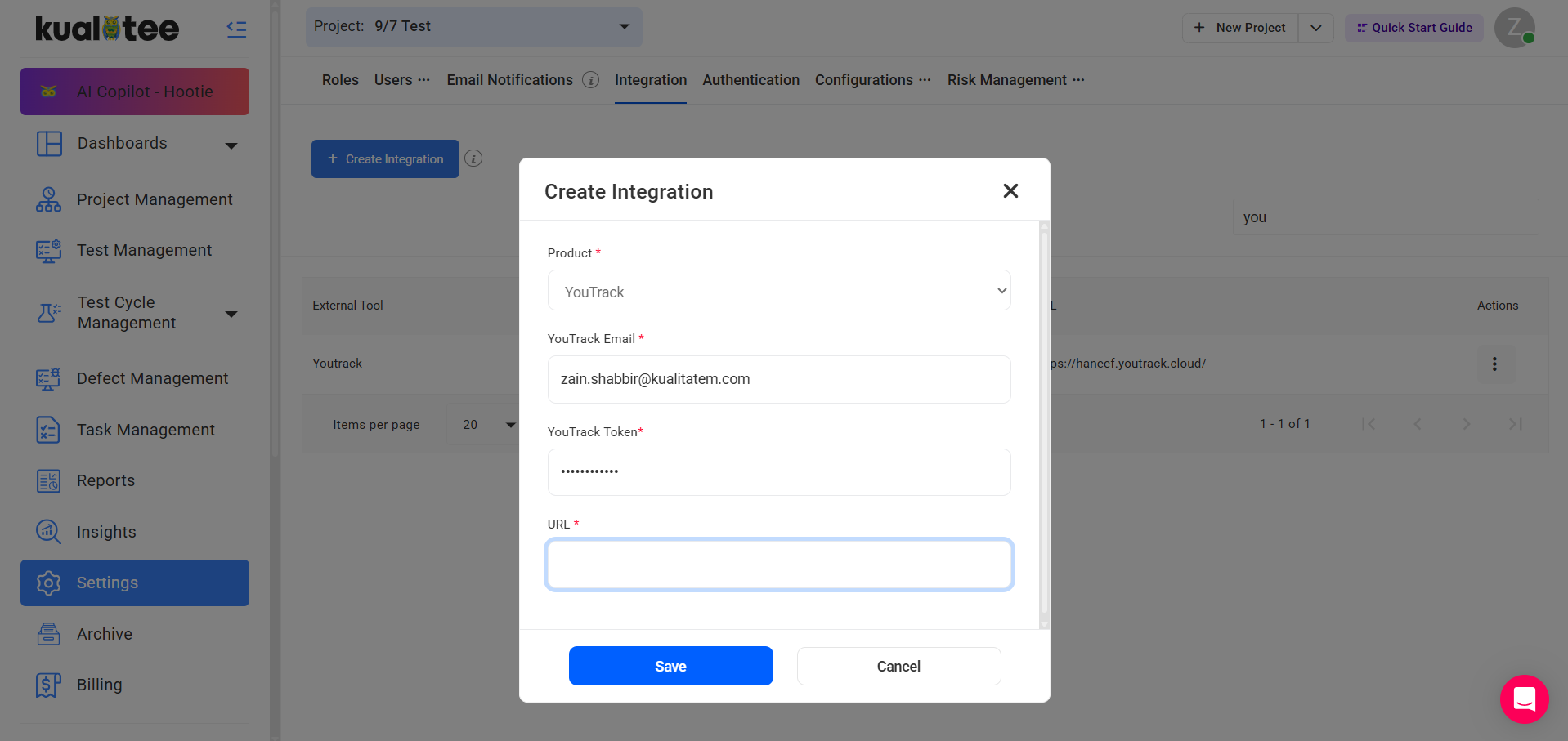
In Kualitee, go to Settings and select Integration. Choose Create New, pick YouTrack, and enter your YouTrack email, the token you generated and your YouTrack URL. Save to confirm the connection.
Map Your Projects
In the relevant Kualitee project, go to Settings and edit the YouTrack integration. Choose Map Project, then select the integration type, your YouTrack project and the matching Kualitee project.
Manage QA and Defects
Run your testing and manage defects in Kualitee, while your issues stay synced with YouTrack.

Bring Testing and Development Into One QA Workflow
Most software teams run several tools across development and QA. YouTrack handles project management, issue tracking, Agile boards, workflows, reports and dashboards. With Kualitee as the top layer of test management, your entire test process is contained within a single place:
- ✓ Manual testing
- ✓ Functional and regression testing
- ✓ Test case management and execution
- ✓ Bug tracking synchronized back to YouTrack
- ✓ Release testing
- ✓ QA reports across all projects
YouTrack manages the development flow, while Kualitee adds the defined QA flow that interacts in both directions through the bidirectional sync.
Frequently Asked Questions
YouTrack is JetBrains' project management and issue-tracking software for development teams. YouTrack by itself isn't a test management system. YouTrack test management software is integrated with a dedicated QA tool, such as Kualitee, and your test cases, executions and defects are in Kualitee and defect, bug and issue synchronization are two-way.
Yes. The integration is bidirectional in the case of Kualitee and YouTrack. You connect it with a YouTrack token, map your projects, and defects, bugs and issues sync both ways between the tools.
Yes. Defects, bugs and issues sync in both directions. A change on one side is reflected on the other, so QA and development stay aligned on status and when the bug or defect is resolved.
You can extend YouTrack for testing via JetBrains apps and integrations. For structured test case management with steps, executions, and a full defect life cycle, connect a dedicated tool such as Kualitee alongside it.
No, it doesn't replace YouTrack. Kualitee complements YouTrack. YouTrack stays your home for development and issue tracking, and Kualitee adds test management, defect tracking and reporting around it.
Get Started with YouTrack Test Management
Centralize your development and issue management in YouTrack. Provide your QA team with a separate space for test case management, test execution, defect tracking, and reporting. Sync bugs and issues both ways with Kualitee's YouTrack integration, and connect the entire testing lifecycle.
Start a free trial and connect your YouTrack workflow with Kualitee. Or book a demo and we'll walk you through it.