





Powerful QA Test Management Tool

Test Management Tool: Traceability and Reporting
Kualitee, a powerful QA management tool, empowers teams—including QA professionals, developers, and managers—to efficiently organize and oversee their work. It facilitates seamless collaboration among team members and streamlines the automation of processes. Teams can create, execute, and manage their workflows within this intuitive platform, eliminating the need to rely on multiple tools for different tasks. Even complex processes become straightforward with Kualitee’s user-friendly interface.
Our Quality Assurance software is designed to be intuitive and easy to navigate, making quality assurance a smooth and enjoyable experience. It integrates seamlessly with other tools, simplifying planning and execution. With robust reporting capabilities, teams can generate detailed insights on progress, issues, and other key metrics essential for maintaining high standards.
Kualitee also features a comprehensive Case Library, allowing you to purchase pre-written scenarios directly within the platform, further enhancing efficiency and effectiveness.
Streamline Your Testing
It is a real-time test management tool that enhances the scope of quality assurance, lightening the workload associated with creating case scenarios and ensuring the delivery of a high-quality product. Whether it’s managing workflows, organizing tasks, or applying filters, it efficiently tracks progress in a user-friendly manner, ensuring team members can focus on delivering results without unnecessary repetition.
With Kualitee, testing teams can easily:
- Track progress
- Analyze test case execution results
- Identify any issues or defects
- Lighten load of writing test cases
- Ensure high-quality delivery on time and within budget
Customizable Test Case Management System
We recognize the importance of managing tests to the success of any software project. That’s why we’ve designed it in a way that teams can tailor it to their specific needs. Test case management in Agile workflows is simplified with Kualitee.
Collaborative Test Management for Faster QA Testing
Kualitee offers a testing process management solution with features that facilitate smooth task assignment for QA managers and the team. You can customize the processes according to specific requirements with real-time flexibility and data-driven cases with our user friendly software.
Improve your testing efficiency further with our intuitive test management software that seamlessly integrates with Jira test management and a host of other leading software tools, ensuring comprehensive control and organization in your testing process.
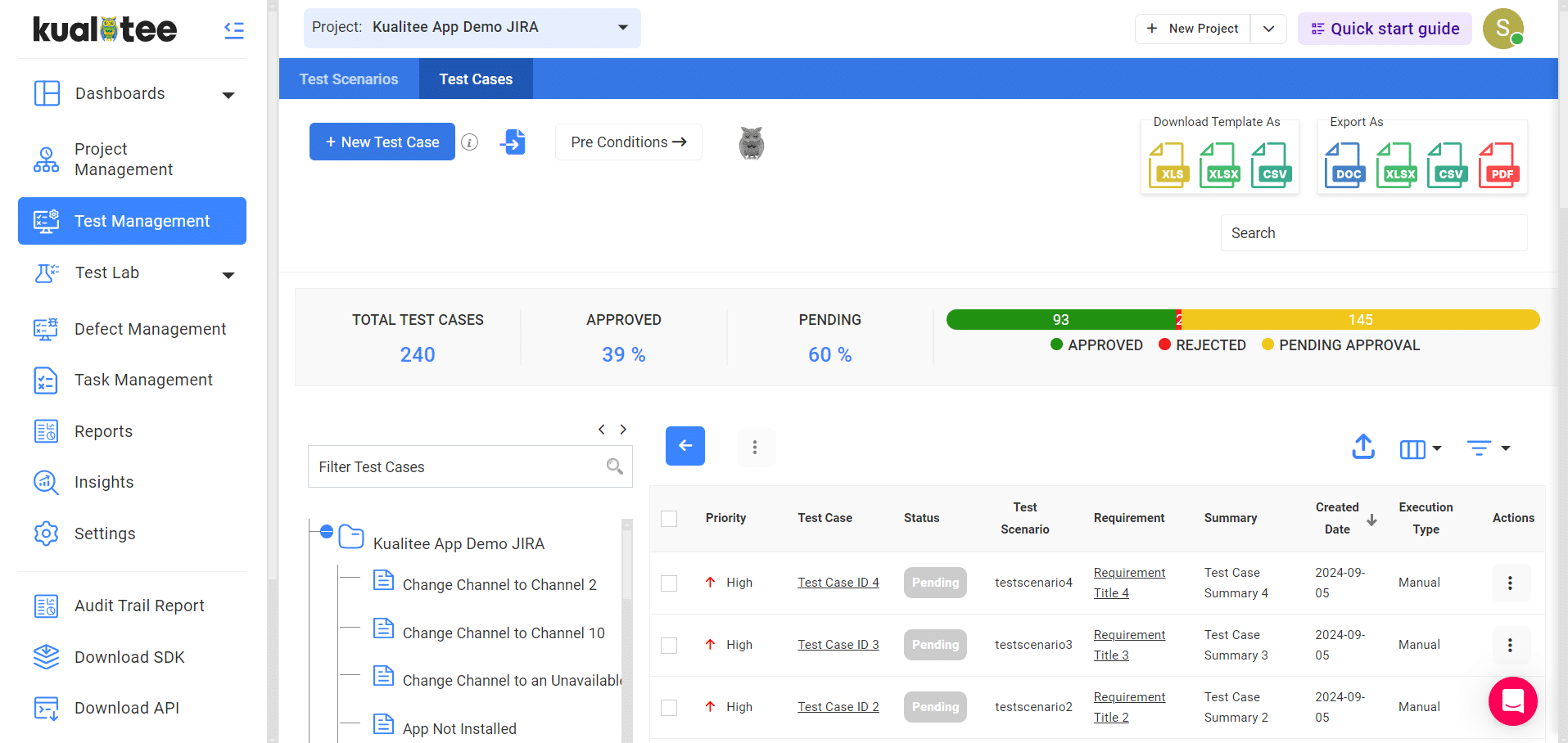


With any test case management tool, exporting data and results to your desired format is a challenge. Export your testing data to Excel, Word, and CSV with export features in a timely and efficient way.

For any project manager, assigning and assessing tasks of desired testers is a tiresome duty. It offers smooth, user-friendly, customer-centric, feedback-enabled management of testing processes.

Customize any fields that you require with convenience and ease with Kualitee. With this, ensure flexibility with third parties or integrated data sources.

Create templates for test cases and recall templates whenever needed, to save time.

Kualitee offers attachments for various fields. You can easily add the information you think is necessary.

It can help you create customized test reports to ensure that test coverage, reference and status etc. are up to date.

It allows users to define and manage requirements for testing, which ensures that the testing process is aligned with project objectives.

With Kualitee, users can create detailed test scenarios that outline the steps required to validate specific functionality or features of an application.

It enables users to create and manage test cases, which are designed to evaluate the performance of specific functionality or features of an application.

It provides both manual and Rest APIs test case execution, which allows users to perform tests manually or use Rest APIs to automate the testing process.

Kualitee's automated BDD framework provides an easy and efficient way to automate tests, making it possible for users to quickly identify and resolve issues in their application. If you use a modern BDD framework i.e. Allure, Mochawesome or Puppeteer, it supports these, as well as allowing report-based executions.
-
What is a QA test management tool?
A QA test management tool is software that organizes the entire testing lifecycle: writing test cases, executing them across builds, tracking defects found, and reporting coverage to stakeholders. Modern tools like Kualitee combine test case management, defect tracking, and requirements traceability in one platform, eliminating the spreadsheet-plus-Jira workflow most QA teams start with. Kualitee starts at $12/user/month, all features included. -
What features should a QA test management tool have in 2026?
Essential features in 2026: (1) AI-assisted test case generation from requirements; (2) integrated defect tracking with Jira, Azure DevOps, GitHub Issues; (3) test automation framework integration (Playwright, Selenium, Cypress); (4) requirements traceability matrix; (5) real-time reporting dashboards; (6) role-based access; (7) mobile testing support; (8) API access for CI/CD integration. Kualitee ships all eight in the base $12 plan. -
How does Kualitee compare to Jira for test management?
Jira is a project management tool where test cases are added via plugins like Zephyr or Xray. Kualitee is a purpose-built test management platform that integrates with Jira for defect sync but centralizes test case authoring, execution, and reporting in a testing-optimized UI. Kualitee handles requirements traceability, test coverage, and QA-specific reporting that Jira alone cannot produce without paid add-ons costing $10-15/user/month on top of Jira. -
What is Hootie AI in Kualitee?
Hootie AI is Kualitee's built-in AI assistant for test case generation. It reads user stories, requirements documents, or acceptance criteria and generates full test cases including preconditions, steps, expected results, and edge cases. Hootie AI reduces test authoring time by 60-70% based on customer feedback. It ships with every Kualitee plan — no separate AI add-on cost. -
How much does a QA test management tool cost?
QA test management tools range from free open-source options (TestLink) to enterprise platforms at $50-100/user/month (qTest, PractiTest). Mid-market platforms typically cost $20-40/user/month (TestRail, Zephyr Scale). Kualitee is priced at $12/user/month with all features included — no tiered feature restrictions, no per-integration fees, no AI add-on charges. This makes it one of the lowest-cost fully-featured test management tools. -
Does Kualitee support test automation?
Yes. Kualitee integrates with Playwright, Selenium, Cypress, Appium, and other test automation frameworks. Automated test results import automatically via API, appearing in the same reports as manual test results. This gives QA managers a unified view of coverage across manual and automated testing. Kualitee also exposes REST APIs for custom CI/CD integrations with GitHub Actions, GitLab CI, Jenkins, and Azure DevOps. -
Can Kualitee replace our current spreadsheet-based testing workflow?
Yes — Kualitee replaces the "Excel + email + Jira" workflow most QA teams inherit. Test cases live in one searchable database instead of scattered spreadsheets. Defects link directly to failing test cases and requirements. Reports generate automatically instead of manual Excel pivots. Teams migrating from spreadsheets typically see 40-60% reduction in QA administrative time within 90 days of adoption. -
Is there a free trial of Kualitee?
Yes. Kualitee offers a 14-day free trial with full feature access — no credit card required. Sign up at kualitee.com, invite your QA team, import existing test cases, and connect Jira or your automation framework. If you need extended evaluation for enterprise procurement, contact sales@kualitatem.com to arrange a 30-day pilot with dedicated onboarding support.