





Tricentis Tosca Test Management Software for QA Teams
Tosca runs your automated tests. Kualitee gives you a place to manage everything around them. Connect the two, and you can trigger your Tosca suites straight from Kualitee, then watch the results land on their own. Your test cases, executions and defects all live in one place, with your manual and automated testing side by side. No more copying run results from one tool into another.
Connect Tricentis Tosca With Dedicated Test Management
Tosca and Kualitee handle two different parts of QA. Put them together and your automation and your test management stop living in separate tools.
Tosca is where your automation runs. It's an enterprise testing platform built for:
- ✓ Model-based and codeless test automation
- ✓ Continuous testing across large application sets
- ✓ Running automated suites at scale
Kualitee is where your test management lives. It's where you:
- ✓ Organize test cases and test suites
- ✓ Track test execution across cycles and projects
- ✓ Manage defects through a proper QA workflow
The trouble is that automation results often sit apart from the rest of your QA. A suite runs in Tosca, and unless someone logs the outcome somewhere central, the manual and automated sides never meet. This integration closes that gap. You trigger Tosca runs from Kualitee, and the results come back into the right project and cycle on their own.
Here's what that gives you:
- ✓ Trigger Tosca test suites from inside Kualitee
- ✓ See automated results recorded automatically, no manual entry
- ✓ Manage manual and automated testing from one QA environment
Simplify QA With Tosca Test Management
Connecting Tosca to Kualitee takes the manual logging out of automated testing. Here's what your team gets.
Connect Automation and Test Management
Trigger your Tosca automation from Kualitee and keep the results next to your wider QA work, instead of in a separate tool.
Centralize Test Cases
Organize test cases, test suites, executions and QA activity in one environment built for the job.
Improve Defect Visibility
Capture, prioritize, assign and track the defects that testing turns up, all through a structured QA workflow.
Get a Clearer View of Testing
See test progress, execution results and open defects in one place, so QA always knows where a release stands.
Combine Tosca Test Automation With Kualitee Test Management
Automation is one part of QA, not the whole of it. Running the tests is the easy half. The rest is organizing test cases, managing suites, tracking executions, recording results, handling defects and reporting on progress. Tosca covers the automation. It was never meant to be your test management system too.
That's the layer Kualitee adds. Use Tosca for the automated and model-based testing it does well. Use Kualitee as the Tosca testing software layer that holds your test cases, tracks your executions and manages your defects. The two stay connected, so nothing falls through the gap between them. For QA teams weighing up Tosca QA software options, this is the piece that turns raw automation runs into a managed testing process.
Tosca on Its Own vs Tosca With Kualitee
Tosca is built to run automation. Managing the wider QA process is a different job. Here's what the integration adds.
| Task | Tosca on its own | Tosca + Kualitee |
|---|---|---|
| Automated test runs | Runs the suite, model-based and codeless | Same runs, triggered from Kualitee |
| Result logging | Lives in Tosca's own output | Synced into Kualitee automatically |
| Test cycles | Managed manually | Created automatically for each Tosca run |
| Manual and automated together | Separate from manual testing | Both sit side by side in one view |
| Test case management | Built around automation | Full test case repository with steps and results |
| Defect management | Not a defect workflow | Full defect lifecycle with severity and priority |
| QA reporting | Automation-focused | Manual and automated reporting in one place |
Tosca keeps running your automation. Kualitee brings the test management around it, and the results sync back on their own.
Key Features of Tricentis Tosca Test Management Software
These are the features that make the Tosca connection work.
One-Click Execution
Trigger your Tosca test suites straight from Kualitee. No switching between platforms to start a run.
Real-Time Result Sync
As soon as a Tosca run finishes, the results update in Kualitee on their own, so your reports stay current.
Automated Cycle Management
Kualitee creates a test cycle for each Tosca execution and fills it with the results, saving manual logging.
Centralized Reporting
See manual and automated results side by side for a full view of where a project's quality stands.
Centralized Test Case Management
Create, organize, assign and maintain your test cases in one dedicated QA environment.
How to Connect Tricentis Tosca With Kualitee
Setup takes four steps, and none of them need code. The full walkthrough is in the Kualitee User Guide.
Create the Integration
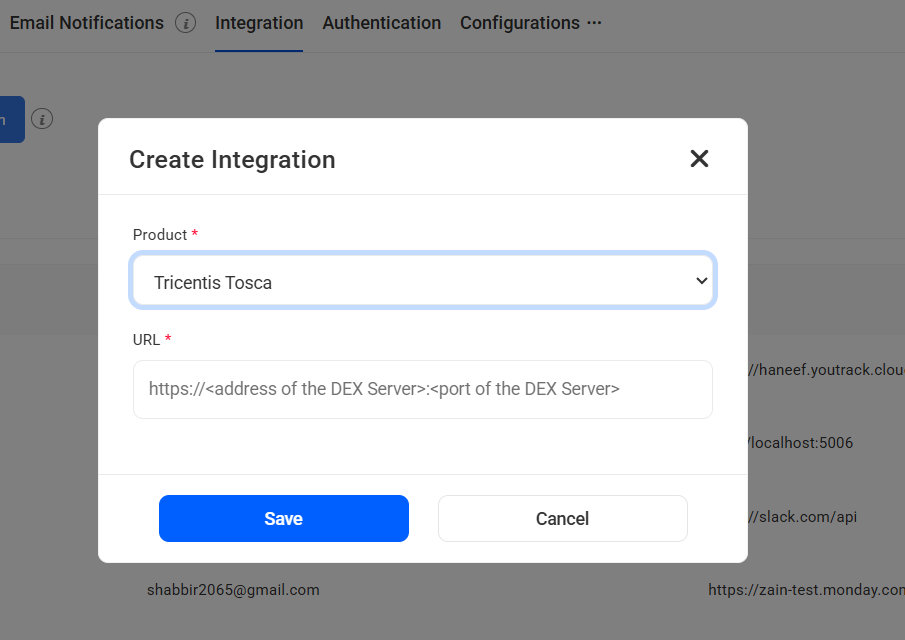
In Kualitee, go to Settings, then Integration. Click Create Integration and pick Tricentis Tosca from the list.
Connect Your Tosca Server
Enter the address and port of your Tosca execution server, then save to make the connection. Your admin will have these details.
Map Your Projects
Open the integration you just created, choose Map Project, and link your Tosca projects to the matching Kualitee projects.
Execute and Sync
Go to Test Cycle Management, then Test Cycles, and use the Automation Tools button to trigger your Tosca runs. Kualitee creates the cycle and fills in the results as they come back.

Manage Test Cases Beyond Test Automation
Automation runs the tests. It doesn't organize them. A test case needs steps, expected results, an owner, and a link to what it covers. A whole QA process needs suites, execution records and a way to track progress across a cycle. That's a different job from running a suite.
That's what Kualitee gives you. With it, your team can:
- ✓ Create structured test cases with clear steps
- ✓ Organize test cases into suites
- ✓ Assign tests to the right people
- ✓ Manage executions across cycles
- ✓ Track testing progress and record results
- ✓ Handle regression runs between releases
- ✓ Link defects back to the tests that found them
Tosca helps you automate testing. Kualitee helps you organize and manage the whole QA lifecycle around it. That's the difference proper Tosca test case management makes.
Connect Tosca Testing With Defect Management
When an automated test fails, you need more than a red line in a report. You need a defect you can own, prioritize and retest. That's where Kualitee comes in.
Here's the flow: a Tosca test fails, the result shows up in Kualitee, and a tester raises a defect against it. From there, you get:
- ✓ Centralized defect tracking in one place
- ✓ Clear defect ownership
- ✓ Severity and priority on every defect
- ✓ Defect status through the whole cycle
- ✓ Retesting until the fix holds
- ✓ QA and development working from the same information
The failures come from your automated runs. The defect management happens in Kualitee, where the rest of your QA already lives.
Bring Automated and Manual Testing Into One QA Workflow
Most enterprise QA teams don't test just one way. They run automated suites, manual checks, regression cycles, functional tests and release testing, often on the same project. The hard part is keeping all of it in one place.
That's what a central test management layer is for. Keep using Tosca for the automation it handles well, and use Kualitee to bring the rest together:
- ✓ Automated testing, triggered and tracked through Kualitee
- ✓ Manual testing managed alongside it
- ✓ Regression testing between releases
- ✓ Test case management and execution tracking
- ✓ Defect tracking through a real QA workflow
- ✓ Release testing and QA reporting for the whole team
Tosca runs the automation. Kualitee gives every kind of testing on your project a single home.
Frequently Asked Questions
It's a test management platform that connects to Tosca so your automated runs and your wider QA sit in one place. Tosca handles the automation. Kualitee handles test cases, executions and defects, and the integration brings the results together.
Yes. You connect Kualitee to your Tosca execution server, map your projects, and trigger Tosca runs from Kualitee. The results sync back into the matching project and test cycle on their own.
Tosca is built for automation, not for organizing the broader testing process. For structured test cases, suites, execution tracking and defect management, teams connect a dedicated tool like Kualitee alongside it.
Yes. When a Tosca run's results come into Kualitee, a failed test can be raised as a defect and managed there, with severity, priority, ownership and retesting, all in one QA environment.
Yes, and that's the point. Tosca runs your automation, Kualitee manages the testing around it, and you trigger runs and collect results from one place.
No. Kualitee works alongside Tosca. Tosca stays your automation engine, and Kualitee adds the test management, defect tracking and reporting around it.
Bring Tosca Testing and Test Management Together
Keep Tosca for your automated testing. Give your QA team a dedicated place for test case management, test execution, defect tracking and reporting.
Connect the two, trigger your runs from Kualitee, and manage the whole testing lifecycle in one structured environment.
Start a free trial and connect your Tosca workflow with Kualitee. Or book a demo, and we'll walk you through it.