If you’ve spent any time in QA, you’ve probably used the terms “test case” and “test scenario” in the same breath. Worse, you might even use them interchangeably.
You’re not alone, though, as even seasoned testers blur the line between these two concepts.
But here’s the thing: confusing them isn’t just a semantics problem. Mixing them can lead to poorly structured test plans, missed coverage, and bugs that easily slip into production.
In this guide, we’ll break down exactly what test cases and test scenarios are, how they differ, and when to use each. Using both strategically inside a proper test management platform leads to better software quality at a much higher speed.
What is a Test Scenario in Software Testing?
Think of a test scenario as your big picture view. It is a high-level description of a situation or user journey that needs to be validated in a software application.
It answers one core question: What should be tested?
It doesn’t tell you how to test. Instead, it tells you what end-to-end behavior or workflow you’re trying to verify. This makes test scenarios extremely useful early in the planning process when your goal is to ensure nothing important gets overlooked.
Plus, they are typically written in plain language so that any stakeholder (like a product manager, a developer, or a client) can read and understand them without needing deep technical expertise.
Characteristics of a Test Scenario
- High-level: Covers broad user flows.
- Simple Language: Easy for non-technical stakeholders to understand.
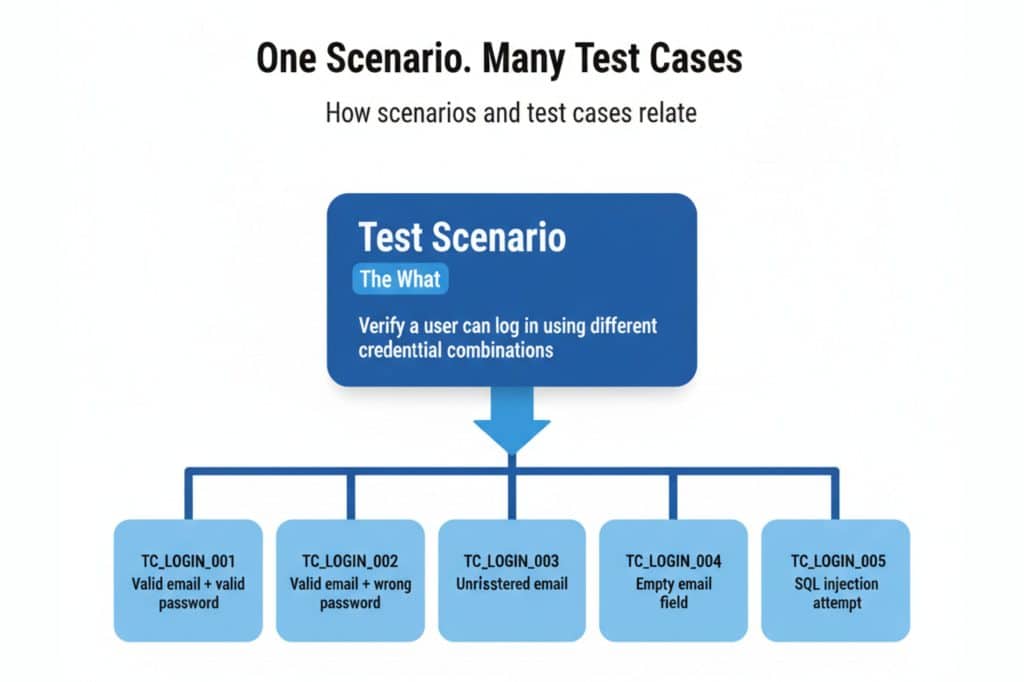
- Parent Element: One scenario typically generates multiple test cases.
Example: “Verify that a registered user can log in with valid credentials.”
What is a Test Case? Definition and Examples
A test case is a surgical, step-by-step set of instructions. It answers: How exactly do we test this?
Test cases include specific inputs, preconditions, and expected results to ensure consistency across manual or automated runs.
Anatomy of a Good Test Case
| Component | Description | Example |
| Test Case ID | Unique identifier | TC_LOGIN_001 |
| Test Case Title | Short description | Login with valid credentials |
| Preconditions | What must be true before execution | User account must exist; app must be running |
| Test Steps | Step-by-step execution instructions | 1. Open the login page 2. Enter valid email 3. Enter valid password 4. Click “Sign In” |
| Test Data | Input values used | Email: test@email.com / Password: Pass@123 |
| Expected Result | What should happen if the software is working | User is redirected to the dashboard |
| Actual Result | Captured during execution | (filled in during the test run) |
| Pass/Fail Status | Outcome | Pass / Fail |
| Priority | Importance level | High / Medium / Low |
Characteristics of a Test Case
- Detailed: Includes precise steps and test data.
- Repeatable: Any tester gets the same result every time.
- Traceable: Linked directly to requirements or scenarios.
- Measurable: It produces a clear pass or fail outcome.
Test Case vs Test Scenario: Side-by-Side Comparison
| Dimension | Test Scenario | Test Case |
| Purpose | Defines what to test | Defines how to test |
| Level of Detail | High-level, broad | Detailed, specific |
| Audience | Business, product, management | QA engineers, developers |
| Includes Steps? | No | Yes |
| Includes Test Data? | No | Yes |
| Includes Expected Results? | No | Yes |
| Scope | Covers an entire workflow or feature area | Covers a single condition or behavior |
| Relationship | The Parent that generates test cases | The Child derived from test scenarios |
| Reusability | Lower, as it too context-specific | Higher across releases and modules |
| When Created | Early in the planning phase | After scenarios are defined |
| Used For | Coverage planning, stakeholder communication | Execution, defect tracking, automation |
| Example | “Verify the checkout process” | “Verify that user cannot proceed without entering a billing address” |
Real-World Examples of Test Scenarios and Test Cases
Scenarios set the stage, while cases handle the specifics. For a Login feature, the following can be the test scenario and the test cases.
Test Scenario (the “what”)
Verify that a user can log in to the application using different credential combinations.
Test Cases Derived From That Scenario (the “how”)
TC_LOGIN_001 — Login with valid email and valid password
- Steps: Navigate to login page → Enter valid credentials → Click Sign In
- Expected: User lands on dashboard with a welcome message
TC_LOGIN_002 — Login with valid email and incorrect password
- Steps: Navigate to login page → Enter valid email → Enter wrong password → Click Sign In
- Expected: Error message displayed: “Incorrect password. Please try again.”
TC_LOGIN_003 — Login with unregistered email
- Steps: Navigate to login page → Enter email not in the system → Enter any password → Click Sign In
- Expected: Error message: “No account found with this email.”
TC_LOGIN_004 — Login with empty email field
- Steps: Navigate to login page → Leave email blank → Enter any password → Click Sign In
- Expected: Validation error: “Email is required.”
TC_LOGIN_005 — Login with SQL injection in the email field
- Steps: Navigate to login page → Enter ‘ OR ‘1’=’1 in email → Click Sign In
- Expected: Input is sanitized; error message shown; no unauthorized access
TC_LOGIN_006 — Verify “Remember Me” checkbox persists the session
- Steps: Login with valid credentials → Check “Remember Me” → Close browser → Reopen and navigate to app URL
- Expected: User is still logged in without being asked to log in again
Notice how one test scenario spawned multiple test cases, with each targeting a distinct condition.
This highlights the natural and powerful relationship between the two artifacts.
Which Comes First: Test Scenario or Test Case?
Scenarios always come first. They establish the scope before you dive into the details of execution, ensuring complete coverage and easier stakeholder collaboration.
The workflow looks like this:
Business Requirements / User Stories
↓
Test Scenarios (What to test)
↓
Test Cases (How to test each scenario)
↓
Test Execution
↓
Defect Reporting

You start by reviewing business requirements or user stories and mapping out the end-to-end flows that matter. Those become your test scenarios. From there, you build test cases that outline exactly how to test each scenario. Finally, you move into test execution and defect reporting.
This top-down approach ensures:
- Complete coverage: Nothing gets missed because everything traces back to a requirement.
- Efficient planning: You know the scope before you dive into detail.
- Easier collaboration: Scenarios are easy to review and sign off on before detailed test cases are written.
When to Use Test Scenarios
Scenarios are perfect for high-level alignment and rapid validation. Use them when:
- Planning Early: Map out the testing scope before writing detailed steps.
- Getting Buy-in: Help non-technical stakeholders quickly validate the test coverage.
- Under Pressure: Use scenarios as a guide for exploratory testing during tight sprints.
- Testing Journeys: Verify complex, end-to-end user workflows (UAT or Regression).
- Onboarding Features: Align QA and Development on feature intent before final details exist.
When to Use Test Cases
Use test cases for formal documentation, automation scripting, and consistent regression testing.
- Formal Testing: Required for audit trails in regulated industries like banking and healthcare.
- Automation Scripting: Provides the structured instructions needed for frameworks like Selenium or Playwright.
- Regression Testing: Ensures consistency across release cycles by following identical steps and data.
- Traceability: Links defects directly back to requirements to show what failed and why.
- Team Onboarding: Simplifies knowledge transfer to new members or external contractors.
- Coverage Reporting: Generates measurable data on pass/fail rates for management reviews.
When to Use Both Together
The short answer: almost always.
Test scenarios and test cases aren’t competitors. There are two layers of the same strategy. Scenarios give you coverage; test cases give you rigor.

Here’s how elite QA teams combine them:
Step 1 — Build scenarios from requirements
Take your user stories or business requirements and map them to test scenarios. At this stage, you’re just ensuring every important behavior is identified.
Step 2 — Review scenarios with stakeholders
Share the scenario list with product managers and developers. Does it cover the right things? Are there edge cases stakeholders know about that QA might miss?
Step 3 — Derive test cases from each scenario
For each scenario, think through every condition: positive paths, negative paths, boundary values, performance edge cases, and security concerns.
Step 4 — Link test cases to scenarios in your test management tool
This linkage is what gives you traceability. When a test fails, you know which scenario (and therefore which requirement) is affected.
Step 5 — Execute, log, iterate
Run test cases, log defects with references to both the case and scenario, and update your coverage metrics.
Common Mistakes Teams Make
Even experienced QA engineers fall into these traps:
- Mistake 1: Writing only test cases, skipping scenarios. Teams jump straight to detail but miss the big picture, leading to incomplete coverage. Scenarios are essential for forcing a wider perspective.
- Mistake 2: Writing only test scenarios, skipping test cases. This “exploratory only” trap results in inconsistent tests that are difficult to automate or use for compliance reporting.
- Mistake 3: Writing test scenarios that are too vague. Scenarios like “Test the login page” are useless. A good scenario is specific about the user journey, such as: “Verify that a locked account displays the appropriate error and offers account recovery options.”
- Mistake 4: Not linking test cases to scenarios. Orphaned test cases not linked to a requirement are a maintenance nightmare. If requirements change, you won’t know which tests need updating.
- Mistake 5: Never revisit scenarios after new releases. Scenarios should be living documents. When features change, the scenarios and all dependent test cases must be reviewed and updated.
- Mistake 6: Treating test case management as a spreadsheet problem. Spreadsheets fail at scale, lacking versioning, traceability, collaboration, and defect tracking integration. If your test cases live in Excel, it’s time to upgrade.
Summary: Test Case vs Test Scenario at a Glance
| Test Scenario | Test Case | |
| Question Answered | What to test? | How to test it? |
| Level | High-level | Detailed |
| Best For | Planning, coverage, stakeholder alignment | Execution, automation, compliance |
| Written By | QA lead, business analyst, or tester | QA engineer |
| Output | A list of user flows/behaviors to validate | Step-by-step instructions with expected outcomes |
| Come First? | Yes | Derived from scenarios |
Test scenarios ensure you test the right things. Test cases ensure you test them right. Both are essential, and neither replaces the other.
Ready to Take Your Test Management Seriously?
Whether you’re scaling a startup QA team or managing enterprise testing across multiple releases, the quality of your test artifacts directly impacts the quality of your software.
Start organizing your test scenarios and test cases the right way in a platform built for it.
Try Kualitee free for 14 days, no credit card required.
FAQs
Q: Can a test case exist without a test scenario?
Technically, yes, but it is not recommended. Test cases need a parent scenario for context and to ensure complete test coverage.
Q: Is a test scenario the same as a use case?
They are related but not the same. A use case describes user interaction in a business context, while a test scenario is derived from it to define what QA needs to validate.
Q: How many test cases should one test scenario produce?
It depends on complexity. Simple scenarios may yield 3–5 test cases, while complex flows can produce 20 or more. The goal is to cover all meaningful conditions (positive, negative, boundary, and edge cases).
Q: Should test scenarios be included in test plans?
Yes. They are the first artifact in a test plan, providing a quick overview of the scope before diving into detailed test cases.
Q: How does Kualitee help manage both test scenarios and test cases?
Kualitee offers a centralized repository to organize test cases by scenario, link them to requirements, and manage execution and defect tracking. Its Hootie AI also helps speed up test case creation.
Q: What’s the difference between a test scenario and a test suite?
A test scenario is a conceptual description of what should be tested. In platforms like Kualitee, once you derive your test cases from a scenario, you can easily bundle them into actionable test suites for immediate, automated regression runs.