





GitLab Test Management Software for QA and Development Teams
Your developers live in GitLab. Your testers live in Kualitee. Keep them aligned with two-way integration that synced issues and defects automatically. Execute test cases, support shift left testing workflows, and manage releases in Kualitee while your dev team stays in the tool they already trust.
Everything You Need for GitLab Test Management
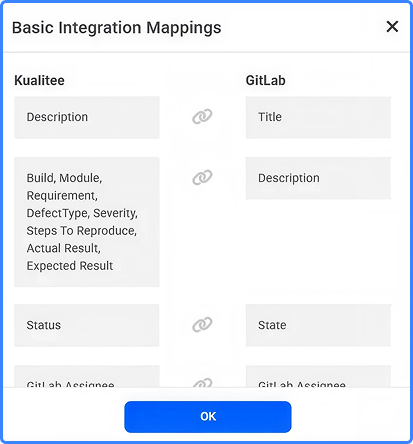
A GitLab issue and a QA defect are often the same problem written twice. Link your GitLab project to Kualitee, and the two-way sync does that work for you. Execute test cases, support shift left testing workflows, and manage releases in Kualitee while your dev team stays in the tool they already trust.
GitLab Issue Synchronisation
Issues and defects sync both ways. A status change, comment or label on one side automatically updates on the other.
Unified Test Workspace
Manage manual testing alongside automated regression frameworks (Selenium, Playwright, Appium) so you are not switching tools.
Requirement Traceability
Link a requirement to its test cases, defects and releases, and trace it in either direction.
Dashboards & Test Reporting
Track execution reports, pass and fail trends, and live release health without spreadsheets.
Enterprise Security
Maintain a strict control over your workflow with role-based permissions, automated audit logs, and secure collaboration.
Ship Releases with Fewer Surprises, Not More Status Meetings
Your code and your issues already sit in GitLab. Testing runs in Kualitee. The integration joins the two, so GitLab stops being a separate tab your testers keep open on the side and becomes one step in a single QA process.
Plan tests, run them, log defects and track releases in Kualitee, and the issues developers care about show up right back in GitLab.

GitLab Issues Alone vs. GitLab with Kualitee
| Task | GitLab issues only | GitLab + Kualitee |
|---|---|---|
| Issue tracking | Project-level issues only | Two-way sync with QA defects |
| Test cases | None. No native test case concept | Full manual & automated repository |
| Dev handoff | Manual comments & tagging | Automated status and labels sync |
| Execution history | Not tracked | Full history & cross-build trends |
| Requirement traceability | None | Links requirements to tests & releases |
The Bug Lifecycle: From Test to Fix
Tester finds and logs
A test fails in Kualitee, and the tester logs a defect with a screenshot. It instantly lands as a GitLab issue.
Developer fixes and closes
The dev pushes a fix and closes the GitLab issue. Kualitee updates automatically, signalling it is ready for verification.
Reopens stay on one thread
If the fix does not hold, the tester retests, it fails again, and they reopen the defect in Kualitee. The reopen syncs straight back to GitLab, so the developer finds the issue live again where they closed it.
Kualitee has helped our QA and dev teams stay in sync during fast release cycles. You don't need to ping someone just to get an update.
Who Benefits Most From This?
See release quality in one place instead of chasing the dev team for status.
Keep their test work in Kualitee and skip the manual copy into GitLab.
Get defects as issues in the project they already use, with the build and steps attached.
Get a QA process wired into the GitLab workflow rather than parked next to it.
Keep Control of Who Sees What
When issue and defect sync between tools, managing access is critical. Kualitee keeps your workspace secure and compliant with automated tracking and strict permissions.
-
✓
Role-Based Permissions
Testers, developers, product owners, and auditors only see what their specific role requires keeping the rest out of their way.
-
✓
Automated Audit Logs
Every action is instantly recorded. Know exactly who changed what, and when, without manual tracking.
-
✓
Built for Regulated Teams
Perfect for banking, fintech, and other strict environments. Generate the exact audit trail needed for regulatory release sign-offs effortlessly.

How to Connect GitLab in 4 Steps
Connect GitLab
In Kualitee, open Settings and select Integration. Choose Create New, pick GitLab and enter your GitLab access token. You need admin access in both tools. Save to confirm.
Link Your Projects
Link a GitLab project to a Kualitee project. That sets up the two-way sync between GitLab issues and Kualitee defects.
Sync Issues Automatically
Once linked, the issues stay in sync. A status change, a new comment or a label update on one side appears on the other.
Monitor Software Quality
Manage test cases, track executions, log defects and follow release quality from one dashboard in Kualitee.
Why Teams Choose Kualitee for GitLab Test Management
 4.6/5 on G2 · 236+ verified reviews · 56 Summer 2026 badges
56 Summer 2026 badges won across Bug Tracking, DevOps, Software Testing, Test Management and AI Software Testing Tool.

Less manual reporting
Issues sync on their own, so bugs stop getting copied between GitHub and Kualitee.

Better test visibility
QA, developers and product read release health off the same dashboards.

Stronger collaboration
One shared view of issues and defects keeps dev and QA aligned.

Trusted at scale
Already trusted by 500+ mid-market and enterprise teams running Kualitee worldwide.
Frequently Asked Questions
It is a test management platform that connects to GitLab, so your testing and your GitLab issues stay in sync. Kualitee handles test cases, executions, defects and releases, and its two-way GitLab integration keeps issues aligned across the two tools.
Two-way. Changes move in both directions between GitLab issues and Kualitee defects. Update a status, add a comment, or change a label on either side and the other reflects it, so neither tool holds a version the other has not seen.
Yes, both directions. Link a GitLab project to a Kualitee project and issues sync across. A status change, a new comment or a label update on one side updates the other on its own.
In Kualitee, go to Settings, then Integration. Choose Create New, select GitLab and enter your GitLab access token. You need admin access in both tools. Save to start syncing.
Yes. Both live in the same workspace in Kualitee, next to your synced GitLab issues, so the whole QA effort sits in one place. Selenium, Playwright and Appium have direct support, with results tracked alongside your manual tests.
Does the GitLab Integration Support CI/CD?
Kualitee fits in a CI/CD workflow. The GitLab sync keeps dev and QA aligned, and for automated test execution reporting, Kualitee connects directly to Jenkins pipelines.