





Linear Test Management Software for QA Teams
Your team plans and tracks work in Linear. Your QA team needs a place built for testing. Kualitee connects the two. Linear tasks and Kualitee defects sync both ways. So a bug logged in one shows up in the other. Your test cases, executions and defects live in Kualitee. Linear stays where your team runs its projects and sprints.
Connect Linear With Dedicated Test Management
Linear and Kualitee do two different jobs. Together they cover the whole path, from planning the work to testing it.
Linear runs your projects. It's an issue tracker for teams, built for:
- ✓ Tasks, sprints and project planning
- ✓ Issue tracking through development
- ✓ Fast, keyboard-first bug tracking
Kualitee runs your testing. It's where you:
- ✓ Build and manage structured test cases
- ✓ Run test executions and record results
- ✓ Track defects through a full QA workflow
Here's the problem. Tasks and QA defects sit in two tools that don't talk. A bug gets logged in one place. Nobody updates the other. The two teams drift apart.
Kualitee closes that gap. The Linear integration syncs tasks and defects both ways. Turn a Linear task into a Kualitee issue, or a Kualitee issue into a Linear task, without switching apps to assign or track it.
Why QA Teams Use the Linear Integration
Connecting the two takes the manual work out of keeping development and QA aligned. Here's what you get.
Keep QA and Development Connected
Your testing in Kualitee links to the tasks your team already runs in Linear. Both sides see the same work.
Two-Way Sync
Log a task in Linear or an issue in Kualitee. It shows up in the other. Field mapping keeps the details in step.
Manage Testing in a Real QA Environment
Test cases, executions, cycles, defects and reports all live in Kualitee.
See Where Testing Stands
QA and development both get a clear view of testing progress and open defects.
How Linear Test Management Works With Kualitee
This is the part that matters most day to day. Here's how a bug moves once the two are connected.
- ✓ A tester runs a test case in Kualitee and finds a bug.
- ✓ They log it as a defect, with the steps and details.
- ✓ The defect syncs to Linear as a task.
- ✓ A developer picks it up and fixes it.
- ✓ The update syncs back to Kualitee, ready for QA to check.
- ✓ The tester retests. If it passes, the issue closes on both sides.
One bug, tracked from both sides, the whole way through. Nobody re-types it into a second tool. Nobody guesses which version is current.
Details like the task name, defect description and status sync between the two. Your QA team works in Kualitee. Your developers stay in Linear.

Linear Alone vs Linear With Kualitee
Linear is built to track tasks and issues. Running a QA process is a different job. Here's what the integration adds.
| Task | Linear on its own | Linear + Kualitee |
|---|---|---|
| Tasks and issue tracking | Built for it, works well | Stays in Linear, nothing changes |
| Structured test cases | Issues, not test cases | Full test case repository with steps and results |
| Test execution tracking | Not built for it | Run tests and record pass or fail per cycle |
| Task and defect sync | Lives only in Linear | Syncs both ways with Kualitee |
| Defect management | Issue status only | Full defect lifecycle with severity, priority and ownership |
| Requirement traceability | Manual, if at all | Requirement to test to defect, linked |
| QA reporting | General dashboards | Test and defect reports built for QA |
Linear keeps tracking your tasks. Kualitee adds the test management layer, and the sync means neither side has to update the other by hand.
Key Features of Linear Test Management Software
These are the features that make the Linear connection work.
Two-Way Task and Defect Sync
Turn Linear tasks into Kualitee defects, and Kualitee issues into Linear tasks. Changes flow both ways.
Pre-Configured Field Mapping
The task name, defect description and status map between the two out of the box. No manual setup for each item.
Test Case Management
Create, organize, assign and manage structured test cases in one QA environment.
Test Execution
Run test cases and track results across cycles and releases.
Defect Management
Log defects and manage them through their lifecycle, with status, priority, ownership and retesting.
Linear Test Case Management With Kualitee
You can track testing as issues in Linear. It works for a while. The strain shows once testing gets serious.
A real test case needs steps, expected results, a pass or fail record and a link to what it covers. A full QA process needs suites, cycles, regression runs and traceability. That's a lot to ask of an issue tracker built for tasks.
Kualitee is built for it. Your team gets:
- ✓ Test case organized into suites
- ✓ Clear steps and expected results
- ✓ Test execution and status tracking
- ✓ Regression testing between releases
- ✓ Requirement traceability from test to defect
- ✓ Defect tracking in one place
Linear handles the tasks. Kualitee gives your test cases somewhere built for QA.
Linear Bug Tracking, Backed by a Real Defect Workflow
Linear is quick for logging bugs. That's part of why teams like it. The limits show when a bug needs more than a status and an assignee.
A real defect has severity, priority, an owner, a history and a retest. That's where Kualitee comes in. Log the bug once, and it lives in a proper defect workflow while it stays synced to the task in Linear.
Here's what that adds:
- ✓ Two-way sync between Linear tasks and Kualitee defects
- ✓ Severity and priority on every defect
- ✓ Clear ownership and status
- ✓ Retesting until the fix holds
- ✓ Defect reporting for the whole project
Your developers keep the fast Linear workflow they like. Your QA team gets the structured bug tracking they need. Both work from the same information.
How the Kualitee Linear Integration Works
Setup takes a few steps, and you'll need admin access on both tools.
The full walkthrough is in the Kualitee User Guide.
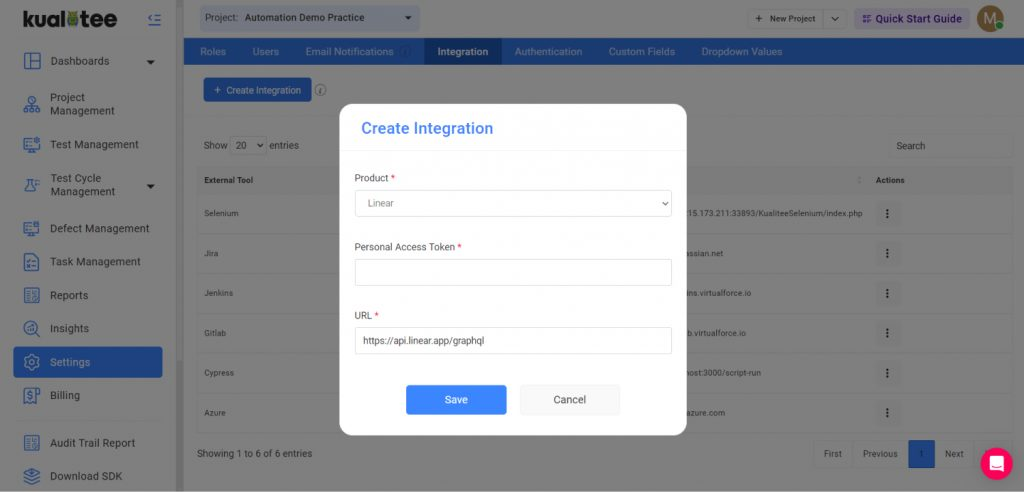
Open Integration Settings
In Kualitee, go to Settings and select Integration from the top bar.
Create the Integration
Choose Create New, then pick Linear from the drop-down.
Add Your Linear Token
Enter the personal access token from your Linear account.
Save and Sync
Click Save. Kualitee starts syncing tasks from Linear as defects, and the two-way sync is live.
What's the Difference Between Linear and Test Management Software?
Fair question. Both deal with tasks and bugs, so the line can blur. The difference is what each one is built for.
- ✓ Linear is an issue tracker. You use it for tasks, sprints, project planning and quick bug tracking.
- ✓ Test management software like Kualitee is built for QA. That means test cases, executions, cycles, requirements, defects, regression testing and reporting.
They aren't rivals. Linear covers the project and task side. Kualitee covers the testing. The integration connects them so both teams work from the same information.
Frequently Asked Questions
Test management software is a tool built for QA. You use it to create test cases, run executions, track defects and report on testing. Linear test management software connects that to Linear, so your project work stays in Linear while Kualitee handles the test cases, executions and defects, with tasks and defects synced between the two.
Yes. Kualitee has a two-way integration with Linear. You connect it with a Linear personal access token, and tasks and defects sync across both tools.
Yes, and it gives your Linear bug tracking a full defect workflow. You log a bug once in Kualitee, and it stays synced to the Linear task both ways. Each defect gets severity, priority, an owner, a status history and a retest, so bugs get tracked to a fix instead of sitting as an open task. Developers keep the fast Linear workflow. QA gets the structure.
Turn a Linear task into a Kualitee defect, or a Kualitee issue into a Linear task. Details like the task name, description and status map between the two, so both sides stay in step.
Yes, and that's the point. Your team keeps planning work in Linear while QA manages test cases, executions and defects in Kualitee. The two stay connected.
No. Kualitee works alongside Linear. Linear stays your home for tasks and issues, and Kualitee adds the test management, defect tracking and reporting around it.
Start Managing Your Linear Testing in Kualitee
Keep Linear for your tasks and sprints. Give your QA team real tools for test cases, execution, defect tracking and reporting. Connect the two, sync your tasks and defects both ways, and bring development and testing into one workflow.
Start a free trial and connect your Linear workspace with Kualitee. Or book a demo and we'll walk you through it.