playwright logo image

Playwright Integration | Centralized Test Reporting

Playwright is a powerful automation framework for end-to-end web testing. It enables reliable cross-browser, cross-platform, and cross-language automation, ensuring consistent user experiences. Kualitee’s integration with Playwright allows you to run Playwright tests directly from Kualitee and consolidate all your test reports in one place.
image
img

Key Feature

  • Generate Reports on Kualitee: Effortlessly generate comprehensive reports within Kualitee for your Playwright test executions.
  • Execute from Kualitee: Run Playwright test scenarios directly from Kualitee and automatically update the status of your test cases.
  • Centralized Reporting: Keep all your Playwright test results organized and accessible in a single, unified location within Kualitee.
img

Configuration

With the Kualitee Bridge, you can seamlessly integrate Playwright, enabling you to run tests and import results into Kualitee.

To configure the integration between Kualitee and Playwright:

  • You need admin access on both tools.
  • Download and install the Kualitee Bridge package.
  • Go to Settings and select Integrations from the top bar.
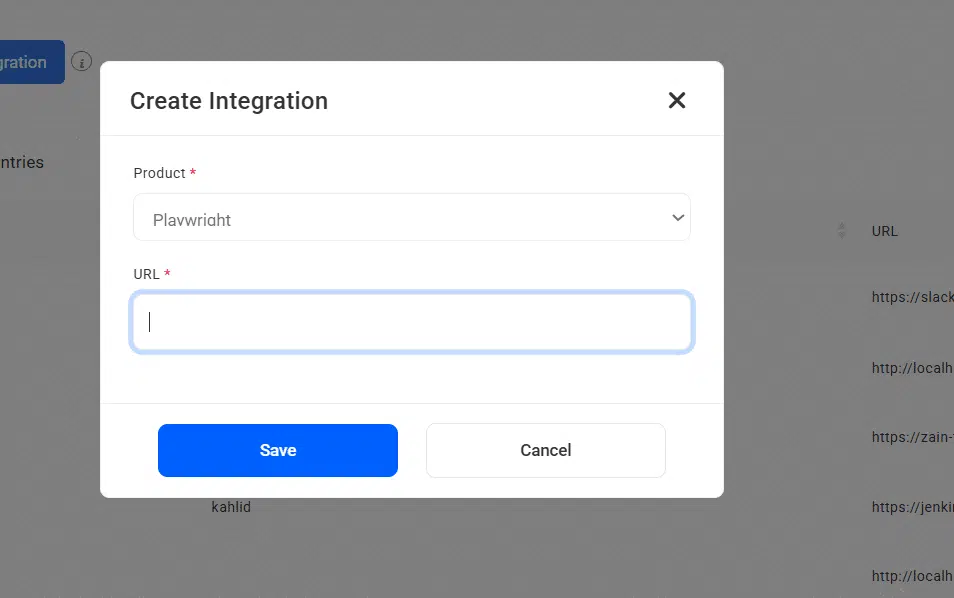
  • Go to ‘Create New’ in the external tool integration listing.
  • Select Playwright tool from the drop-down menu.
  • Configure the necessary details to connect Kualitee with your Playwright test environment.
  • Specify the location of your Playwright test scripts.
  • Click ‘Save’ button to confirm a successful integration.
  • Now, go to Test Cycle management section
  • Click on “Sync Playwright” button to execute test cases from Kualitee
  • A cycle will be created with executed test cases
FAQs
  • How does Kualitee integrate with Playwright?
    Kualitee integrates with Playwright by importing test results from Playwright's JSON reporter via the Kualitee API. After each Playwright run, results are POSTed to Kualitee where they map to existing test cases or create new ones automatically. This centralizes Playwright test results alongside manual test evidence in Kualitee's reporting dashboards.
  • Can Kualitee create defects from failed Playwright tests?
    Yes. When Playwright tests fail, Kualitee can automatically create defect records including the test name, failure message, stack trace, screenshot, and video trace (Playwright's built-in trace viewer output). Auto-defect creation is configurable per project. Most teams enable it for regression suites and disable it for flaky test suites to avoid noise.
  • What is the difference between Playwright and Selenium for E2E testing?
    Playwright is a modern E2E testing framework from Microsoft with built-in auto-wait, cross-browser support (Chromium, Firefox, WebKit), and trace viewer for debugging. Selenium is the long-established standard with the widest browser and language support but requires more configuration for stability. Playwright typically produces faster, more reliable tests but has a steeper learning curve for teams familiar with Selenium's WebDriver protocol.
  • How do I report Playwright test results in CI/CD?
    Configure Playwright with the JSON reporter (`--reporter=json`) in your GitHub Actions, GitLab CI, Jenkins, or Azure DevOps pipeline. Add a post-test step that POSTs the results file to Kualitee's ingestion API endpoint. Kualitee also supports Playwright's HTML reporter for human-readable reports and Allure reporter integration for teams already using Allure. Setup typically takes 15-20 minutes per pipeline.
  • Does Kualitee work with Playwright's Page Object Model tests?
    Yes. Kualitee treats each Playwright test spec (`.spec.ts` or `.spec.js` file, individual `test()` calls) as a test case. Page Object Model organization is a code-level pattern that's transparent to the reporting layer — Kualitee sees test results, not implementation details. Teams typically organize Kualitee test cases by user journey or feature area, mirroring the folder structure of their Playwright test suite.
  • Can I use Kualitee with Playwright, Cypress, and Selenium in the same project?
    Yes. Kualitee ingests results from any framework that produces JSON test reports — Playwright, Cypress, Selenium, TestNG, Jest, Mocha, and Pytest are all supported. Teams often combine frameworks (Playwright for cross-browser E2E, Cypress for component tests, Selenium for legacy suites) and use Kualitee as the unified reporting layer. All results appear in the same coverage dashboards regardless of source framework.