





Bitbucket Test Management Software for QA Teams
Your developers push code and track issues in Bitbucket. Your QA team needs a place built for testing. This integration connects the two. So, issues sync both ways between Bitbucket and Kualitee.
Your team keeps managing test cases, executions, and defects in Kualitee, while Bitbucket stays the home for your code. Nobody has to log the same issue twice.
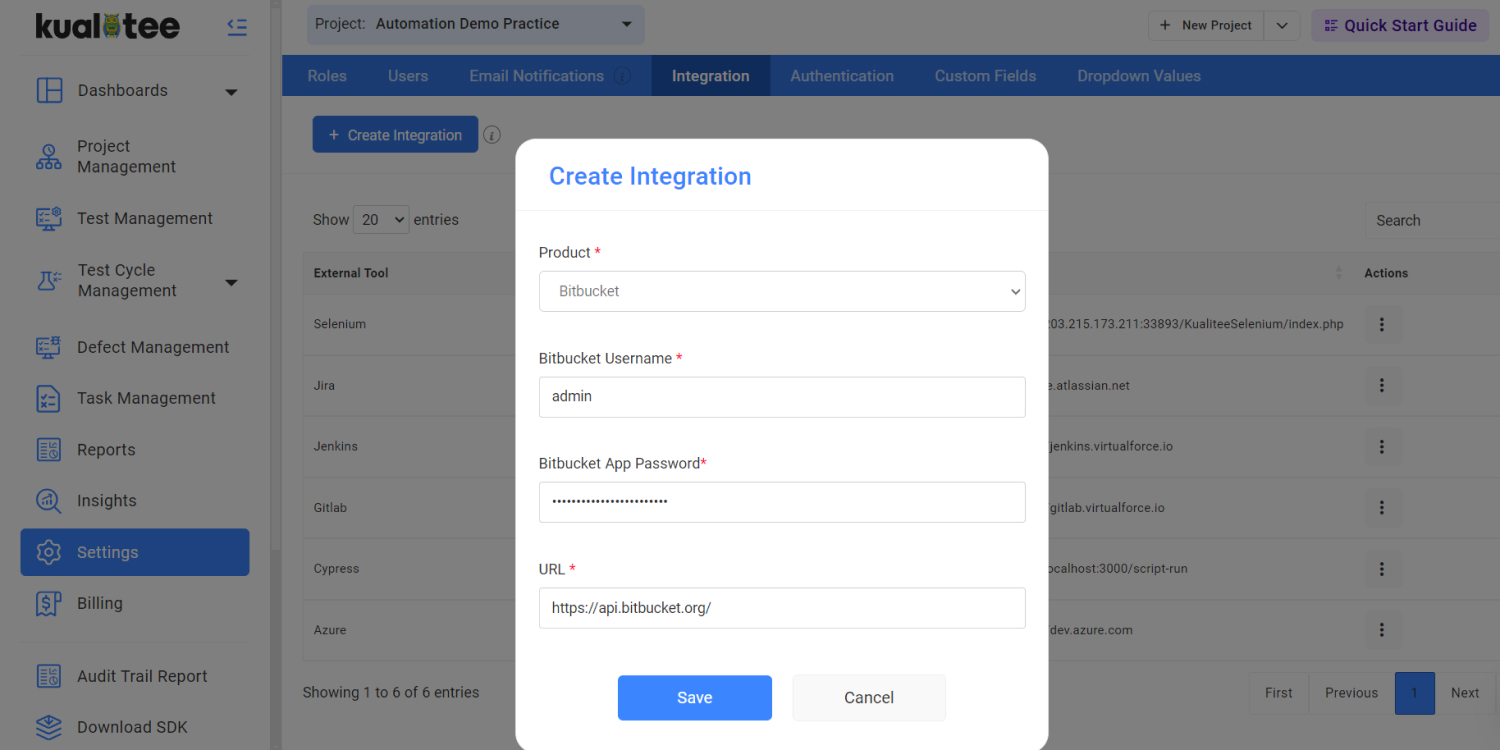
Connect Bitbucket With Test Management
Bitbucket and Kualitee handle two different parts of shipping good software. Put them together and your development and QA sides stop working in separate worlds.
Bitbucket is where your code lives. It's where your team:
- ✓ Manages Git repositories and source control
- ✓ Runs builds and CI/CD through Bitbucket Pipelines
- ✓ Tracks issues tied to the code
Kualitee is where your testing lives. It's where you:
- ✓ Manage and run your test cases
- ✓ Track defects through their whole lifecycle
- ✓ Keep your QA process organized in one place
The integration ties the two together. Link a Bitbucket repository to a Kualitee project, and your issues sync between them both ways. When an issue's status changes, a comment gets added, or an association changes in Kualitee, that update carries across on its own.
Here's what that gives you:
- ✓ Connect Bitbucket repositories to Kualitee projects
- ✓ Keep issues, statuses and comments in sync across both
- ✓ Manage all your test cases, executions and defects from one QA environment
Simplify QA With Bitbucket Test Management
Connecting Bitbucket to Kualitee brings your development and QA work into one connected flow. Here's what your team gets.
Connect Development and QA
Bitbucket handles the code, Kualitee handles the testing, and the sync keeps both sides working from the same issues.
Sync Issues Automatically
Supported issue updates carry across between Bitbucket and Kualitee on their own, so nobody logs the same thing twice.
Centralize Test Management
Run your test cases, executions, defects and QA activity in Kualitee, all in one place your team can work from.
Improve Defect Visibility
Developers and testers get a connected view of issues across the whole testing and development cycle, not two separate pictures.
How Bitbucket Test Management Works
Setup takes four steps, and none of them need a developer.
Connect Bitbucket
In Kualitee, go to Settings, then Integration. Choose Create New and pick Bitbucket.
Select Your Repository
Choose the Bitbucket workspace and the repository you want to connect.
Map Your Kualitee Project
Pick the Kualitee project you want that repository linked to.
Start Syncing
Save the configuration and enter your Bitbucket account details to switch the integration on.

Keep Bitbucket Issues and QA Defects in Sync
This is where the integration earns its keep. Picture the everyday QA loop.
A tester runs a case in Kualitee and finds a defect. They log it in Kualitee with the details. Because the Bitbucket repository is linked, that issue is in sync with Bitbucket, where the developers work. The developer fixes the problem and updates the issue. That update syncs back, so the tester sees it's ready to check. They retest, and if it passes, the issue closes on both sides.
The point is that the two teams stay on the same issue the whole way through. No copying between tools. No wondering whether the version you're looking at is the current one. Kualitee's integration supports two-way sync of supported issues, including status changes, comments and associations, so both sides always see the same state.
Key Features of Bitbucket Test Management Software
These are the features that make the Bitbucket connection work.
Bitbucket Repository Mapping
Link a Bitbucket repository to the right Kualitee project, so the issues that matter sync to the right place.
Two-Way Issue Sync
Supported issues sync between Bitbucket and Kualitee in both directions, so neither side falls behind.
Status Synchronization
When a supported issue's status changes, it stays aligned across both tools.
Comment Synchronization
Issue discussion stays connected, so development and QA aren't holding two halves of the same conversation.
Build Synchronization
Once you save the configuration, build synchronization starts as part of the setup.
Connect Bitbucket Pipelines with Your QA Workflow
If your team runs Bitbucket Pipelines, your automated builds and tests already happen there. Kualitee doesn't change that. It wraps a QA layer around it, so the automation and the test management each do their own job.
| Bitbucket Pipelines Handles | Kualitee Handles |
|---|---|
| Building, testing and deploying code | Managing your test cases and executions |
| Test summaries and execution history | Tracking defects through their lifecycle |
| Failure details from automated runs | Organizing the wider QA process |
| Flaky-test identification and quarantining | Requirement and release visibility |
Your automated tests keep running in Pipelines. Kualitee is where the rest of your QA work gets organized. Bitbucket testing software runs the automation, and Kualitee manages everything around it.
Frequently Asked Questions
It's a test management platform that connects to Bitbucket, so your testing and your code issues stay in sync. Kualitee handles the test cases, executions and defects, and its Bitbucket integration keeps issues aligned between the two tools.
Yes. Kualitee has a two-way integration with Bitbucket. Link a Bitbucket repository to a Kualitee project and supported issues sync between them, so both teams work from the same information.
It syncs supported issues in both directions, including status changes, comments and associations. Saving the configuration also starts build synchronization as part of the setup.
Yes. Each Bitbucket repository links to a Kualitee project, and the issues in that repository sync with that project.
Bitbucket Pipelines gives you automated build and test features like test summaries, execution history and flaky-test identification. For managing test cases, defects and your wider QA process, that's where a dedicated tool like Kualitee comes in.
No. Kualitee works alongside Bitbucket. Bitbucket stays your home for code and source control, and Kualitee adds the test management and defect tracking around it.
Connect Bitbucket With Kualitee for Better Test Management
Keep Bitbucket at the center of how your team builds software. Just give your QA team tools made for the job. Connect your repository to Kualitee, and your development and QA work stays in sync from the first commit to the final retest.