





Trello Test Management Software for QA Teams
Your developers plan and move work on Trello boards. Your testing team requires an environment to execute test cases, report bugs, and track them to a fix. Kualitee is Trello test management software that connects the two.
Link your Trello board to Kualitee, and cards and defects will synchronize. Log an issue in Kualitee, push it to Trello as a card, and assign it. Open the same card straight from the defect when you need it. Trello is your project hub. Kualitee gives you the QA layer around it.
Connect Trello With Dedicated Test Management
Trello and Kualitee solve two different problems. Together they close a gap most QA teams know well.
Trello is where your team organizes the work. It is where your:
- ✓ Developers, product owners, and testers track tasks on boards, lists, and cards
- ✓ Team moves work through stages and keeps projects visible
- ✓ Day-to-day collaboration happens
Kualitee is where the testing happens. It is where you:
- ✓
- ✓
- ✓
The problem is that testing work and project work sits in separate tools, so the two teams lose track of each other. Kualitee is Trello test management software that syncs your Trello board and Trello cards with a real QA process.
Defects and cards then stay in sync across both platforms. So no one has to keep switching between the apps to track them.
- ✓ Connect Trello project workflows with a dedicated QA process in Kualitee
- ✓ Keep test cases, executions, and defects in one place
- ✓ Track defects through a real QA workflow, not just a card on a board
- ✓ Bring your project team and your QA team together
Benefits (Simplify QA With Trello Test Management)
Connect project work and QA
Link Trello boards to Kualitee so project cards and QA defects stay connected. No more scattering the same work across two tools.
Centralize test management
Manage test cases, test suites, and test executions in a place built for QA. Trello keeps handling the project side.
Sync defects both ways
Log a defect in Kualitee and push it to Trello as a card. Or bring Trello cards in as defects. Edits sync across both platforms, so QA and developers work from the same information.
Cut the tool-switching
Assign cards, add labels, and open the linked Trello card from the Kualitee defect. Less hopping between tabs to keep everyone in the loop.
Connect Trello Cards with QA Defects
This is the part that matters most for QA teams. Here is what happens when a tester finds a bug.
A typical workflow with Kualitee and Trello:
- ✓ A tester runs a test case in Kualitee and finds a defect.
- ✓ The defect is logged in Kualitee with its details.
- ✓ It goes to Trello as a card, mapped, labeled, and assigned to the right person.
- ✓ The development team sees the card on their board. They work the fix through their normal Trello flow.
- ✓ Card and defect edits stay in sync across both tools as the work moves.
- ✓ QA retests in Kualitee and closes the defect once the fix passes.
You have a single thread tying together the project board and test management system. The developers continue to work with Trello while the testers work within Kualitee. Neither team is left guessing about the other.

Key Integration Features of Trello Test Management Software
Two-way card and defect sync
Link your Trello board to Kualitee and sync cards and defects both ways. Create a card on your Trello board and see it as a defect on Kualitee.
Log issues with pre-configured mapping
QA teams log issues with pre-configured field mapping between Kualitee defects and Trello cards. The connection works without a custom setup.
Sync edited cards and defects
Updates made on either platform will automatically sync between the two. The QA and dev team will be working off the same version of the bug or card.
Labels and assignment
Add labels and assign cards to users. The right person picks up the work and the board stays organized.
Link to Trello cards
Open the related Trello card from the Kualitee defect details page. No need to search across tools for it.
Add Trello QA Software to Your Testing Workflow
Trello does great work in terms of planning projects, tasks, and workflows via boards and cards. In the case of software testing, that's not enough. It needs structured test cases, test suites, execution tracking, regression runs, and defect management.
So split the work. Use Trello to organize projects and development tasks. Use Kualitee as your Trello testing software for test cases, test executions, issue tracking, and testing progress. Keep the two connected so nothing falls between them.
This is not about replacing Trello. This is about having Trello for the project's daily work, and Kualitee to have that work dedicated for QA.
Trello Bug Tracking & Defect Management
Many teams attempt to log bugs in Trello's board.. It works until the volume grows. Then you need severity, priority, ownership, status, and retesting in one place. A card alone does not give you that.
Connect Trello with Kualitee and your bug tracking gets a real defect workflow behind it:
- ✓ Log defects in Kualitee and sync them to Trello as cards
- ✓ Keep defect ownership, labels, and assignment clear across both tools
- ✓ Track defects from first report through retest to resolved
- ✓ Give developers the board view they like and QA the structured tracking they need
- ✓ Keep eyes on unresolved issues instead of losing them in a list
The workflow is visible via Trello, while the defect data is organized using Kualitee.

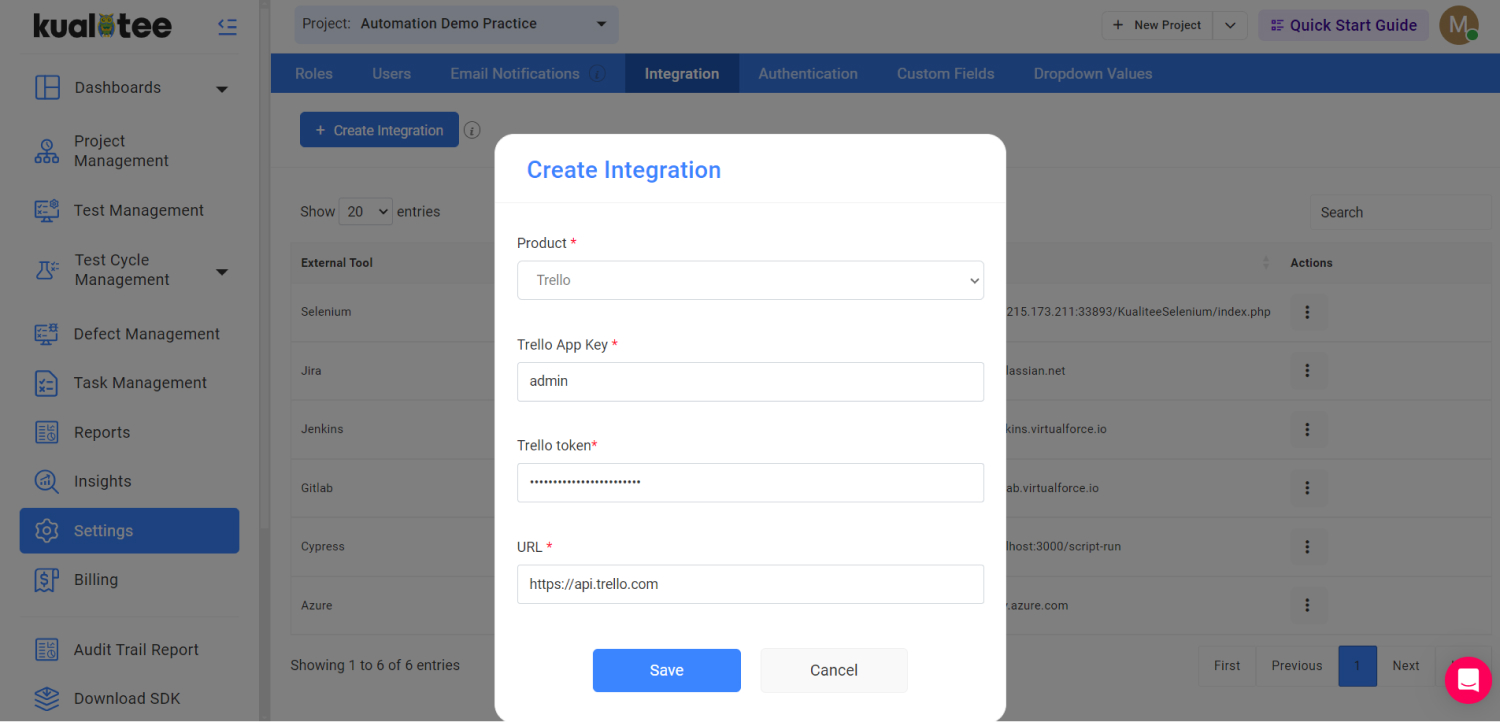
How to Integrate Trello with Kualitee in 4 Steps
Setup takes four steps, and none of them need a developer.
Open integration settings
In Kualitee, go to Settings and select Integration from the top bar.
Create a new integration
Choose "Create New" in the external tool integration listing. Select Trello from the dropdown.
Add your Trello credentials
Enter your Trello App Key, Trello Token, and the URL of your Trello account.
Save and sync
Click Save to confirm the integration. Kualitee starts syncing Trello tasks in as defects.
Support Agile Testing with Trello and Kualitee
Agile teams live on their Trello boards. Kualitee fits that rhythm instead of fighting it. Developers keep organizing sprint and task work in Trello. QA runs dedicated testing in Kualitee. The two stay connected.
Across a sprint, that covers:
- ✓ Task-based testing tied to the work on the board
- ✓ Test case organization and execution tracking
- ✓ Regression testing between releases
- ✓ Defect management synced to Trello cards
- ✓ Release testing
- ✓ QA progress visibility for the whole team
Trello runs the project workflow. Kualitee adds the QA layer, and the two stay connected.
Frequently Asked Questions
Yes, up to a point. Trello boards, lists, and cards can hold bug reports, and many teams start there. It works until the volume grows. Then you need severity, priority, ownership, status, and retesting, and a card alone does not give you that. Connecting Trello with Kualitee adds a real defect workflow behind the board, so you keep the Trello view and gain structured tracking.
No. Trello is a project and task tool. It does not have structured test cases, test execution, or a defect lifecycle built in. Kualitee adds that layer and connects to your Trello board, so testing and defect tracking sit alongside the work your team already runs on Trello.
Log a defect in Kualitee and sync it to Trello as a card, with labels, assignment, and ownership. Developers work on the fix on their board. Card and defect edits stay in sync across both tools. QA retests in Kualitee and closes the defect once the fix passes. You can open the linked Trello card from the Kualitee defect details page at any point.
They can both track bugs. Trello is a bit leaner, faster to get started with, and is better for a team wanting a simple visual board. Jira is a bit heavier and supports detailed issue workflows.
They are both not test management tools, but you can use Kualitee with either one, maintaining your project tool and overlaying structured test cases, test executions, and defect management.
Yes to both. Kualitee offers a two-way integration with Trello. You connect your Trello board and its cards to Kualitee.
You can create a card on Trello, and it will appear as a defect in Kualitee.
Or create a defect in Kualitee, and it appears as a card on Trello. Any changes made to the cards or defects will be reflected on both. Setup requires admin access on both tools.
Admin access on both Kualitee and Trello. You also need your Trello App Key, Trello Token, and account URL. Add those under Settings, then Integration, then Create New, then Trello. Save to start syncing.
Not really. You will still use Trello for your projects and tasks. And now Kualitee will help you with the QA part, like test case management, execution, and defect tracking. So Trello and Kualitee both work side by side.
Connect Trello With Kualitee For Better Test Management
Keep Trello at the center of your project workflow. Give your QA team real tools for test case management, test execution, and defect tracking. Link the two, sync your cards and defects both ways, and run a more structured, more visible testing process.
Start a free trial and connect your first Trello board with Kualitee.
Or book a demo and we will walk you through it.