





Jenkins Test Management Software for Smarter Test Automation
Your Jenkins pipeline runs the tests. Kualitee tells you what they mean. Connect the two and every automated run flows into Kualitee, where your manual and automated tests already live. You get one view of every build, every execution and every defect, without switching between tools to piece the story together.
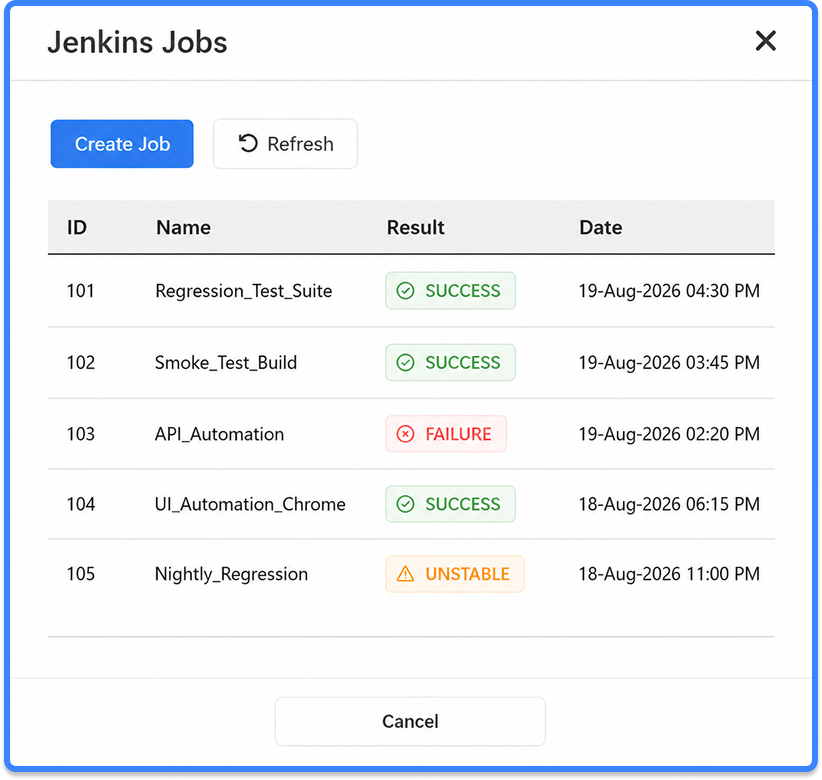
Streamline Test Automation with Jenkins and Kualitee
Jenkins runs jobs. It compiles the code, runs your pipeline and reports pass or fail. Past that, it goes quiet. A Jenkins build will not tell you which test case broke, who owns it, or whether the failure touches a requirement you committed to a client last month. That was never Jenkins' job.
Kualitee picks up where the pipeline stops. It pulls in the results Jenkins produces and stores them as proper QA data, right alongside your manual test cases, defects and releases. Run your tests on every commit or overnight on a schedule. The results end up in Kualitee, ready to work with, either way.
Automated Test Execution Sync
Jenkins results import into Kualitee after each run.
Centralized Test Management
Manual and automated tests in one workspace.
Real-Time Build Status
Track every build and execution without leaving Kualitee.
Defect Tracking
Create and link bugs straight from failed Jenkins executions.
CI/CD Visibility
Monitor releases, builds, executions and quality metrics on one dashboard.
Enterprise Integrations
Works alongside Jira, GitHub, GitLab, Bitbucket, Azure DevOps, Selenium, Playwright and Appium.
Turn Every Jenkins Build into Test Insight You Can Act On
A Jenkins log confirms a job ran. It will not tell you which case failed, who is on the hook for it, or whether it maps to open work. Reading the console after every build to work that out is slow, and on a heavy day nobody does it. Kualitee turns each run into data you can move on immediately. A failure becomes a record with the build number and test case attached, one you can assign and close, instead of a red line in a log that scrolls away.
- ✓ Import test execution results automatically
- ✓ Track passed, failed and skipped tests per run
- ✓ Link failed executions to defects in a click
- ✓ View historical execution trends across builds
- ✓ Manage releases with full requirement traceability
- ✓ Give QA and development the same view of every result
Any Framework Your Jenkins Pipeline Runs
Connecting Kualitee does not touch your automation. Keep the pipelines and frameworks you already run. Kualitee reads the results Jenkins hands over, and for teams who want a closer link, it supports Selenium, Playwright and Appium directly.
Your frontend, backend, mobile and regression suites all report into one place. Fast feedback from a pipeline only helps if someone sees it, and a result buried in a build log rarely gets seen. Kualitee gives every run somewhere to land.
Jenkins Alone vs Jenkins with Kualitee
Here is what changes when you put a test management layer on top of the pipeline.
| Task | Jenkins On Its Own | Jenkins + Kualitee |
|---|---|---|
| Automated test runs | Runs the suite, reports pass or fail | Same runs, results imported automatically |
| Test case records | None. Jenkins has no concept of a test case | Every execution maps to a managed test case |
| Manual tests | Not supported | Managed in the same workspace as automated runs |
| Failed test to defect | Read the log, log the bug by hand elsewhere | Raise a defect from the failed run, build number attached |
| Requirement traceability | None | RRequirement to test to defect to build, in one line |
| Execution history | Limited to build logs and retention settings | Full history and trends across builds and releases |
| Release view | Per build, in the console | Release status across every linked build and test |
| Who can see it | Whoever has Jenkins access | Role-based access for QA, dev, product and auditors |
A Failed Build, Start to Finish
Here is how the flow works once the Jenkins integration is in place.
A developer pushes a change on Friday afternoon. Jenkins runs the pipeline and the automated suite, and three tests fail. Without a connected system, those three failures sit in a console log until someone reads them, which on a Friday afternoon might be Monday.
With Kualitee connected, the run syncs the moment it finishes. The three failed executions show up against the right test cases. A tester opens one, sees it is a real regression and raises a defect straight from the failed execution. That defect carries the build number and the test case with it, so the developer who picks it up knows where to look. The requirement tied to that test case now shows a failing status, which lets the release owner see the risk before planning Monday's work.
Nobody retyped results into a second tool. Nobody guessed which test failed or dug for the build it came from. One failed run became tracked, assigned, traceable work, and it happened while the tester did one thing: look at
Manage Your Entire QA Workflow from a Single Platform
Automation is Jenkins' strength. The workaround for it, i.e., managing test cases, tracking defects, planning releases, is what Kualitee holds. With a live link back to your build data, nothing has to be copied across.
Centralized test cases
Automated execution history
Requirement traceability
Defect lifecycle management
Release management
Reporting dashboards
Role-based collaboration
For teams in banking, fintech and other regulated work, this is what makes an audit manageable. Asked how a release was verified, you point to one traceable line from requirement to test to defect to build, instead of stitching the story together from Jenkins logs and spreadsheets after the fact.
Who Gets the Most from Test Management for Jenkins
This setup pays off for teams who have outgrown manual result tracking.
Get one dashboard that shows where a release stands, without chasing three people for a status.
Stop copying numbers between tools and put the time back into testing.
Get defects that already carry the build and the failing test, so there is less back and forth before a fix lands.
Get traceability from requirement to test to defect, which matters most where a regulator or a client can ask for proof.
If your automated suite is small and one person watches every run, you may not feel the gap yet. Teams running suites across several projects, with more than a couple of testers, tend to hit it first. The handoff between Jenkins and the test records is usually the thing that breaks.
Why QA Teams Integrate Jenkins with Kualitee
Kualitee earned 56 G2 badges in the Summer 2026 reports, across Bug Tracking, DevOps, Software Testing, Test Management and AI Software Testing Tool. Here is what the integration gives a team day-to-day.

Recognized by G2
56 badges in Summer 2026, across five categories including Test Management and AI Software Testing Tool.

Reporting without the copy-paste
Every execution is captured the moment a build finishes.

One shared view
QA, developers and product read from the same results.

Scales with the pipeline
Works from a single project up to a full enterprise setup.
How the Jenkins Integration Works
Connect Jenkins
In Kualitee, open Settings and go to Integration. Choose Create New, pick Jenkins from the list and enter your Jenkins server details. Save to confirm the connection. It takes a few minutes.
Run Automated Tests
Keep your existing Jenkins pipelines as they are, with Selenium, Playwright, Appium or any other framework Jenkins already drives. Nothing about your build setup changes.
Sync Results Automatically
Once a build finishes, its executions and status sync into Kualitee. You map a Jenkins build to a Kualitee project once, then the results follow on every run.
Analyze and Improve Quality
Track execution history, investigate failures, create defects and monitor release quality from one dashboard.
Key Features of the Jenkins Integration
Automated Test Result Synchronization
Execution results are imported from Jenkins after every build.
Unified Test Management
Manage manual and automated testing from one platform.
Defect Management
Create defects directly from failed automated tests.
Release Tracking
Monitor quality across releases with full visibility.
CI/CD Integration
Works with Jenkins pipelines and the DevOps tools around them.
Reporting and Analytics
Live dashboards, reports and execution metrics.
Requirement Traceability
Connect requirements to test cases, executions and defects.
Enterprise Ready
Role-based permissions, audit logs and workflows you can shape.
Frequently Asked Questions
You connect your Jenkins server inside Kualitee under Settings, then Integration. Map a Jenkins build to a Kualitee project. The build status and executions sync across. Your pipeline keeps running as it did, and the results now land in Kualitee.
Yes. Once the integration is set up, results from each build import into Kualitee on their own. There is no manual export or upload step.
Any framework your Jenkins pipeline already runs. Kualitee has direct automation support for Selenium, Playwright and Appium. And it reads the execution results Jenkins passes through for other frameworks.
Yes. Both live in the same workspace. Automated runs come in from Jenkins and sit next to the manual cases your team writes and runs in Kualitee.
Yes. Kualitee is built to sit inside a CI/CD setup. It connects to Jenkins pipelines and works with tools like Jira, GitHub, GitLab, Bitbucket and Azure DevOps.
Jenkins runs jobs. It does not manage test cases, defects, requirements or releases. Kualitee gives you that layer and links it to your build data. So, you get the test management, reporting and traceability Jenkins on its own cannot provide.
Why use Kualitee instead of managing tests only in Jenkins?
Jenkins runs jobs. It does not manage test cases, defects, requirements or releases. Kualitee gives you that layer and links it to your build data. So, you get the test management, reporting and traceability Jenkins on its own cannot provide.