





Selenium Test Management Software for QA Teams
Selenium runs your automated browser tests. Kualitee gives you a place to manage everything around them. Connect the two, and you upload your scripts in Kualitee, run them through Selenium, and the results populate on their own. Your automated tests, your manual tests and your defects live in one place. No more digging through separate run outputs to see what passed.
Connect Selenium Automation With Dedicated Test Management
Here's a distinction worth making up front. Selenium is a browser automation framework. It isn't a test management platform, and it was never meant to be.
Selenium WebDriver controls the browser. Selenium Grid runs tests in parallel across machines, browsers and operating systems. But Selenium's own docs are clear that WebDriver doesn't handle assertions, pass or fail logic, or reporting on its own. Those come from other tools.
That's the gap Kualitee fills. It's the test management layer around your Selenium automation. Selenium runs the tests. Kualitee organizes, manages and reports on the whole QA effort.
With the two connected, you can:
- ✓ Manage your automated test cases in one place
- ✓ Run Selenium tests and import the results
- ✓ Track pass and fail status and execution history
- ✓ Turn failed tests into defects
- ✓ Manage manual and automated testing side by side
- ✓ Report on coverage and QA progress
Bring Selenium Automation and Test Management Together
Connecting Selenium to Kualitee takes the manual logging out of automated testing. Here's what you get.
Manage Automated Tests in One Place
Link your Selenium automation to structured test cases and QA workflows in Kualitee.
Track Automation Results
Bring Selenium execution results into Kualitee and watch pass or fail status and execution history in one view.
Connect Failures to Defects
Turn a failed automated test into a defect, and connect your QA findings to the development workflow.
Combine Manual and Automated Testing
Manage manual test cases and automated Selenium results next to each other, for a full picture of your coverage.
How the Selenium Integration Works With Kualitee
This is the part that matters most day-to-day. Here's how a Selenium run fits into your QA once the two are connected.
- ✓ You create a test case in Kualitee and upload your Selenium script.
- ✓ Selenium runs the automated browser test.
- ✓ The result populates in Kualitee, pass or fail.
- ✓ A failed test becomes a defect, with the details attached.
- ✓ A developer fixes it.
- ✓ You run the Selenium test again to verify the fix.
Selenium executes the automated browser test. Kualitee gives your QA team one place to manage the test, the result, the defect and the execution history. Your engineers keep writing Selenium scripts. Your QA team sees the whole picture in Kualitee.

Selenium Alone vs Selenium With Kualitee
Selenium is built to run browser automation. Managing the wider QA process is a different job. Here's what the integration adds.
| Task | Selenium on its own | Selenium + Kualitee |
|---|---|---|
| Browser automation | Runs the tests across browsers | Same runs, scripts uploaded in Kualitee |
| Pass or fail logic | Comes from a test framework | Results tracked as pass or fail per case |
| Result logging | Lives in run output | Populates in Kualitee automatically |
| Test case management | Not built for it | Full test case repository with steps and results |
| Manual and automated together | Automation only | Both sit side by side in one view |
| Defect management | Not a defect workflow | Full defect lifecycle with severity and priority |
| Reporting | Needs a separate reporter | Full defect lifecycle with severity and priority |
Selenium keeps running your automation. Kualitee adds the test management layer, so the results and the defects live in one place.
Key Features of Selenium Test Management Software
These are the features that make the Selenium connection work.
Selenium Integration
Connect Selenium automation to Kualitee and manage automated testing alongside your wider QA workflow.
Automated Test Management
Organize Selenium tests, tie them to test cases, and keep reusable automation assets in one place.
Test Execution Tracking
Track automated execution, results, history and failures from one QA environment.
Defect Management
Capture failed tests as defects, assign ownership, track status and manage retesting.
Test Reporting
Watch automated and manual results through execution reports, dashboards and QA metrics.
Kualitee supports Selenium alongside Playwright, Appium and other automation frameworks, with the results brought into one test management workflow.
Manage Selenium Test Cases With Dedicated QA Workflows
Selenium is about browser automation, not test-case management. Its own documentation says WebDriver handles browser interaction but leaves assertions, pass or fail decisions and reporting to other tools.
That's where a dedicated platform helps. Selenium test case management in Kualitee gives your automation a management layer, so you get:
- ✓ Test case organized into suites
- ✓ Test scenarios and test plans
- ✓ Automated tests mapped to test cases
- ✓ Test execution and status tracking
- ✓ Regression testing between releases
- ✓ Requirement traceability from test to defect
- ✓ Test reporting for the whole project
Selenium automates the browser. Kualitee organizes those automated tests inside a structured QA workflow.
Track Selenium Test Execution and Results
Selenium is strong at running tests at scale. Selenium Grid can run them in parallel across machines, browser versions and operating systems, which helps with larger suites. The challenge is keeping all those results in one place.
Kualitee is where that data lands. Run your Selenium test automation wherever it makes sense, and keep the results centralized. You get:
- ✓ Automated test execution tracked in one place
- ✓ Pass and fail results per run
- ✓ Execution history across cycles
- ✓ Regression and cross-browser results, together
- ✓ Failed-test analysis
- ✓ Execution reporting for the whole team
Scale your Selenium execution as far as you need. Your results and your QA visibility stay in one workflow.
Turn Selenium Failures Into Actionable Defects
When an automated test fails, you need more than a red line in a log. You need a defect you can own, prioritize and retest.
Here's the flow. A Selenium test fails, the result shows up in Kualitee, and a tester raises a defect with the details from the run. From there you get:
- ✓ Failed tests captured as defects
- ✓ Steps and details carried over from the run
- ✓ Severity and priority on every defect
- ✓ Clear ownership and status
- ✓ Retesting until the fix holds
- ✓ Regression checks to confirm nothing else broke
The failures come from your Selenium runs. The defect management happens in Kualitee, where the rest of your QA already lives.
What's the Difference Between Selenium and Test Management Software?
Fair question. Both deal with tests, so it's easy to mix them up. The difference is what each one is built to do.
- ✓ Selenium is a browser automation framework. Its main parts are WebDriver, Selenium IDE and Selenium Grid. You use it to run automated browser tests across browsers and platforms, in parallel.
- ✓ Test management software like Kualitee is built for QA. That means test cases, suites, plans, executions, cycles, requirements, defects, traceability and reporting.
They aren't rivals. Selenium handles the browser automation. Kualitee handles the test management. The integration connects the two into one automated QA workflow.
Connect Selenium Testing With CI/CD Workflows
Selenium fits into automated delivery pipelines. Its docs describe Grid as suited to distributed execution and CI/CD, including tools like Jenkins and GitHub Actions. So your Selenium tests can run as part of every build.
Kualitee gives you the visibility layer over that. Your tests run in the pipeline, and the QA results stay centralized. You get:
- ✓ Automated regression testing in the pipeline
- ✓ Build validation from your test runs
- ✓ Automated results tracked in one place
- ✓ Failed-test analysis after each build
- ✓ Test reporting for the whole team
Run Selenium as part of your delivery pipeline. Keep the QA results and the test management in one place.
How the Selenium and Kualitee Workflow Works
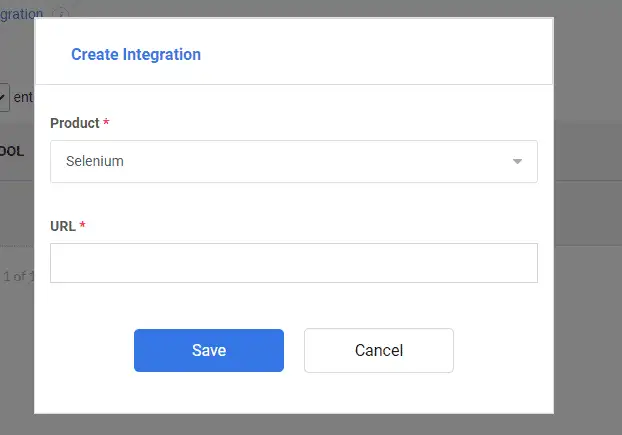
Setup is straightforward. The full walkthrough is in the Kualitee User Guide.
Connect Selenium
Install the Kualitee plugin and connect your Kualitee domain from settings.
Map Automated Tests
Upload your script and set the test case type to automation, so it ties to the right test case.
Run and Track Tests
Run the Selenium test, and the result comes into Kualitee for centralized tracking.
Fix and Retest
Raise a defect from a failure, fix the issue, and run the Selenium test again to verify.
Frequently Asked Questions
Selenium is a browser automation framework. On its own, it runs tests, but it isn't a test management system. Selenium test management software connects it to a platform like Kualitee, so you can run Selenium tests, import the results, manage test cases and track defects in one place.
No. Selenium is a browser automation framework. It runs automated tests, but it doesn't manage test cases, defects or the wider QA process. A tool like Kualitee adds that layer and connects to your Selenium automation.
Yes. You install the Kualitee plugin, connect your domain, and upload your scripts. You run them through Selenium, and the results populate in Kualitee automatically.
Yes. You map your automated Selenium tests to test cases in Kualitee, and manage them alongside your manual tests, with execution history and reporting in one place.
Yes. Manual test cases and automated Selenium results sit side by side in Kualitee, so you get a full view of your test coverage.
Yes. A failed Selenium test can be raised as a defect in Kualitee, with the details from the run, then assigned, tracked and retested until the fix holds.
No. Kualitee works alongside Selenium. Selenium stays your automation framework, and Kualitee adds the test management, defect tracking and reporting around it.
Manage Selenium Testing With Dedicated Test Management
Keep Selenium as your browser automation framework. Give your QA team a central place for test case management, automated execution, defect tracking, reporting and traceability. Connect Selenium with Kualitee, and bring your manual and automated testing together.
Start a free trial and connect your Selenium automation with Kualitee. Or book a demo and we'll walk you through it.