





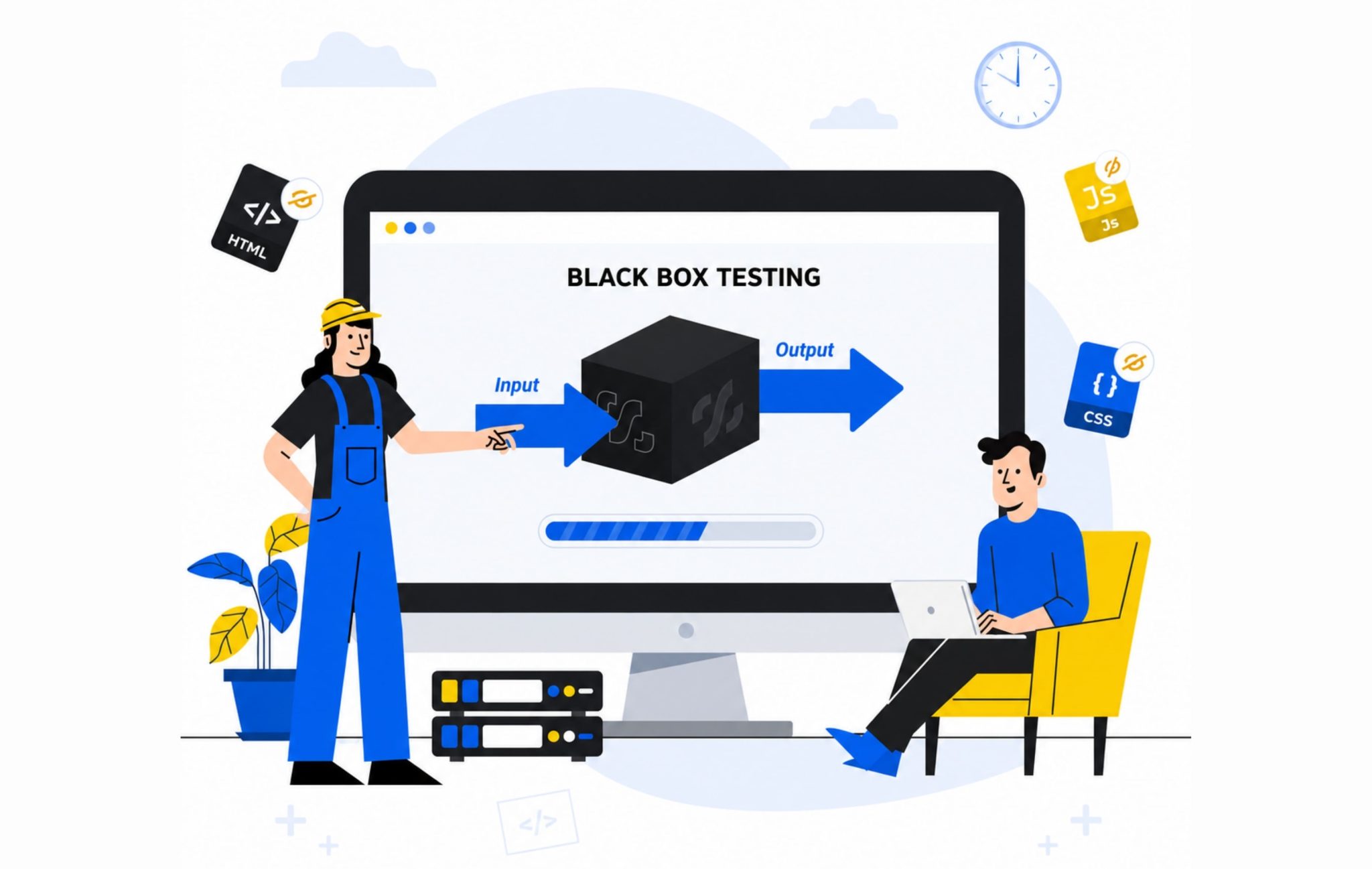
Every user who opens your application judges it the same way: by what it does, not by how it was built. They never see the code, the database, or the logic underneath. They just notice when something breaks, and they leave when it does. In a survey, 88% of users said they would abandon an app after hitting bugs or glitches, and nearly a third would walk away the moment they hit the first one. That is the standard black box testing that is built around.
Instead of reading the source, the tester feeds the software real inputs, watches the outputs, and checks them against what the requirements promised. It is the closest a testing method gets to sitting in the user’s chair, which is why it remains one of the most widely used approaches in software testing across QA teams of every size.
This guide breaks down how it works, the eight core techniques, how it compares to white box and grey box testing, the tools teams rely on, and where it fits in a modern test strategy.
What is Black Box Testing?
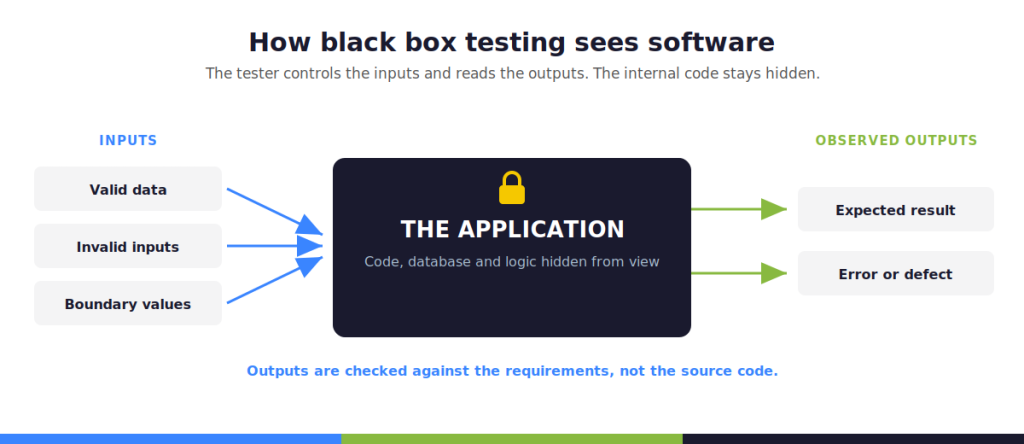
Black box testing evaluates software without knowledge of internal code. It is a software testing technique that focuses on inputs and expected outputs based on requirements. Instead of examining the architecture, the tester feeds the software application real inputs and checks the resulting outputs against the documented specifications. This approach validates user workflows and business logic, forming the foundation of functional testing efforts across modern development cycles.
Why Is It Called “Black Box”
The term comes from the idea of a sealed container, an opaque container where the internal workings remain completely hidden from the observer. In software testing, this means the internal code, database structure, and server logic are invisible to QA engineers. The tester treats the application as a black box, relying entirely on the user interface and requirements documents to determine if the system behaves correctly.
Black Box Testing Example (Login Form)
Because black box testing is grounded in the user’s perspective rather than the codebase, a login form is one of the clearest illustrations of the approach in practice. A tester enters a valid username and password and confirms that access is granted. Then the tester enters an invalid password, an empty field, or a username that does not exist, and checks that the system responds with an appropriate error message rather than granting access or crashing. None of this requires looking at the authentication code behind the form. The tester only needs the requirements document and a way to observe results, which is precisely what makes this a black box testing example rather than a code-level exercise.
Black Box vs White Box vs Grey Box Testing
Black box testing, white box testing, and grey box testing are primarily categorised by how much internal code access the tester requires.
Black box testing relies entirely on requirements and observed behavior.
White box testing relies on the source code itself, tracing logic paths and internal workings line by line.
Grey box testing sits between the two, giving the tester partial access to internal structure, such as database schemas or API documentation, while still testing largely from the outside.
| Aspect | Black Box Testing | White Box Testing | Grey Box Testing |
|---|---|---|---|
| Internal code knowledge | None | Full | Partial |
| Who typically performs it | QA testers, business analysts | Developers, SDETs | QA engineers with a technical background |
| Test basis | Requirements, specifications | Source code, logic paths | Requirements plus limited internal detail |
| Common techniques | Equivalence partitioning, boundary value analysis, decision tables | Statement coverage, branch coverage, path testing | Integration testing, penetration testing |
| Programming knowledge required | Not required | Required | Often required |
| Primary goal | Validate behavior against requirements | Validate internal logic and code paths | Validate integration points and data flow |
When To Choose Each
Select black box testing when validating end-to-end user workflows, functional requirements, and system interfaces. Choose white box testing during the unit testing phase to ensure code quality, optimize algorithms, and measure statement coverage. Opt for grey box testing during integration phases or security audits, where understanding how microservices communicate helps testers target specific data vulnerabilities without needing full source code access. A mature test management platform coordinates all three methods to ensure total coverage.
The 8 Key Black Box Testing Techniques
Black box testing techniques give testers a structured way to design test cases without depending on internal code. Each technique targets a different risk area, from invalid inputs to complex business rules, and together they form the foundation of most black box testing programs. A tester rarely relies on a single technique; most test cases in a mature test suite are built by layering two or three of the eight approaches below against the same requirement.
1. Equivalence Partitioning
Equivalence partitioning divides input data into groups, or partitions, that the system is expected to treat the same way. Instead of testing every possible value, the tester picks one representative value from each partition, one valid and one invalid, and assumes the result will hold for the rest of that group. For an age field that accepts 18 to 65, testers would check one value inside the range, one below it, and one above it. This keeps the number of test cases manageable while still covering the input data space, and it gives the test suite a defensible reason for skipping the values in between rather than testing at random.
2. Boundary Value Analysis
Boundary value analysis focuses on the edges of input domains, since defects cluster around boundary values far more often than in the middle of a range. If a field accepts values from 1 to 100, boundary value analysis checks 0, 1, 2, 99, 100, and 101. This technique often pairs directly with the partition work described above, since each partition boundary becomes a natural target for a fresh set of test cases built specifically around the boundary values themselves. Many teams write these edge-focused test cases immediately after drafting partitions, treating the two as a single design pass rather than separate steps of test data preparation.
3. Decision Table Testing
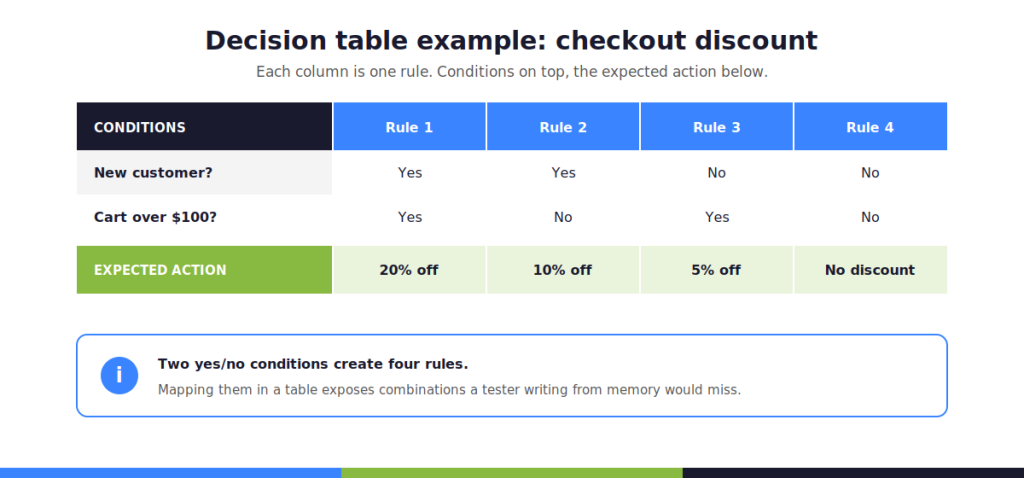
Decision table testing uses tables to represent combinations of inputs and outcomes, which makes it well-suited to systems with complex business rules. Each row lists a combination of conditions, such as user type and payment method, alongside the expected action. Decision tables help testers spot rule combinations that would be easy to miss if test cases were written from memory rather than mapped out systematically.
4. State Transition Testing
State transition testing checks how a system behaves as it moves between defined states, such as an order moving from pending to shipped to delivered. Testers verify both valid transitions and invalid ones, such as attempting to cancel an order that has already shipped. This technique is common for workflows, order management systems, and any product with a defined lifecycle.
5. Error Guessing
Error guessing draws on tester experience and historical defect data to anticipate where a system is likely to fail. There is no formal structure, but experienced testers often outperform structured techniques on certain classes of bugs precisely because they have seen similar failures before. Error guessing works best as a supplement to the other black box testing techniques rather than a replacement for them.
6. Use Case Testing
Use case testing designs test scenarios around how real users actually interact with the software application, following complete workflows from start to finish rather than isolated fields. A use case for an e-commerce checkout, for example, would trace the full path from adding an item to the cart through payment confirmation, checking that each step behaves correctly in sequence.
7. Pairwise Testing
Pairwise testing addresses the problem of combinatorial explosion, where testing every combination of multiple input parameters becomes impossible due to time constraints. Instead, pairwise testing generates a smaller set of test cases that still covers every pair of parameter values at least once, which research has shown catches a large share of defects caused by parameter interactions.
8. Cause-Effect Graphing
Cause-and-effect graphing maps logical relationships between input conditions, or causes, and the resulting system behavior, or effects. The graph is then converted into a decision table that guides test case design. This technique is particularly useful for requirements with multiple interacting conditions, since it exposes logic gaps that plain-language requirements often leave ambiguous.
Types of Black Box Testing
Black box testing is not a single activity but a category that covers several distinct testing types, each aimed at a different quality attribute and drawing on different testing techniques from the list above.
Functional Testing
Functional testing checks whether each function of the software application performs according to the requirements. This includes verifying calculations, form submissions, navigation, and any other behavior defined in a functional specification. Functional testing is often the first and largest share of a black box testing effort.
Non-Functional Testing (Performance, Usability, Compatibility)
Non-functional testing evaluates how well a system performs rather than what it does. Performance testing measures speed and stability under load. Usability testing measures how easily real users can complete tasks. Compatibility testing confirms the software application behaves consistently across browsers, devices, and operating systems. All three remain black box activities because none require inspecting internal code.
Regression Testing
Regression testing re-runs existing test cases after a code change to confirm that previously working functionality still works. Because regression testing is based on requirements and expected outputs rather than the code change itself, it is a natural fit for black box testing, and it is frequently automated to keep pace with frequent releases.
Security Testing (DAST: Dynamic Application Security Testing)
Security testing under the black box model is typically performed through Dynamic Application Security Testing, or DAST, which probes a running software application from the outside, sending malicious or malformed input data and observing how the system responds. DAST tools look for issues like injection vulnerabilities and broken authentication without ever reading the underlying source code, which makes this form of security testing a direct extension of black box principles.
The Black Box Testing Process: Step-by-Step
- Review requirements and specification documents to understand expected behavior.
- Identify test conditions based on functional requirements, user workflows, and known risk areas.
- Design test cases using techniques such as equivalence partitioning, boundary value analysis, and decision table testing.
- Prepare test data, including valid values, invalid inputs, and boundary values.
- Execute test cases against the running software application and record actual results.
- Compare actual results with expected results to identify defects.
- Log defects with enough detail for developers to reproduce them.
- Retest fixed defects and run regression testing to confirm no new issues were introduced.
Black Box Testing Tools: What Teams Use
Most black box testing today relies on a mix of open-source and commercial tools, each suited to a different layer of the product being tested.
Selenium, Cypress, Appium, SoapUI, LoadRunner
- Selenium is widely used for black box testing of web applications, automating browser interactions such as clicks, form submissions, and page navigation without any need to view the underlying code.
- Cypress is primarily used for front-end black box testing, and testers favor it for its fast feedback loop and built-in debugging tools.
- Appium automates black box testing for mobile applications across both iOS and Android from a single test suite.
- SoapUI is effective for black box testing of APIs, sending requests and validating responses against expected schemas.
- LoadRunner tests performance aspects in black box testing, simulating large numbers of concurrent users to measure how a system holds up under load.
Most teams eventually wire these tools into a broader automation testing pipeline rather than running them as one-off scripts.
How AI Assists Black Box Test Case Design
AI is changing how testers generate black box test cases. Rather than manually mapping every equivalence partition or boundary value by hand, teams increasingly use AI assistants to scan requirements documents and propose candidate test cases in minutes.
Hootie AI, Kualitee’s built-in AI assistant, applies this approach directly inside the test management workflow, suggesting test scenarios from user stories and flagging gaps in test coverage. This does not replace tester judgment, but it does compress the time spent on the repetitive parts of black box testing techniques, leaving more time for exploratory work and error guessing informed by real product experience.
Advantages & Limitations of Black Box Testing
Advantages:
- Requires no programming knowledge, which allows non-programmers to participate in quality assurance processes,
- Widens the pool of people who can contribute to test coverage.
- Tests can be designed before the actual code is written since they depend on requirements rather than implementation.
- It simulates real-world usage from the end-user perspective, making it a strong indicator of how software will actually be received.
- It uncovers ambiguities in functional requirements documentation by exposing vague or incomplete requirements.
Limitations:
- Testing every possible input stream is impossible due to time constraints; this requires testers to sample intelligently.
- Black box testing may miss errors due to overlooked functions, particularly hidden code paths or edge cases that never surface through the interface alone.
- Defects like memory leaks or inefficient algorithms remain invisible until white box or performance testing uncovers them.
These limitations are not a reason to abandon the approach; they are a reason to pair it with other forms of software testing.
A QA engineer who understands where black box methods fall short can plan a broader software testing strategy that layers white box coverage, performance testing, and manual exploratory sessions on top of the black box foundation, rather than assuming any single software testing technique can carry the entire quality assurance effort alone.
Black Box Testing Best Practices
To ensure a software application behaves exactly as expected from the user’s perspective, QA teams must structure their workflows around these core practices:
- Start with clear requirements: Effective testing requires requirements that are specific enough to test against, since vague requirements produce vague test cases.
- Combine testing techniques: Layer multiple approaches, such as pairing partition-based test design with boundary value analysis, rather than relying on one method alone.
- Maintain traceability: Trace test scenarios back to specific functional requirements to make coverage gaps visible at a glance.
- Log defects thoroughly: Document issues with clear reproduction steps in a proper defect management tool, since a black box tester cannot point to a line of code as evidence.
- Update test cases regularly: Revisit and update test cases whenever requirements change, keeping the test suite perfectly aligned with the current build.
- Mentor junior QA hires: Pair new testers with experienced QA engineers for the first few cycles to help them learn how to spot missing boundary values and edge cases in real time.
Design test cases, log defects, and trace every test back to a requirement without switching tools. Hootie AI drafts black box test cases straight from your requirements and user stories, so your team spends less time on setup and more time catching what users would.






















