





Smoke testing offers the fastest method to find out whether a new build is worth testing at all. In a CI/CD pipeline pushing multiple builds a day, the expensive mistake is not a broken build; it is discovering it three hours into a full regression pass. A five-minute check at the door catches the same failure before anyone spends time on it. Running it early saves an estimated four to ten QA hours per prevented incident, which is time a team would otherwise lose testing a build that was never stable to begin with.
This guide covers what smoke testing is, when to run it, the types of teams that use it, how it can be integrated into the CI/CD pipeline, and how it differs from sanity, regression, and UAT testing.
What Is Smoke Testing?
Smoke testing is a quick round of checks that verifies critical functionalities of a new software build before further testing begins. If the login screen fails to load or the core API returns an error, the build stops there and never reaches the deeper test cycle. This basic functionality check exists to save time, not to catch every bug, which is exactly why smoke testing stays shallow by design.
Smoke testing does not substitute for functional testing or regression testing. But it acts as the checkpoint determining whether those deeper efforts are worth running at all.
Smoke Testing vs Build Verification Testing (BVT)
Smoke testing is also known as build verification testing (BVT). Both terms describe the same activity: executing a shallow pass over the software build to confirm stability. Teams that use Jenkins or GitLab CI often label the same pipeline stage BVT in older documentation and smoke tests in newer runbooks, but the intent remains identical. Most engineers now default to smoke testing as the more common term.
Why Smoke Testing Matters (The Gatekeeper Analogy)
Smoke testing acts as a gatekeeper for deeper quality assurance efforts, standing between a freshly compiled build and the testers who would otherwise spend hours on it. Much like inspecting a building’s foundation, bringing in plumbing or electrical wiring is useless if the concrete itself cannot stand. In the same way, a build with broken core functionality never reaches the test cases written for regression testing or user acceptance testing.
By deliberately trading depth for speed, the smoke test offers three advantages in the release cycle:
- Rapid feedback: Provides an early-warning signal in building health, usually within minutes.
- Protects engineering time: Prevents QA from wasting hours running deep regression passes of a fundamentally broken build.
- Maintains release velocity: Allows teams shipping multiple daily builds to sustain speed without sacrificing basic stability.
How Smoke Testing Works – Step-By-Step Process
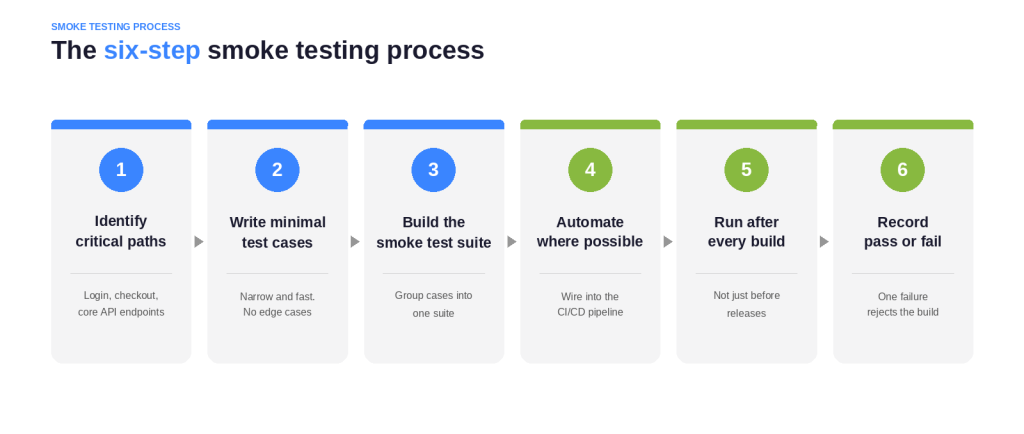
Smoke testing follows a repeatable structure that most teams adapt directly into their CI/CD configuration:
- Identify critical paths. List the features that must work for the application to be usable at all (login, checkout, core API endpoints).
- Write minimal test cases. Keep each test case narrow and fast; this is not the place for edge cases.
- Build the smoke test suite. Group the test cases into a single suite that runs together.
- Automate where possible. Wire the suite into the CI/CD pipeline so it runs without manual triggering.
- Run after every build. Automated smoke tests run after every new build, not just before releases.
- Record pass or fail. A single failure is usually enough to reject the build.
When To Run Smoke Tests
Smoke tests run automatically after every deployment in CI/CD pipelines, right after compilation and before any handoff to the broader test team. In practice, this means smoke testing happens after every build and before integration testing, sanity testing, or a full regression pass.
Delaying smoke testing until after other testing phases defeats the entire reason it exists.
Pass/Fail Criteria for a Smoke Test
Teams typically write pass/fail criteria for smoke testing directly into the CI/CD configuration itself. This ensures a failed smoke test automatically blocks the pipeline rather than waiting on a human to notice. Clear criteria matter because ambiguous rules lead to inconsistent decisions.
- When a suite passes: every critical test case executes without error, and the application starts, loads, and responds as expected. This is the signal that the build is stable enough to proceed.
- When a suite fails: If even one core flow fails, the standard call is that the build is not stable enough for further testing. The build gets rejected immediately rather than passed along with a note to “fix it later”
What Goes in a Smoke Test Suite
A standard smoke test suite stays narrow by design. This confirms core functionality rather than replacing detailed testing later in the cycle.
Critical Features and Core Functionality
Every smoke test suite should center on the features that, if broken, make the rest of the application irrelevant. That typically means authentication, the primary API responses, and the workflows that fulfill the product’s core promise. Reviewers should resist the urge to expand the suite with nice-to-have checks; a bloated smoke test suite slows down the testing process, which it is meant to speed up.
Example Smoke Test Cases (Login, Basic API, Key user flow)
A smoke test suite stays shallow, but the exact test cases depend on what the application does. The pattern is the same across products: touch every critical path once, confirm it responds. Then, move on.
Take a mobile banking app as an example. The smoke suite confirms a customer can reach and use core banking fucntions, without validating complex scenarios like concurrent transactions or interest calculation, which belongs in regression. A typical suite checks:
- The app launches, and the login screen loads
- A user can authenticate with valid credentials
- Account balances display correctly
- Transaction history loads
- The fund transfer screen is reachable
- The core API returns a 200 response with expected data
If any one of these fails, the build is rejected. There is no point running hundreds of regression cases on transaction edge conditions when a user cannot log in or view a balance. In a regulated environment like banking, that early gate also keeps a fundamentally broken build from ever reaching the compliance-sensitive test stages downstream.
These test cases are deliberately shallow. Smoke tests are shallow and quick, while regression tests are deep, and mixing the two goals produces a suite that is neither fast nor thorough.
Types of Smoke Testing
Teams choose between manual and automated approaches based on release frequency and available tooling.
Manual Smoke Testing – When It Makes Sense
Manual execution still has a place in smaller teams or early-stage products with slower release cadences, allowing a tester to click through critical paths by hand.
While this approach requires no setup, the method completely fails to scale once a team ships multiple builds a day.
Automated Smoke Testing – For CI/CD Pipelines
Automated smoke testing is the standard for any team running continuous integration. Once a smoke test suite is scripted, it can execute on every commit without pulling a human off other work.
Kualitee’s automation testing features let QA teams script and schedule automated smoke testing so it runs on every merge without manual triggering. This frees testers to focus on more complex test cases further down the pipeline. Once automated smoke testing is in place, teams rarely go back to running smoke testing by hand.
Hybrid Smoke Testing – Manual + Automated Approaches
Many mature teams run a hybrid model: an automated smoke test suite fires on every build, while a tester spot-checks anything visually sensitive that automation tends to miss, such as a new UI component.
Functional vs Non-Functional vs Integration Smoke Tests
| Type | What It Validates | Example |
|---|---|---|
| Functional smoke test | Critical software functions work as intended | User can log in; checkout completes |
| Non-functional smoke test | Performance and security attributes hold | Page loads within an acceptable time; a basic security header is present |
| Integration smoke test | Application components work together | Frontend can reach the backend API after deployment |
Most smoke test suites combine all three, weighted toward functional checks, since functional smoke testing tends to catch the most release-blocking issues.
Smoke Testing in CI/CD Pipelines
Modern software teams rarely run smoke testing as a separate manual step; they build it directly into the CI/CD pipeline so nothing ships without clearing the gate first.
How to Integrate Smoke Tests in Jenkins / GitHub Actions / GitLab CI
Integrating smoke testing typically follows the same pattern regardless of platform.
- In Jenkins, a smoke testing stage runs immediately after the build stage.
- GitHub Actions and GitLab CI follow the same order: build, smoke testing, then everything else.
Whichever platform you use, the test environment for this stage should mirror production closely enough that a pass genuinely means the build is sound.
Kualitee’s integrations with CI servers and issue trackers let teams wire smoke testing into that existing pipeline and auto-sync any failures back to the tools their developers already use.
Smoke Tests as Automated Quality Gates
Smoke tests serve as automated quality gates in CI/CD pipelines, meaning a failed smoke test can automatically halt a deployment before it reaches staging or production.
This removes the guesswork of deciding whether a build is safe to promote. Kualitee’s test management platform lets teams configure smoke testing gates alongside their broader test case libraries, so a smoke testing failure and a regression testing failure are visible in the same dashboard rather than scattered across separate tools.
Smoke Testing vs Sanity Testing vs Regression Testing
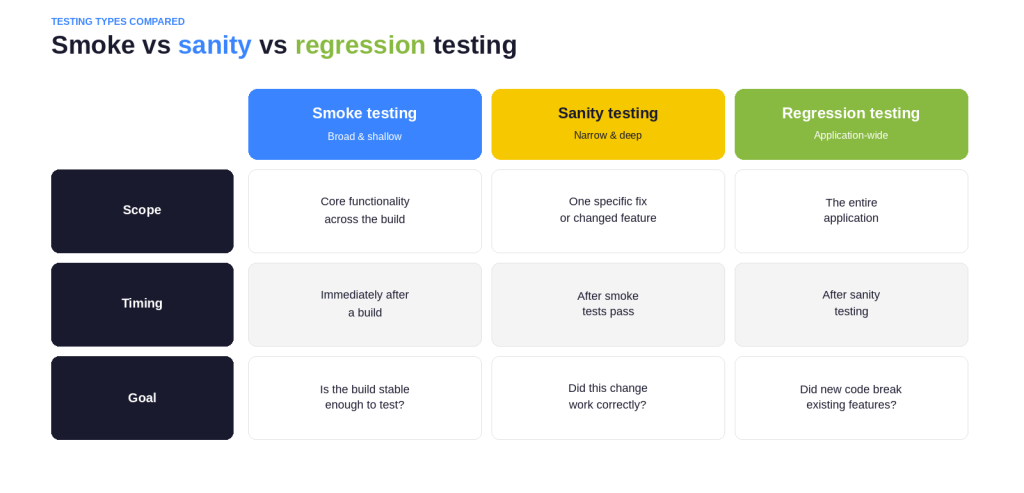
Smoke testing, sanity testing, and regression testing all sit in the same testing pipeline but answer different questions.
| Testing Type | Scope | Timing | Goal |
| Smoke Testing | Broad & Shallow | Immediately after a build | Verifies core functionality to see if the build is stable. |
| Sanity Testing | Narrow & Deep | After smoke tests pass | Verifies specific bug fixes or minor feature changes. |
| Regression Testing | Application-wide | After sanity testing | Ensures new code didn’t break existing functionality. |
Smoke vs Sanity – The Key Difference
Sanity testing focuses on specific changes after smoke tests pass, narrowing in on the one feature or bug fix that just went into the build. Smoke testing is broad and shallow. Sanity testing is narrow and slightly deeper.
For a full breakdown of when to use each in a smoke testing workflow, read the detailed comparison guide on smoke testing vs sanity testing.
Smoke vs Regression – Depth and Timing
Regression testing checks for unintended effects of new changes across the entire application. Smoke testing occurs before regression testing in the testing process, acting as the gate that determines whether a full regression testing pass is even worth running.
Running regression testing against a build that fails smoke testing wastes hours confirming what a five-minute smoke testing pass would have caught immediately. This is why smoke testing always comes first in a well-ordered testing pipeline.
Smoke Testing Best Practices
- Keep the smoke test suite short, ideally under fifteen minutes to execute in full, since long-running smoke testing defeats its own purpose.
- Automate smoke testing as early as possible in the CI/CD pipeline rather than treating it as an afterthought.
- Review and prune test cases regularly; a smoke test suite that grows unchecked starts to resemble a regression suite instead of a smoke testing suite.
- Run smoke tests in a test environment that closely matches production configuration.
- Treat a failed smoke test as a hard stop, not a warning.
Common Smoke Testing Mistakes (And How to Avoid Them)
- Treating smoke testing as detailed testing. Smoke testing focuses on breadth, not depth; padding it with edge cases defeats its speed advantage.
- Skipping automation. Manual smoke testing does not scale past a handful of releases a week; automated smoke testing does.
- Ignoring failures. When a smoke test fails, it happens for a reason; proceeding to further testing anyway usually means rediscovering the same failure later at a higher cost.
- Letting the suite grow unchecked. Every added test case should justify its place against the goal of confirming core functionality only, or smoke testing stops being fast.
- Running smoke tests in the wrong test environment. A pass in a stripped-down sandbox does not guarantee that smoke testing would also pass in production.
Tools For Smoke Testing in 2026
Most teams already run smoke testing using a modern tech stack:
- CI/CD Platforms: Jenkins, GitHub Actions, GitLab CI
- Automation frameworks: Selenium, Playwright, or Cypress.
- Test Management: Kualitee
Where Kualitee fits is one layer up. Instead of having data scattered across tools, Kualitee ties those automated smoke testing results into a single test management platform alongside manual test cases and regression suites.
To save time on setup, Kualitee’s Hootie AI for test case generation can generate smoke test cases directly from requirements or user stories. This cuts down the manual work of drafting a smoke test suite from scratch.
Defects caught during smoke testing can be logged straight into Kualitee’s defect management to keep the failure and its fix in one traceable record.
Kualitee is rated 4.6 out of 5 across 222 reviews on G2.






















