





Roles and Privileges
Create Roles and Designate Privileges to Them for Organized Team Workflow
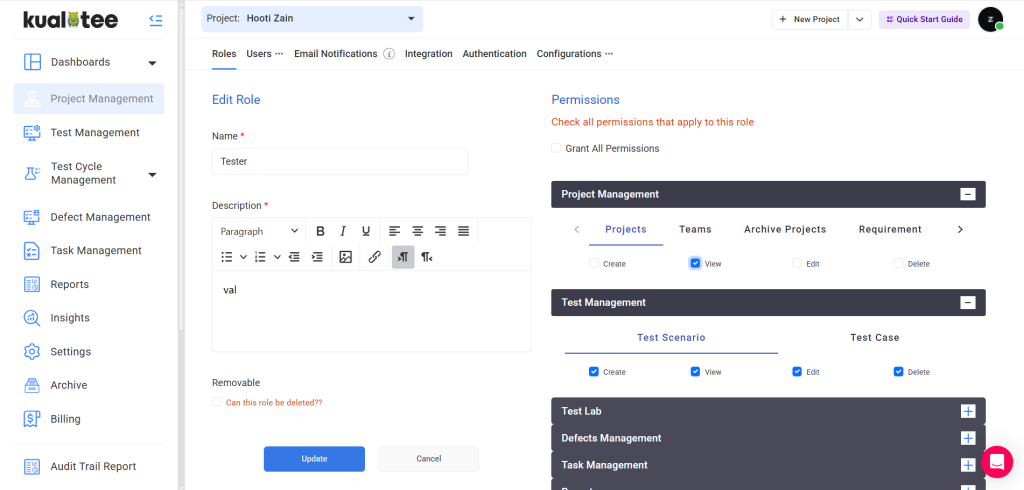
Every QA team has different people who need different levels of access. Testers need to log defects and update execution status. Managers need to approve test plans and view reports across projects. Developers need visibility into the bugs assigned to them, but nothing else.
Kualitee’s user roles and permissions system lets you define exactly that, without giving everyone access to everything.
Setting up roles takes minutes. Create a role, assign the privileges that belong to it, and add team members to it. If your org structure changes, update the role once, and it applies to everyone in it. No IT ticket required. No chasing an admin to grant access one person at a time.
The best software for managing user access and roles in a QA context is the one that gets out of your team’s way – Kualitee does.
- Create custom roles and assign specific privileges to each. View, edit, execute, approve, or admin.
- Add or remove team members from any role in seconds. Changes apply immediately across the platform.
- Keep sensitive project data visible only to the people who need it. No blanket access for the whole team.
- Works across all Kualitee features – test cases, defects, reports, and settings all respect the role you assign.
