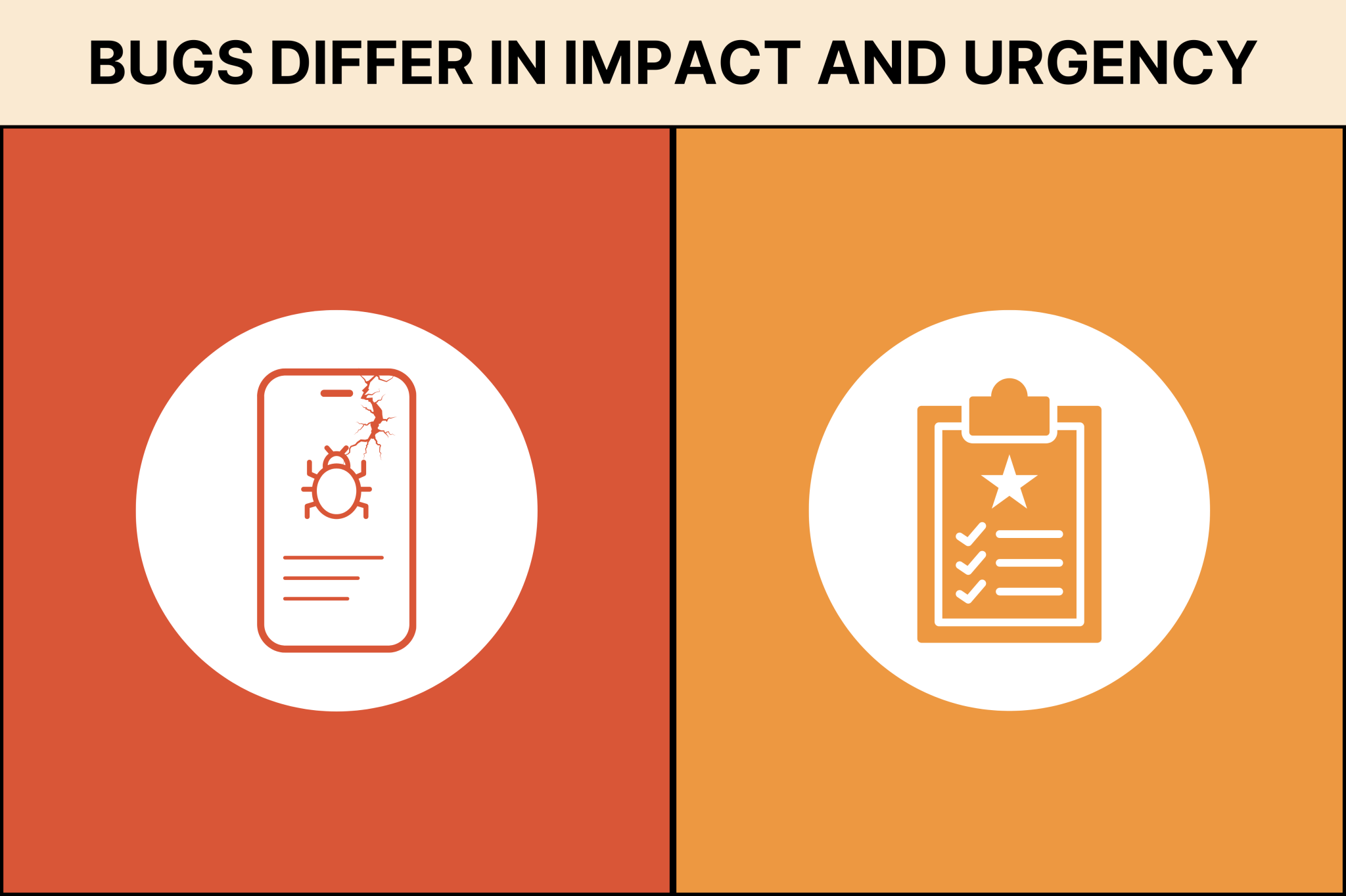
Software testing teams may face a lot of issues, but not every issue needs the same attention. There can be some severe issues that can even break the application and require fixation on a priority basis. However, minor UI/UX issues like small visual glitches are low-priority bugs that users hardly notice.
Teams are responsible for judging the intensity of a defect in order to decide how and when to fix it. If they are unable to do so, the work will slow down, product quality will drop, and users will start sending support tickets. Testers use a structured way to understand bug severity levels to decide how fast it should be fixed.
Severity helps teams understand how deeply a defect affects the system. Once they start prioritising fixing severe issues, testing becomes easier, and stakeholders get clearer visibility of risks.
What Is Bug Severity?
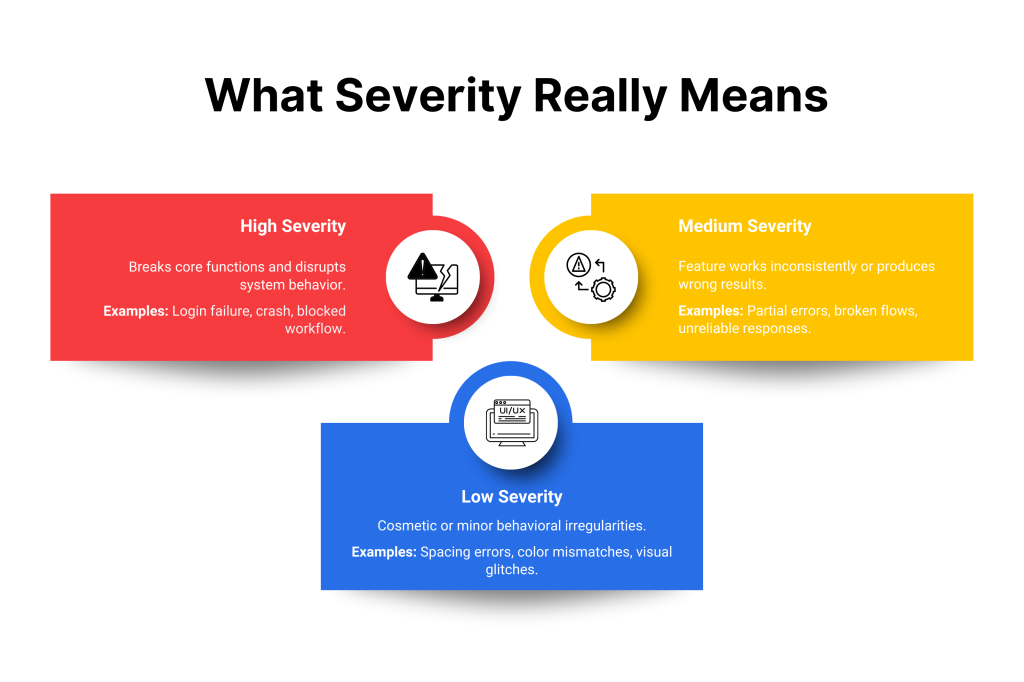
Bug severity shows how strongly an error is affecting the functioning of the system or application. The severity level decides how serious the problem is from a technical perspective. High-severity issues can badly impact the core function of the system. Software testing teams use bug severity levels to technically understand the risk a bug can cause by disrupting the system.
When a feature fails or behaves in an unexpected way, it will badly impact the user experience.
If a user is facing a crash while logging then it is a high-severity bug because it blocks access to the users. That can have a bad impact on the business. Technical teams treat these severe issues as a priority. However, the incorrect font or shade of color on a panel is are low-severity and low-priority task.
Deciding the severity level of the bug is not based on guesswork. Software testers follow some fixed rules to give clear severity grades to report defects with accuracy. Research shows that 88% of users stop using an app due to repeated bugs, crashes, or performance issues.
Minor severity bugs won’t break the feature but will cause some odd behavior. Major severity bugs will cause the system to fail, but if the severity is critical, then the system will shut down, and you will lose all the data. Developers prioritise the critical and major severity bugs and fix them before they reach users. Fixing a bug in production costs up to 6× more than fixing it in early development.
What Is Bug Priority?
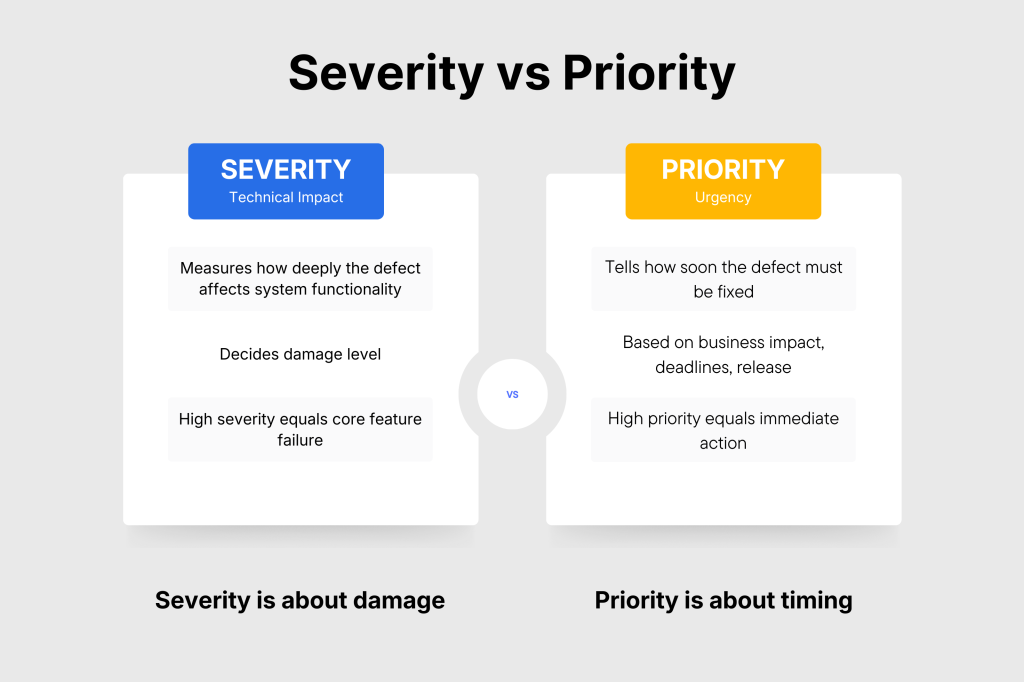
Bug priority tells us how soon we should fix a defect. Problems are prioritized on the basis of timing, planning, and business need, which tells the development team to work accordingly on the fixation. Bug priority does not tell us about the impact of the damage; it just clarifies the urgency of the fix. Severe issues are obviously prioritised because they will impact the customer flow or will block a primary release. Once teams understand bug severity and priority together, they avoid delays and rushed work.
If a team wants to work on a predictable roadmap and follow clear rules, then they have to prioritise the issues. They can classify bug severity as high, medium, or low based on the impact they have on business and timelines.
Developers can fix low-priority bugs at a later date, but medium-priority bugs need to be fixed within their required time of development and testing. However, high-priority bugs must be resolved as soon as possible because they badly affect the system.
Differences Between Bug Severity and Bug Priority
Bug severity and priority are 2 different topics that sound similar, but they have different purposes. Bug severity tells us the impact of a defect on the software’s core functionality. But priority explains the urgency and order to address these issues based on factors like deadline, business, or user requirements. It is mainly not concerned about how critical the bug is. If the problem is severe and needs to be fixed urgently, then it is prioritised by the developers.
If there is a case with high severity but does not require urgent fixation, then there is no need to prioritise it before a high-severity and high-priority task. When teams do not understand these terms properly, they will waste their time fixing the wrong error. This issue will delay the fixation, poor planning, and confused triage meetings.
Understanding Bug Severity Levels
Software bugs can impact the workflow on different levels. For that reason, software testers use severity levels to classify the defect by understanding which bug is causing how much trouble.
These levels help you better understand how much harm a defect causes inside the system. You can better understand which bugs need immediate attention and which ones can be fixed later. There is a range of categories to define the severity and judge the technical depth of the damage instead of relying on assumptions.
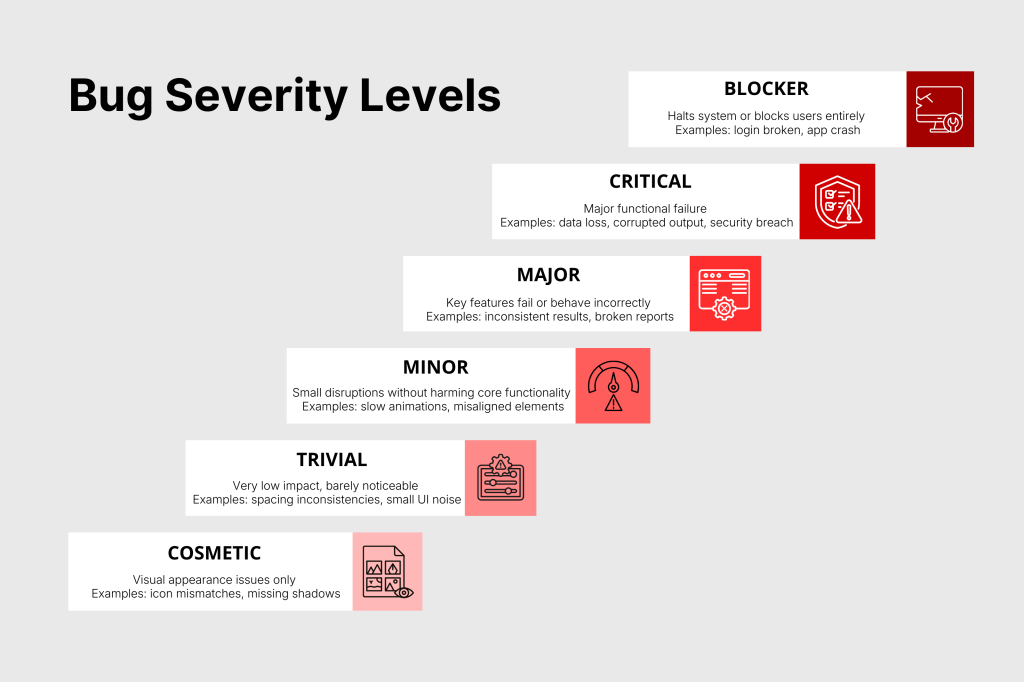
1) Blocker Severity
A blocker defect is a critical one that can halt the system and block the user from proceeding. These issues mainly affect the core functionality, which stops testers from continuing their work as the application stops working.
Core functional defects include issues with login, authentication, check out or system launch. If the application crashes right after opening or the login system fails to work on every device, then the defect is considered a blocker.
2) Critical Severity
Critical defects do not shut down the system, but they affect the functionality of the system. They can result in workflow disruption, corrupted output, security breaches, broken payment systems, or data loss.
Even if the application continues to work somehow, the defects remain a big problem and are difficult to ignore. Critical issues hinder user experience, which results in weakened trust, so they need to be treated on an urgent demand.
3) Major Severity
Major defects will impact the important features of the system or application. Your system will not stop working in this scenario, but there can be some features that can cause issues while working. Mostly, the key functions start behaving inconsistently, produce incorrect results, or fail at times. Users may feel difficulty while still completing tasks, but the experience becomes difficult and unreliable.
For example, a checkout button that works only sometimes or a report that shows partly incorrect information. These defects should be fixed soon because they disrupt user workflows and lower product quality, although they usually do not require immediate emergency attention.
4) Minor Severity
Minor defects create small disturbances without harming core functionality. The system works correctly, but small visual or functional irregularities appear. These include misaligned elements, slow animations, slightly off placements, or incorrect tool tips.
Users can still complete their tasks without being blocked, and the business is not at risk. Minor issues are often scheduled for improvement cycles or UI/UX refinement stages, as they do not interrupt the main user experience. These minor errors do not cause an impact on the system’s working.
5) Trivial Severity
Trivial defects are extremely low-impact issues that create almost no measurable harm. These are harmless glitches involving spacing, color variations, font mismatches, or other minor stylistic inconsistencies.
Since these defects do not affect the user journey or the system’s behavior, they are normally pushed to future sprints, design cleanups, or low-priority refinements when time permits.
6) Cosmetic Severity
Cosmetic severity is mainly those errors that cause visual inconsistencies. They can impact the appearance but not the functionality or working.
There can be icon inconsistencies, missing shadows, or slight layout noise. While they do not impact usability, they may slightly reduce the product’s visual appeal. Teams usually fix cosmetic issues only when working on design enhancements or final UI cleanup.
How to Determine Bug Severity
Determining bug severity is an important part of software testing because it shows how strongly a defect affects the system, the users, and the business. To assign the correct severity, testers must look at the issue from multiple angles rather than relying on assumptions.
Severity depends on how much the defect hurts core functions, whether it affects data, how far it spreads across the application, and how often it occurs.
Testers also consider whether a workaround is available, how much business risk the defect creates, and whether the issue is easy to reproduce. Using a structured method helps teams make accurate decisions, avoid confusion in triage meetings, and maintain consistent product quality.
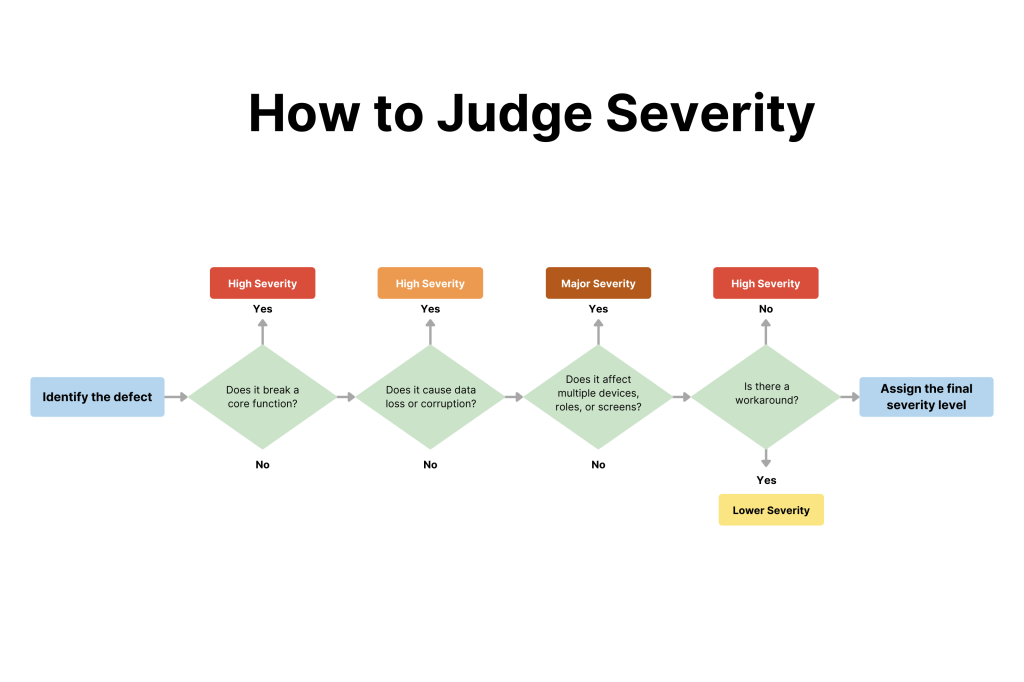
A severe defect can be a problem related to login, checkout, saving data, or when it damages or exposes important information.
Things can also become severe when they spread, especially across multiple screens, devices, or user roles. Even in severity, we try to fix those bugs on an immediate basis that affect our revenue, user trust, or legal compliance.
Surface-level UI errors may stay low severity, but defects in core layers like APIs, authentication, or database operations are always considered more serious due to their wide impact.
How to Determine Bug Priority
Determining bug priority helps you decide how quickly a defect needs to be fixed. Priority depends on the deadline, business needs, and user requirements. If a minor bug is affecting the client, the company’s revenue, or the system’s core feature, then it becomes urgent to resolve. Teams try to understand the defect caused by any bug to set its priority accordingly.
If the issues are affecting the company’s finances, farm sales, and negatively affecting the reputation, then they are important to be fixed. Priority also depends on how easily users can continue their work. If there is a simple wording mistake, the defect may wait. This issue can become urgent if a typing mistake is affecting the future needs.
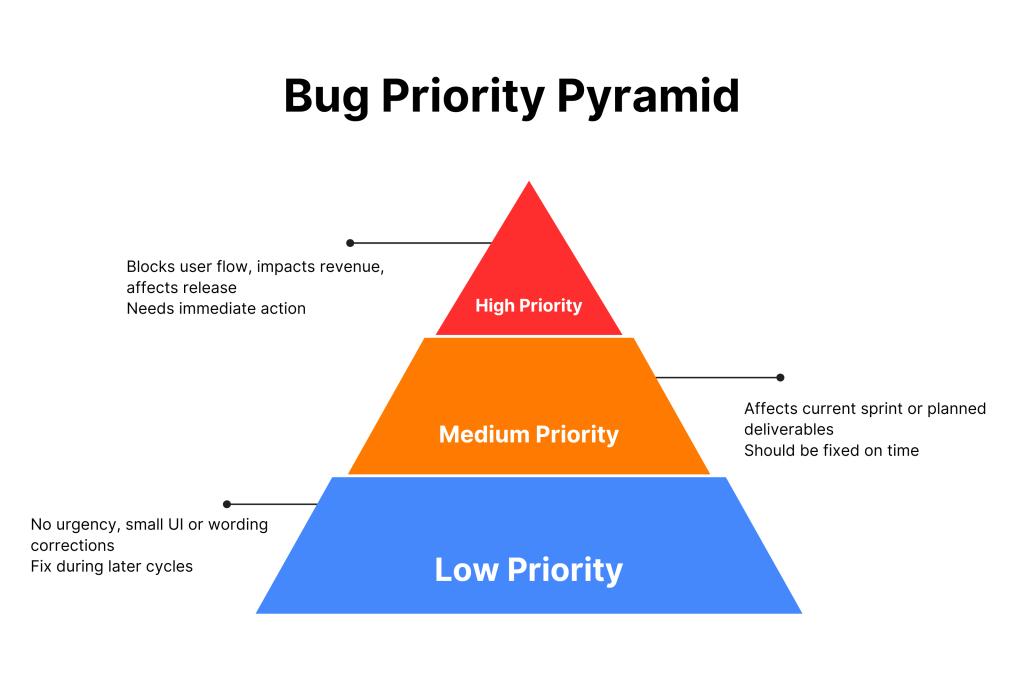
Bugs that cause delays by slowing down the QA, development, or support teams increase priority. By considering business impact, customer impact, deadlines, compliance needs, workarounds, and team workflows, teams can assign priority accurately and ensure that the most important issues are resolved at the right time.
Examples of Severity and Priority Combinations
Understanding of severity and priority is one of the most important skills in software testing. It can be confusing for users to understand their difference. Severity tells you how serious the issue is technically, while priority tells you how urgently it needs to be fixed.
You will face multiple situations where you have to consider both the severity and priority of a bug to decide accordingly and make effective decisions. Here are simple examples that show the difference:
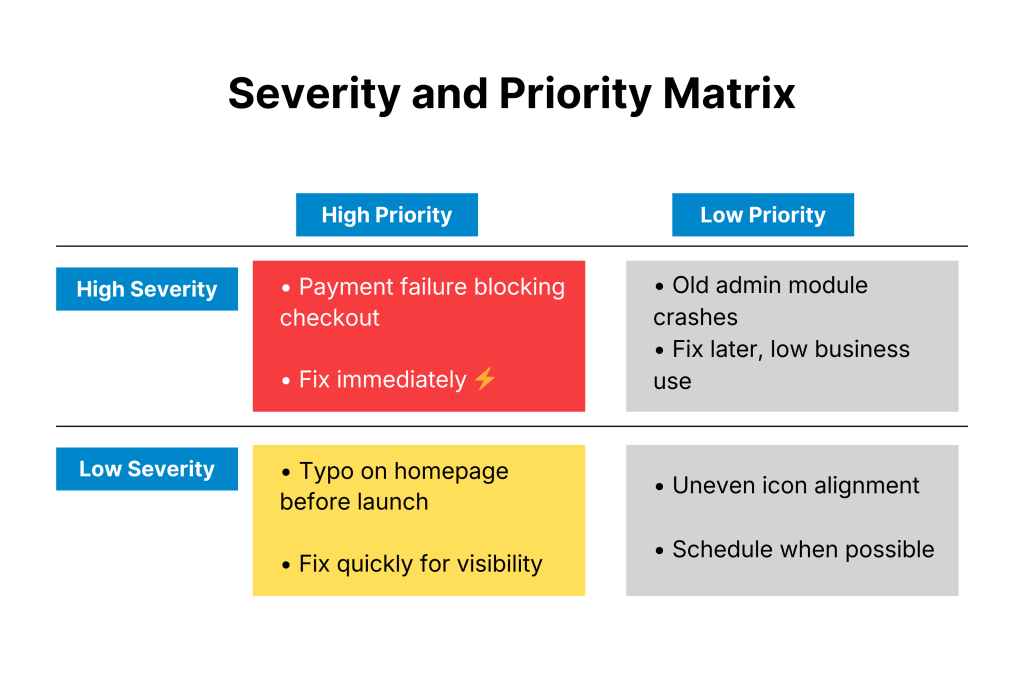
High Severity + High Priority
If the payment system of an application fails to proceed, then users cannot complete purchases. It will badly affect the revenue and needs to be fixed as soon as possible.
High Severity + Low Priority
If an old admin screen gets crashed, but it is not in current use by the user, then this issue can be fixed next month. This task has high severity, but the urgency is low.
Low Severity + High Priority
There is a typing mistake on the homepage regarding a product launching tomorrow. Severity is low, but priority is high due to visibility.
Low Severity + Low Priority
If a small icon on the website looks uneven, but it is not affecting the system performance, then this issue can be fixed later as it is a low-severity and priority one.
Once software testers understand this difference, they are able to differentiate and classify low and high-severity tasks with accuracy.
Best Practices and Guidelines for Managing Bug Severity and Priority
To stay organized and plan work smoothly, you need to manage bug severity and priority. When all the testers follow the same guidelines to classify the issues, it will be easier for the developer to fix them by knowing which issues need attention first.
1) Create Clear Definitions and Processes
Every team should follow the same rules and pathway to manage the severity and priority level of bugs. All the defects will be classified in the same way. They can name severity levels by Blocker, Critical, Major, Minor, and Low in simple terms, and do the same for High, Medium, and Low priority. Once they classify, report them according to a standard bug report template.
2) Conduct Efficient Triage Meetings
Triage meetings help teams review new defects and decide their correct severity and priority. QA leads developers, and product managers can have these short meetings on a regular basis to make decisions on the real impact, user needs, and release timelines. Regular triage helps to ensure that there is no defect that is missed or misjudged.
3) Promote Collaboration and Continuous Improvement
Severity and priority classification work best when QA and product teams communicate openly. QA focuses on technical impact, while product teams evaluate business urgency. Both perspectives are needed for accurate decisions. Classifications should be revisited when deadlines change or defects spread. Workarounds can be used temporarily to help users continue while a complete fix is planned.
4) Use a Shared Severity–Priority Matrix
A simple severity–priority matrix helps everyone understand how each level should be handled. It’s quite similar to a requirements traceability matrix.
When this chart is visible on the sprint board or documentation, team members can easily follow the same rules, reducing confusion and keeping classifications consistent.
5) Avoid Emotional or Assumption-Based Ratings
Decide the severity and priority level based on the real impact, not on the assumption of how bad a defect looks. Make fact-based decisions by understanding the technical depth, user disruption, or business risk. Avoid guessing or adjusting levels based on rarely occurring issues or personal preferences.
6) Re-check Severity and Priority After Updates
If you try to fix something regarding the bugs, it will completely change how a defect behaves. The bug can also spread from one page to another and affect more areas, which will ultimately increase the severity. It is better to regularly check and review how the bugs and the system are performing.
7) Bug Reports Must be Clear
Prefer clear and simple bug reports so that developers can easily understand them to fix issues faster. All the important information from the steps to the expected results needs to be there in the report to avoid any confusion and make the issue easy to track.
8) Using Tools to Understand Severity and Priority
You can use testing tools that help you understand the severity and priority levels based on consistent rules. These tools help to avoid errors and keep everything organized.
Modern Considerations in Bug Severity
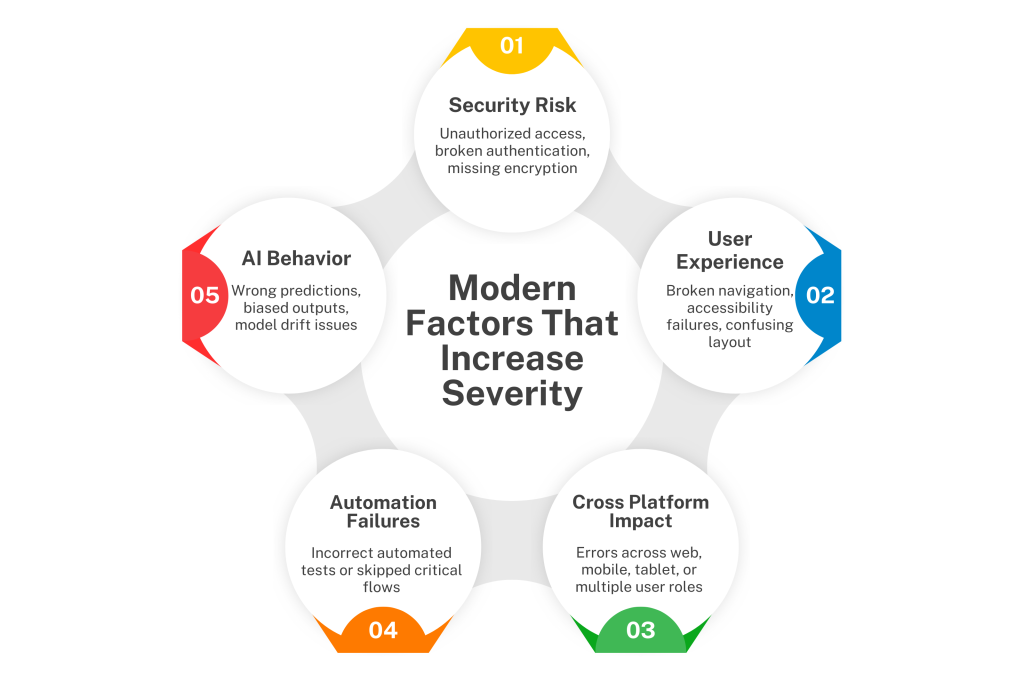
Nowadays, software is getting more complicated and advanced, especially after the involvement of AI and automation. Due to advancement, the judgment of the bug severity does not depend only on the functional impact. It also depends on the user experience. Quality of automation, AI reliability, and security. Here are some advanced considerations that influence severity.
1) Security Issues
The most critical severity bugs are security bugs because they will disrupt the security of the data by allowing unauthorized access.
Systems have a high risk of losing important information about the user or business. Some common security risks include broken access control, missing encryption, session handling, weak authentication, and so on.
2) User Experience (UX) and Accessibility Impact
If the bugs are not affecting the system but causing a poor impact on the user experience, then that can be harmful.
For example, if there is broken navigation on an e-commerce site, then it will trouble users to find the specific collections. Besides that, errors like confusing layout or missing accessibility features will also affect user trust, conversion, and retention.
3) Cross-Platform and Ecosystem Impact
Applications run on multiple devices like phones, tablets, web, smart devices, and APIs.
If a bug affects multiple platforms, it becomes more severe. It is better to stop them from a wider audience as they will become high-severity.
4) Automation Failures
The automation feature is very powerful as it helps systems detect bugs early. If the automation testing system fails to work properly due to a bug, then it can be very risky. The failed system will start creating inaccurate automated results, broken regression tests, and scripts that skip key flows. Automation failures can become high-severity, especially when they do not give accurate reports and hide critical bugs.
5) AI-Generated Bugs
If your application involves an AI system and it starts behaving unpredictably by giving wrong answers, Biased or unfair outputs, Model drift, or failed fallback logic, that can seriously affect users or business decisions.
It will not directly impact the system, but it still can cause performance gaps. Sometimes these issues can be of high severity and priority, so they need to be fixed immediately.
Conclusion
It is important for the teams to understand the bug severity and priority clearly. It will help them streamline their work and deliver higher-quality software.
Knowing the severity of their impact and priority, like how urgently it needs to be fixed, is important to make better decisions with less confusion.
Modern systems can face technical issues on high-end like unpredictable AI behaviour, security threats, and automation gaps. But the process will remain, as you only have to judge the damage and urgency, and then act accordingly.
FAQs
1. What is the bug severity rating?
A bug severity rating is used by software testers to measure the effect a bug has on the technical functioning of a software system.
2. What is the defect severity level?
A defect severity level is a label that tells us about the nature and intensity of a bug to impacts our system’s functionality or user experience. The main bug severity levels include Major, Minor, Blocker, Critical, and Trivial.
3. What are the 4 levels of software testing?
The 4 levels of system testing are unit that tests every component, integration tests the working of modules, system testing tests the complete system activity, and acceptance testing checks if the system is meeting business and user requirements.
4. What are P1, P2, P3 bugs?
P1, P2, and P3 are priority level labels that explain the severity and urgency of how quickly a defect should be fixed. They rate bugs from critical to high priority and then medium priority.