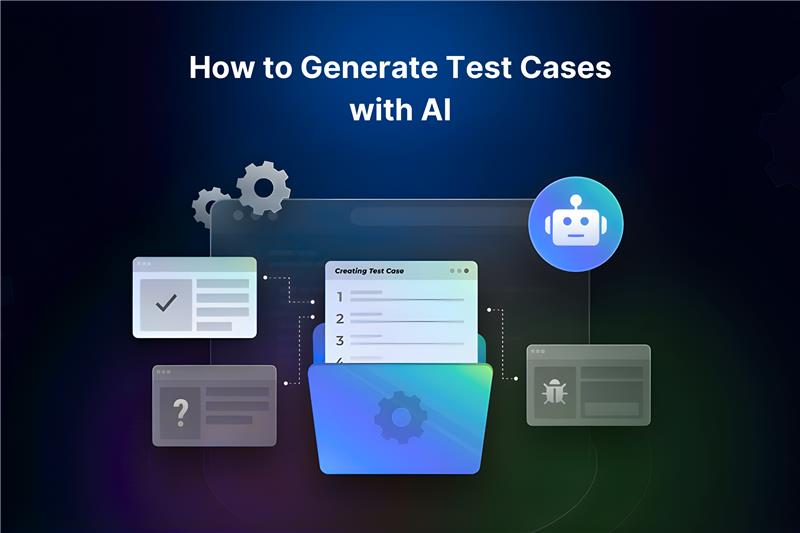
In the past few years, QA teams have been increasingly turning to AI for help in their tasks and to meet deadlines. Their workflows get fast-tracked with the assistance of AI.
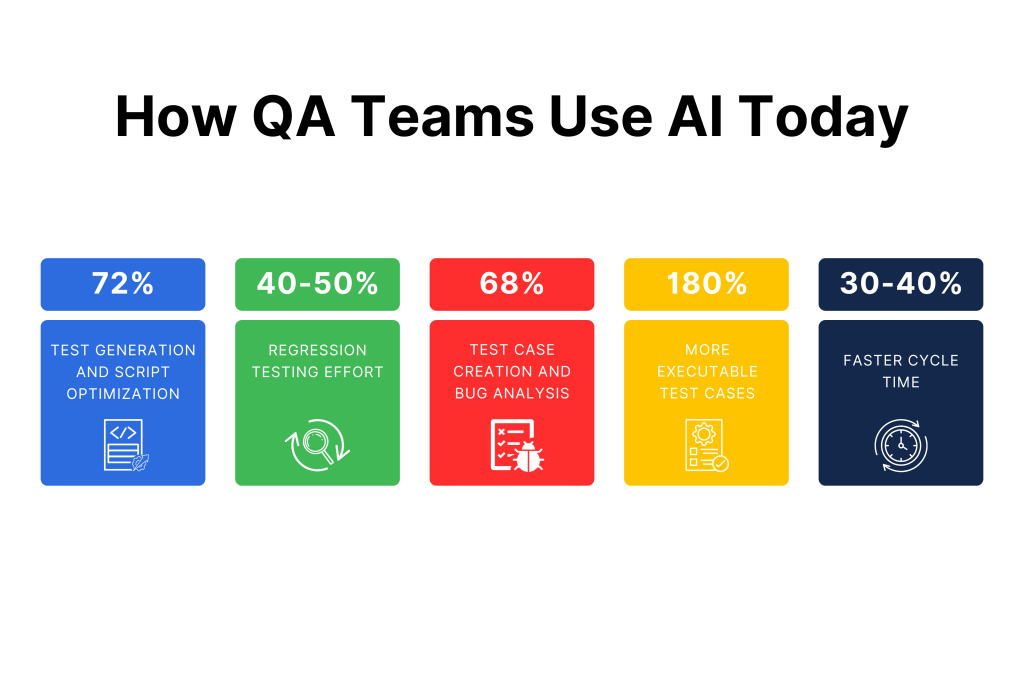
Usually, how it is done is they give prompts to the AI model and tell it what to do. Estimates show that 72% of professionals actively use artificial intelligence for test generation and script optimization.
Now, there are several AI prompts for QA teams that can prove to be of huge value. ChatGPT enables rapid test design, as well as automation planning, debugging and reporting. It, along with other AI tools like Claude and Perplexity, takes away the repetitive tasks that consume up to 40-50% of QA resources in regression testing.
That said, today, we’ll provide 30 expert AI prompts, along with some simple ones, for QA teams that return deeper, context-rich outputs.
Why Do AI Prompts Matter in Modern QA Workflows?
AI prompts for QA teams turn vague ideas into actionable outputs. While this is a big reason in itself why you would want to use them, there are a few other benefits as well, which are:
- The maintenance time that drains 20% of a QA team’s efforts is reduced.
- The results you get are reliable.
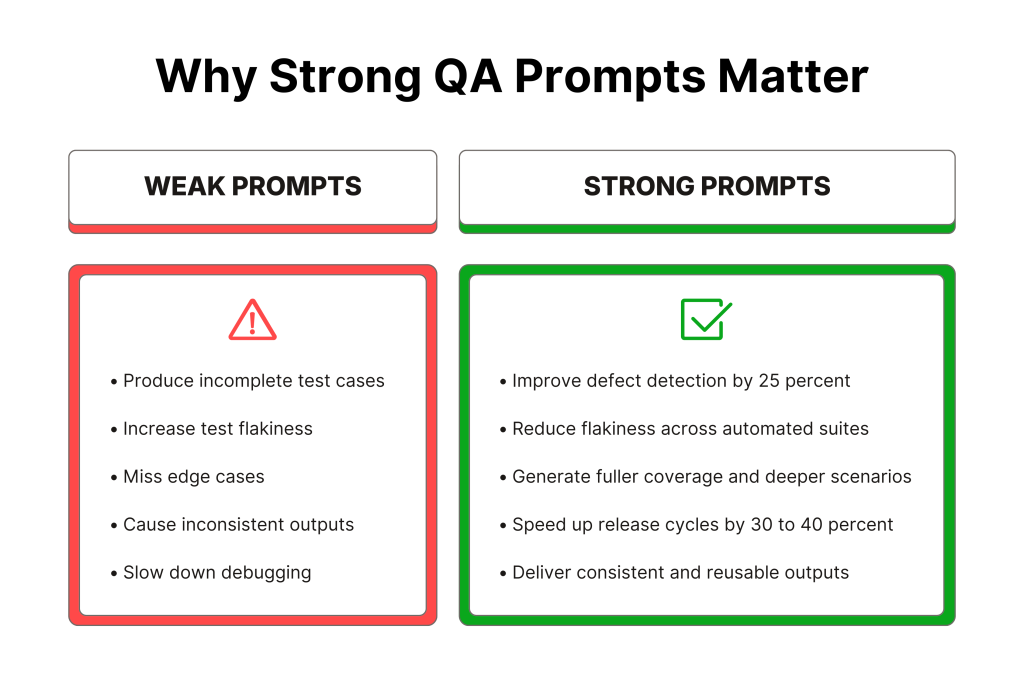
- Release cycles are accelerated by 30-40% in AI-integrated CI/CD pipelines.
- Test cases that are generated are 180% more executable.
Poor prompts yield incomplete test cases, but structured, long-form ones improve accuracy by 25% in defect detection. They also reduce flakiness.
Furthermore, Reddit threads show that testers save hours on data generation and edge cases with detailed prompts. Even though human validation remains key for compliance.
Explore how Kualitee supports AI-assisted QA workflows. Start your free trial and see it in action.
Categories of QA Prompts Every Team Should Use
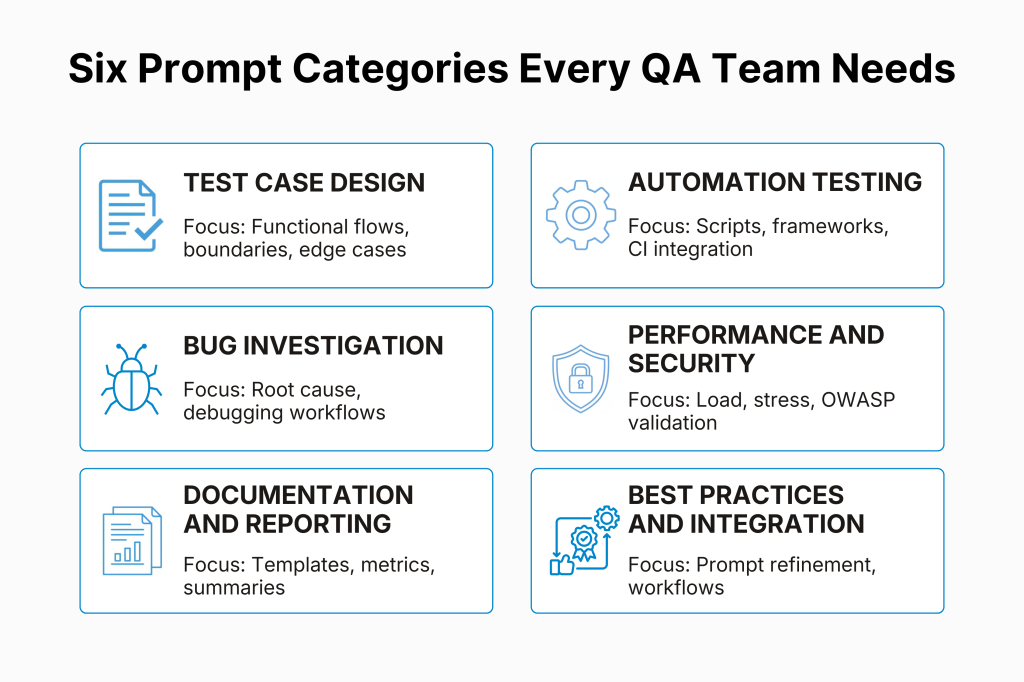
The 30 AI prompts that we’ve added to this post are a mix of short, simple prompts for quick wins and elaborate expert prompts for production-ready results. They’ll be grouped by workflow:
| Category | Prompt Count (Simple + Expert) | Focus Areas |
| Test Case Design | 3+5 | Functional, boundary, edge cases |
| Automation Testing | 3+5 | Scripts, frameworks, CI/CD |
| Bug Investigation | 3+5 | Root cause, debugging checklists |
| Performance & Security | 3+5 | Load, stress, OWASP tests |
| Documentation & Reporting | 3+5 | Templates, KPIs, summaries |
| Defect Triage & Analysis | 3+5 | Prompt engineering, workflows |
AI Prompts for Test Case Design in Software QA
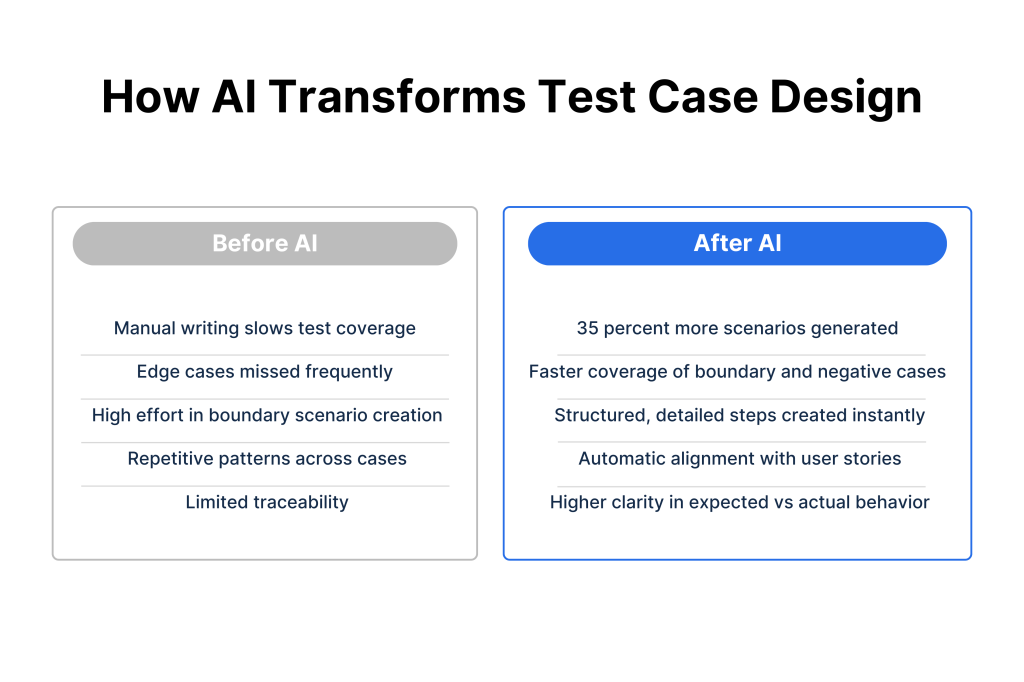
Generative AI shines here, with 40.58% of testers already using it for case creation. AI prompts yield comprehensive suites that cover 35% more scenarios.
Simple Prompts:
- “Generate detailed functional test cases for user login.”
- “Create boundary value test cases for date input.”
- “Suggest edge cases for shopping cart.”
Expert Prompts:
- “You are a senior QA engineer working on a microservices-based web application for B2B customers. Given this user story: [paste user story + acceptance criteria], generate a comprehensive suite of functional test cases. Structure the output as a table with columns: Test ID, Title, Preconditions, Detailed Steps, Test Data, Expected Result, Priority, and Traceability (linking to the specific acceptance criteria IDs). Focus on both happy paths and high‑risk negative scenarios, including validation errors, session handling, and data integrity across services.”
- “Act as an expert in boundary value analysis and equivalence partitioning for financial systems. For this requirement: The amount field accepts values from 1 to 10,000 with up to 2 decimal places and currency = USD only, create a set of boundary and partition-based test cases. Include valid and invalid ranges, data type violations, localization issues, and formatting variations. Present the test cases in a structured table with clear partition labels and mark each case as High/Medium/Low risk.”
- “You are performing exploratory testing for a consumer mobile banking app. Based on this feature description: [paste description of funds transfer feature], generate session-based exploratory test charters. For each charter, include: Charter ID, Mission (what to explore), Areas of Focus (security, usability, performance, data consistency), Data/Tools needed, and Timebox. Highlight at least 5 charters that specifically target edge cases, concurrency issues, and potential race conditions.”
- “As a senior QA lead, design end-to-end test scenarios for an e-commerce checkout flow integrating payment gateway, inventory, and order management systems. Assume these constraints: [list constraints, e.g., multiple currencies, guest vs registered user, discount codes]. Produce 10–15 high-level scenarios, each with a short narrative, main actors, involved systems, and primary risks addressed (e.g., data consistency, idempotency, rollback). Tag each scenario with its priority for regression.”
- “You specialize in accessibility testing for web applications. For a multi-step registration flow described here: [paste short description or URL], generate detailed accessibility test cases aligned with WCAG 2.1 AA. Include tests for keyboard-only navigation, screen reader behavior, focus management, color contrast, and error messaging. Structure the output with: Test ID, Assistive Tech/Condition (e.g., NVDA + keyboard only), Steps, Expected Accessible Behavior, and WCAG reference.”
Want smarter test planning and traceability? Check out Kualitee’s key features for end-to-end QA.
AI Prompts for Automation Testing in Software QA
As mentioned earlier, automation consumes 72% of CI/CD time. However, AI prompts can cut maintenance by 45% via self-healing code.
Simple Prompts:
- “Write a Selenium script for login.”
- “Provide Cypress API test template.”
- “Outline data-driven framework.”
Expert Prompts:
- “You are an automation architect designing a scalable UI automation framework using Selenium WebDriver, Java, TestNG, and the Page Object Model. Given this feature description: [paste login or key feature spec], generate: 1) a proposed project structure (packages, base classes, utilities), 2) example Page Object class with locators and reusable methods, and 3) a sample TestNG test class that uses data providers and asserts both UI and backend conditions. Include comments showing where to integrate reporting and logging.”
- “As an expert in Cypress and modern frontend testing, design a Cypress testing strategy for a React SPA that heavily uses APIs for data. Generate: 1) a set of high-value E2E tests, 2) a set of component/integration tests, and 3) example Cypress code snippets for stubbing API responses with cy.intercept, handling authentication, and dealing with flaky elements. Explain how to tag tests for smoke vs regression and how they can be integrated into a CI pipeline.”
- “You are a senior SDET responsible for API automation in a microservices architecture. Using REST Assured (Java), propose a design for an API automation framework that: 1) handles authentication (OAuth2/JWT), 2) supports data-driven tests from JSON/CSV, 3) implements reusable request/response builders, and 4) validates both functional and contract (JSON schema) aspects. Provide example code for a critical API, including positive, negative, and contract validation tests.”
- “Act as an automation strategist in a CI/CD environment using GitHub Actions and Docker. Given this tech stack: [stack details] and the goal of running regression tests on every pull request, propose: 1) a test suite segmentation strategy (smoke, sanity, full regression), 2) a sample GitHub Actions workflow YAML that runs UI and API tests in parallel containers, 3) criteria for failing builds based on test outcomes and flaky test detection. Include notes on caching, parallelism, and test result artifacts.”
- “You are designing a keyword-driven or low-code automation approach to enable manual testers to contribute scripts. Create a set of 20–30 high-level keywords (e.g., CLICK, INPUT, VERIFY_TEXT, WAIT_FOR_ELEMENT) and show how they would map to underlying implementations in Selenium or Cypress. Provide an example of a test case written in a spreadsheet-like keyword format and the corresponding code that interprets and executes it.”
AI Prompts for Bug Investigation in Software QA
Flaky tests affect a significant number of suites. Thankfully, AI prompts enable faster root-cause analysis.
That said, the following are some AI prompts for bug investigation.
Simple Prompts:
- “Analyze file upload timeout causes.”
- “Steps to reproduce UI flicker.”
- “Causes of flaky tests.”
Expert Prompts:
- “You are a senior QA engineer and performance specialist investigating intermittent 500 errors in a payment API. The stack is Node.js, Express, PostgreSQL, and Nginx, deployed on Kubernetes. Generate a structured investigation playbook that includes: likely root causes, logs and metrics to collect, specific queries/log patterns to look for, recommended tracing (e.g., OpenTelemetry spans), and a prioritized list of experiments to isolate the issue. Present it as actionable steps that a QA and Dev pair can follow.”
- “Act as a debugging expert for flaky UI tests using Selenium in a cloud grid (e.g., Selenium Grid or cloud provider). Provide a detailed diagnostic checklist to identify the cause of flakiness, covering timing issues, dynamic locators, environment instability, test data dependencies, and parallel execution conflicts. For each category, propose concrete checks, tools (e.g., video recordings, HAR files), and mitigation strategies such as explicit waits or test data isolation.”
- “You’re a senior engineer helping QA analyze a bug where uploaded files sometimes appear corrupted in the system. The app uses a React front-end, Node.js backend, and S3 for storage. Generate a root cause analysis template that guides QA to collect reproduction steps, environment details, logs, network traces, and sample corrupted files. Suggest plausible causes (encoding, chunked uploads, proxy issues, content-type mismatches) and verification experiments for each.”
- “Act as a triage lead in a team that receives many similar bug reports about slow page loads in a dashboard. Create a process and template that QA can use to classify, de-duplicate, and prioritize performance-related defects. Include fields for affected views, data volume, filters, browser, time zone, and correlated backend metrics. Propose tags and categories that can be used in a test management tool like Kualitee for better reporting.”
- “You are mentoring a QA team on good bug report quality. Given this vague bug description: [paste example of a poor bug report], rewrite it into three high-quality variants: one for functional failure, one for performance, and one for UX/UI. Each should have: a clear title, environment, preconditions, exact steps, expected vs actual behavior, attachments, and a hypothesis section that can help developers narrow down the issue.”
Turn these prompts into ready-to-use test cases. Book a short demo and see how teams manage everything in Kualitee.
AI Prompts for Performance & Security Testing in Software QA
AI boosts multi-platform efficiency by 25%. AI prompts can be used to simulate real loads.
Simple Prompts:
- “Load test scenarios for API.”
- “SQL injection tests for login.”
- “Security checklist for inputs.”
Expert Prompts:
- “You are a performance engineer designing a load testing strategy for a SaaS multi-tenant application. Tenant sizes range from 10 to 10,000 users. Using a tool like JMeter or k6, propose: 1) realistic user behavior models (scenarios), 2) ramp-up and steady-state configurations, 3) key metrics and SLAs (P90/P95 latency, error rate, resource utilization), and 4) scaling experiments (stress, spike, soak tests). Provide sample configuration snippets and a recommended reporting format.”
- “Act as an expert in API performance testing for a high-traffic public API. For this endpoint description: [paste OpenAPI spec or short description], generate a detailed plan for performance tests, including: single-user baseline, concurrent load tests, rate limiting behavior, and failure mode tests (e.g., downstream dependency slowness). Specify test data strategies, environment prerequisites, and how to interpret typical outcomes.”
- “You are a security-focused QA specialist performing security testing on an authentication and authorization module. Based on this description: [feature/flow description], generate a prioritized checklist of security tests covering OWASP Top 10 categories relevant to auth (e.g., broken authentication, broken access control, injection, session management). For each item, include example test ideas, tools (e.g., Burp Suite, OWASP ZAP), and what evidence QA should capture.”
- “Act as a penetration tester helping a QA team harden their input validation. Given sample endpoints and fields: [list endpoints/fields], design a suite of malicious payloads and test ideas for SQL injection, XSS, command injection, and deserialization issues. Organize them in a way that can be turned into automated security regression tests, and clearly note which tests are safe for lower environments only.”
- “You are responsible for validating non-functional requirements for an analytics dashboard that must render large datasets quickly. Create a test plan that covers browser performance (render time, memory usage, CPU spikes), API performance (aggregation queries), and front-end optimization checks (lazy loading, pagination, virtualization). Include test tools (Lighthouse, browser dev tools, profiling tools), data volumes to simulate, and pass/fail thresholds.”
AI Prompts for Test Documentation & Reporting in Software QA
AI drafts improve dev-QA collaboration by 92%. The following prompts help you ensure traceability.
Simple Prompts:
- “Bug report template.”
- “Weekly QA summary.”
- “Test notes for registration.”
Expert Prompts:
- “You are a QA lead setting up documentation standards for a distributed team. Design a test documentation structure that includes: test strategy, test plan, test design specs, execution reports, and retrospectives. For each artifact, describe its purpose, minimum required sections, recommended templates, and how it should link to requirements, defects, and test runs in a tool like Kualitee.”
- “Act as a QA manager preparing an executive-level release quality report for a major release. Given high-level metrics: [insert sample metrics], generate a narrative report that explains test coverage, defect trends, risk areas, and release recommendations in non-technical language. Structure it with sections for Overview, Highlights, Risks, Mitigations, and Next Steps. Indicate where visuals (charts from Kualitee) should be inserted.”
- “You are documenting a complex integration testing effort involving multiple third-party APIs. Create a documentation template that QA can use to capture: integration points, mock vs live environments, known limitations, external SLAs, and rollback strategies. Provide an example-filled-in template for a payment gateway integration.”
- “Act as a senior QA in charge of UAT coordination. Generate a UAT test plan outline that includes: participant roles, entry/exit criteria, environment setup, test scenarios (business-facing language), defect triage process, and sign-off steps. Show how this plan should link back to system/regression tests and requirements in the test management system.”
- “You are responsible for setting up a reusable test data documentation standard. Define how QA should document test data sets, including anonymization rules, synthetic data generation strategies, data refresh cycles, and linkage between data sets and specific test cases. Provide an example of well-documented test data for a login + profile management feature.”
Optimize collaboration and visibility across teams. Check out Kualitee’s workflow capabilities now.
AI Prompts for Defect Triage & Analysis in Software QA
AI-generated triage reports cut defect resolution time by 40%. These prompts ensure accurate prioritization and traceability:
Simple Prompts:
- “Look at this bug report and help me improve it by making the title clearer, rewriting the steps to reproduce, and separating expected vs actual result: [paste bug report].”
- “Here are several related bug reports from different testers. Help me identify which ones are duplicates and suggest a single, merged bug description: [paste bug reports].”
- “These are the open defects for the current sprint with their severities and modules. Help me group them by module, highlight the most risky areas, and suggest which defects must be fixed before release: [paste defect list].”
Expert Prompts:
- “You are a senior QA lead triaging defects from a sprint regression cycle. Given this batch of 15 defects with descriptions, screenshots, and logs: [paste defect list], perform initial triage and produce a prioritized table with columns: Defect ID, Summary, Severity (Critical/High/Med/Low), Priority (P0-P3), Category (Functional/Perf/UI/Security), Root Cause Hypothesis, Assignee Recommendation, and Dupe/Invalid flags. Flag any cross-cutting patterns or release blockers.”
- “Act as a defect analysis specialist for a microservices app. For this high-priority defect report: [paste detailed defect], generate a structured root cause analysis template including: Reproduction Checklist, Environment Matrix, Log Analysis Questions, Related Test Failures, Impact Assessment (users affected, business risk), and Next Actions (Dev investigation, workaround, regression tests needed).”
- “You are triaging intermittent failures from automated UI tests in CI/CD. Analyze this test failure log excerpt: [paste log], and produce a diagnostic report covering: Failure Pattern (timing/locator/data), Likely Causes (flaky elements, env issues, race conditions), Verification Steps, Mitigation Recommendations, and Retest Priority.”
- “As a QA triage manager, you’re consolidating duplicate defects from multiple sources (Jira, Kualitee, manual reports). Given these similar reports: [list 5-7 defects], create a master defect record with: Consolidated Title/Steps, Linked Defect IDs, Severity Consensus, Trend Analysis (frequency, environments), and Communication Plan for stakeholders.”
- “You specialize in post-mortem defect trend analysis for release quality gates. Using these sprint metrics: [paste # defects by type, escape rate, severity distribution], generate an executive summary report with: Key Trends, Root Cause Categories (code changes, test gaps, env), Action Items for Next Sprint, and Risk Heatmap for critical paths.”
Best Practices for Writing Effective QA Prompts
If the aforementioned prompts aren’t enough for you, or you want to do something in areas other than those that we’ve mentioned, you’re welcome to come up with your own AI prompts.
However, do note that clear, well-structured prompts are what make AI a reliable “junior QA” instead of a noisy idea generator.
To achieve this goal, keep the following best practices in mind.
1. Focus on role, context and goal
You have to describe who the AI should be, along with what it is working on and what outcome you want.
For example, say “You are a senior QA engineer testing a B2B web app” and include the domain, tech stack and whether you need test cases, bug reports, or risk analysis.
2. Provide concrete inputs, not vague ideas
Feed the AI with real artifacts (user stories, acceptance criteria, API specs, bug reports) instead of abstract descriptions.
Paste the smallest self-contained chunk that still has enough detail. Also, clearly label sections like “User Story,” “AC,” or “Logs” so the model can parse them.
3. Specify the structure and format of the output
Tell the AI exactly how to format its answer: table, bullet list, or sections with headings.
Define columns/fields you need (e.g., Test ID, Steps, Data, Expected Result, Priority, Traceability) so outputs can be copied into tools like Kualitee or your test management system without rework.
4. Emphasize risk, coverage, and traceability
Ask explicitly for high-risk paths, edge cases and links back to requirements or defect IDs.
Use wording like “include both happy path and negative tests” and “map each test to acceptance criteria IDs or requirement references” to avoid shallow coverage.
5. Constrain scope and depth
Limit each prompt to one task (e.g., “design test cases” or “refine this bug report”), not a whole QA process.
Mention quantity and depth targets, such as “10–15 high-priority scenarios” or “focus on top 5 risks,” so the model doesn’t over- or under-deliver.
6. Make review and iteration explicit
Treat AI output as a draft and say so in the prompt: “produce a first draft that a QA engineer will review and refine.”
Add follow-up prompts like “tighten duplication,” “raise the bar on edge cases,” or “rewrite in concise, test-management-friendly language” to iteratively improve quality.
7. Align prompts with your workflow
Design prompts around where they plug into your pipeline: test design, automation backlog creation, triage, reporting, or UAT support.
Include hints like “output must be ready to paste into our test case template” or “optimize for quick reading during standup” so the response fits real-world use.
How QA Teams Can Integrate AI Prompts into Daily Workflow
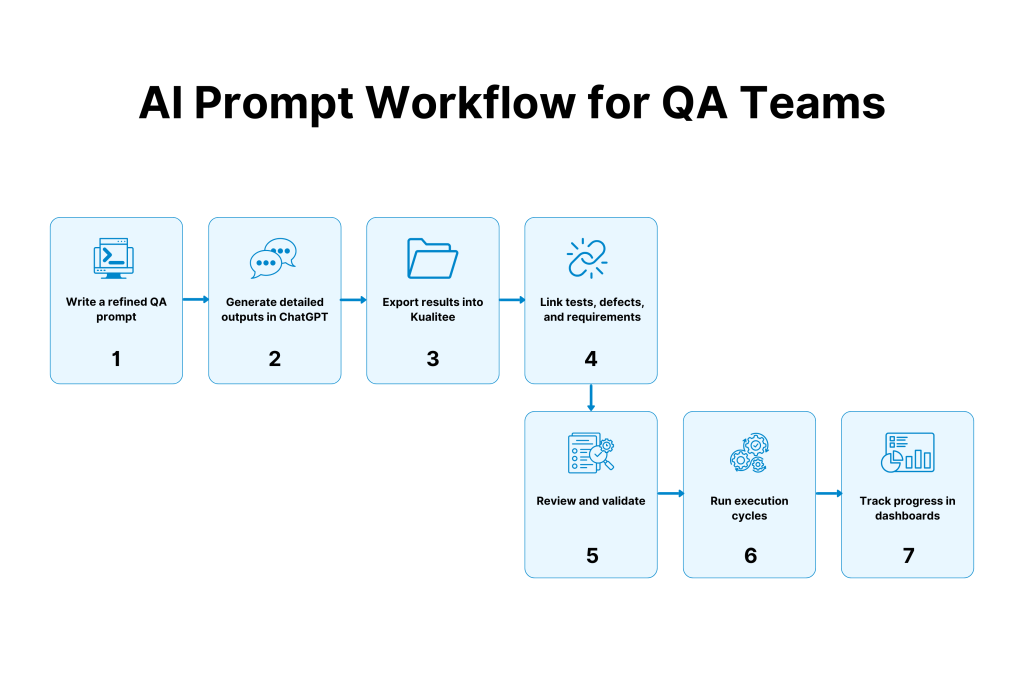
Integrating AI prompts into daily QA workflows turns ChatGPT and other LLMs into a practical assistant instead of a novelty.
- Set up an AI-powered QA loop: Define when and how the team uses AI during a typical sprint. For example, in test design, defect investigation, regression planning or reporting. Make it explicit that AI output is a draft to be reviewed, not a final decision-maker, so responsibility for quality remains with QA leads and engineers.
- Use prompts with ChatGPT, then import into Kualitee: QA engineers often paste expert-level prompts for test cases, bug analysis and regression suites directly into ChatGPT at the start of each task. Clean up the structured outputs (tables, checklists, narratives) first. And then import them into Kualitee as test cases, defects or linked requirements for end-to-end traceability.
- Run focused training and practice sessions: Host short, hands-on workshops where testers practice writing and refining prompts using real user stories, logs and defects. Emphasize adding context, along with constraints and desired formats. We’re saying this because teams report major drops in debugging and rework with specific, task-focused prompts.
- Bring prompts into daily standups: Use a few minutes in standup or QA huddles to share high-performing prompts for new features, tricky edge cases or recurring defect patterns. This keeps the best prompts for software testing visible and encourages consistent use across the team.
- Add review and approval to QA cycles: Include AI-generated artifacts in existing review rituals like test case reviews, defect triage or release go/no-go discussions. Human oversight catches gaps in coverage and incorrect assumptions, shortening cycles when starting from stronger drafts.
- Leverage dashboards and traceability in Kualitee: Store refined AI outputs in Kualitee, linking them to requirements, test runs and defects. Dashboards surface coverage by area, defect clusters, and trends tied to AI-assisted design, helping teams improve which prompts to keep, refine, or retire.
Bring AI-generated test cases and reports into one place. Try Kualitee free and organize your full QA cycle.
Closing Thoughts
AI prompts are no longer just a cool add-on for QA teams. They are now a practical way to speed up testing while reducing mistakes and strengthening coverage.
When teams use the right prompts with clear goals, AI becomes a dependable support system in daily QA work.
The future of quality lies in smart collaboration between humans and AI, and the prompts provided in this post give every team a simple way to move in that direction.
Frequently Asked Questions (FAQs)
Q) How can AI help QA teams?
AI assists QA teams by generating test cases, triaging defects, analyzing logs, planning regressions and creating automation scaffolds. It significantly cuts defect resolution time when prompts include context and structure.
Q) What are the best AI prompts for software testers?
Expert prompts position AI as a “senior QA engineer,” provide user stories or specs, specify table outputs (Test ID, Steps, Priority, Traceability) and focus on risks like edge cases and data integrity.
Q) Can ChatGPT generate test cases?
Yes. ChatGPT produces comprehensive test suites from user stories or requirements, structured as tables ready for import into Kualitee. It covers happy paths, negatives and traceability to acceptance criteria, if asked to do so.
Q) How do QA teams use AI for automation scripts?
Teams paste feature specs into prompts asking for Selenium/Cypress code with Page Objects, data providers and CI integration. AI drafts become starting points for SDETs to refine and implement.
Q) Are AI-generated test cases reliable?
AI test cases serve as strong drafts with human review ensuring coverage gaps and risks are addressed. Detailed prompts boost reliability, with teams reporting debugging drops after workshops.