To deliver a high-quality software product, effective communication is key. It is very important for developers, testers, managers, clients and stakeholders to collaborate so the project can be delivered on time and fulfill the customer’s requirements.
A common issue here is that managers and stakeholders don’t usually have enough time to get into the details of every project their team is working on. They set goals for their teams that need to be achieved in a particular time frame and expect results.
This is where the software test report comes in. Testers and developers perform various tasks such as executing test cases, finding defects, discussing blocker issues, and much more. These tasks are logged into the test report, which is then shared with the managers and the stakeholders.
Reports can be shared daily, weekly or monthly, depending on what is expected by the managers.
Key Takeaways
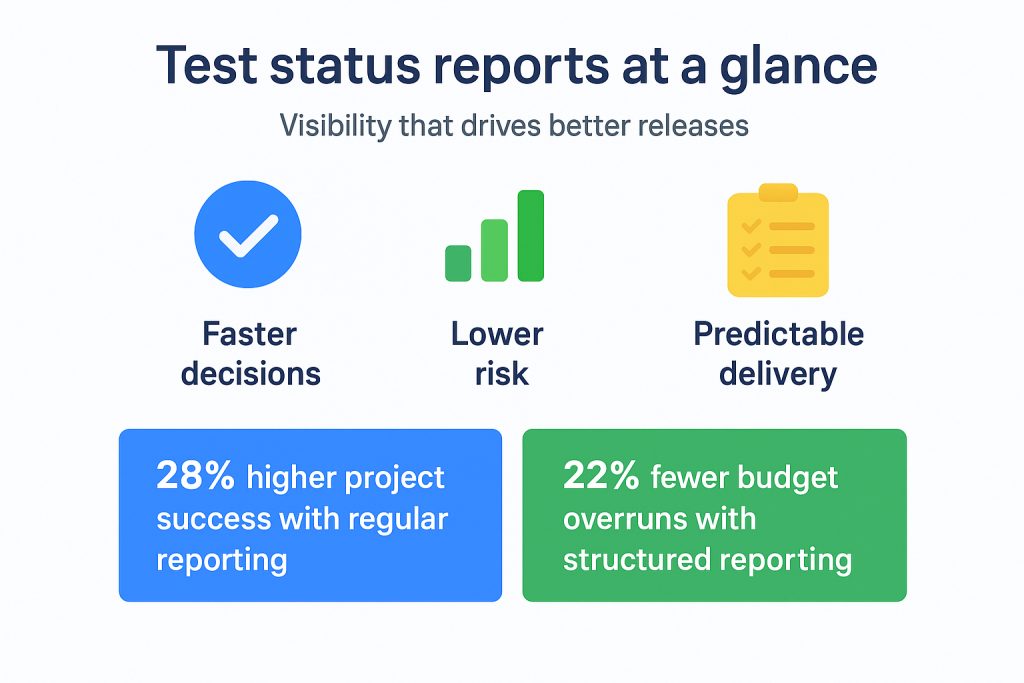
- Software test reports act as a single source of truth. They show quality progress, reveal risks early and keep stakeholders aligned. Teams using structured test metrics catch 25% more defects before release.
- Consistent reporting boosts project success. Research notes that regular status reporting increases IT project success rates by 28% through higher transparency and better stakeholder sync.
- Test reports help spot problems early, so bugs do not slip into production. Banks using continuous testing with strong reporting see defect leakage drop by up to 40%.
- Data-driven reports matter. Capgemini highlights that using analytics and AI-driven reporting cuts defect counts by 29%. This is thanks to faster detection of patterns and weak areas.
- Reporting avoids budget surprises. Gartner indicates firms with proactive test reporting face 22% fewer budget overruns tied to hidden QA risks.
- Strong reporting supports compliance. Around 70 percent of organizations view report quality as essential for meeting standards like ISO 29119.
- Automation improves reporting efficiency and accuracy. AI-supported report generation can reduce report prep effort by up to 40%.
- Tools like Kualitee help teams centralize test data, automate reporting and get real-time visibility across test cycles. They help see defect trends and coverage, leading to improved accountability as teams scale.
What is a Software Test Report?
A software test report is a formal document that summarizes the results, progress and findings of software testing activities. The outcome of every test case that was executed during the development cycle is logged in there.
It captures what has been tested, along with the defects identified and any challenges encountered. The best part about a software test report is that it not only communicates details internally within the QA and development teams. But also informs stakeholders and management on the health and readiness of the software product.
According to MoldStud, teams that track test metrics, either with a software test report or some other way, are 25% more likely to catch defects before release. This leads to better quality software applications and fewer surprises in the long run.
Why are Software Test Reports Important?
Test reports are needed in software testing to deliver high-quality software projects. They do more than just record results.
They play an important role in communication, risk management and various other things throughout the software testing lifecycle. That said, the following are some reasons why software test reports are important.
1. Transparency & Accountability
Test reports provide a clear and ongoing view of the test progress. Everybody involved can quickly have a look at the defects and quality status. Testers, stakeholders, clients, and executives don’t have to ask for updates.
This transparency leads to better accountability and ensures every team member is aligned with the expectations and deadlines.
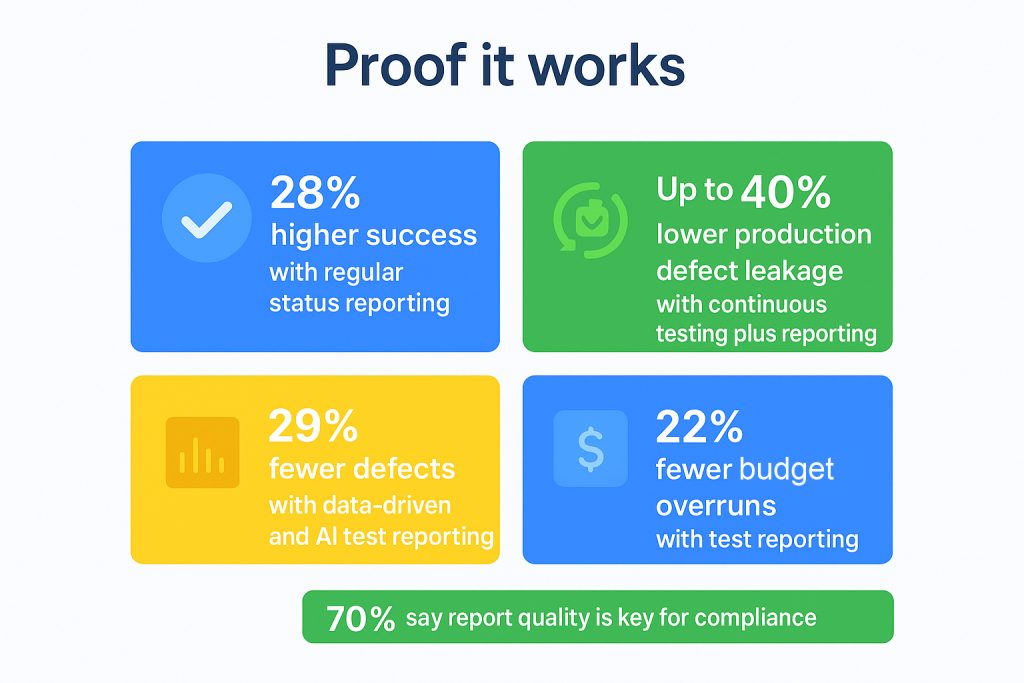
Research published by Omar Shabaya discusses status reporting in IT projects. It mentions that projects incorporating regular status reporting have a 28% higher success rate. And that’s due to improved stakeholder collaboration and greater visibility into development issues.
2. Early Issue Detection
Early identification of bugs, blockers and quality risks is vital to prevent costly delays and rework. This is exactly what software test reports bring you. It enables teams to flag critical issues immediately, allowing quick interventions before defects escalate into production failures.
A review article by Pradeepkumar, published by the Sarcouncil Journal of Multidisciplinary, presents an enterprise test automation strategy. It mentions that organizations, especially banks, utilizing continuous testing combined with detailed reporting, see production defect leakage by up to 40%. This improves the end-user experience and reduces the need for emergency fixes.
3. Performance Monitoring
Test reports act as performance trackers. We’re saying this because they consolidate key metrics such as test coverage, defect density and pass/fail ratio.
QA teams can analyze these over time to identify trends. Moreover, underperforming areas and process bottlenecks can also be seen easily.
A report from Capgemini mentions that leveraging data-driven and AI test reporting decreased the number of defects by 29%. This happens because it’s easy for teams to identify issues with test reports, which are made manually or with AI.
4. Resource & Risk Management
Comprehensive testing reports inform managers about resource utilization and risk levels tied to software quality. This helps prioritize testing efforts on high-risk areas.
Budget and staff are allocated efficiently, and threats to project timelines are mitigated.
Gartner highlights that companies that integrate test reporting experience 22% fewer budget overruns caused by unexpected QA issues. Thanks to early visibility and proactive risk management.
5. Compliance & Auditing
For regulated industries like finance and healthcare, detailed test reporting is one of the most important things to meet legal and contractual obligations. Let us explain.
Test reports provide the documented evidence that auditors require to clarify that software products comply with standards. Such as ISO 29119.
No wonder that 70% of organizations consider report quality important to meet compliance programs.
Types of Software Test Reports
Software testing involves various types of reports. Each one is tailored to a specific stage of the testing lifecycle and audience. Below is an overview of the key types of software test reports.
Daily Status Reports
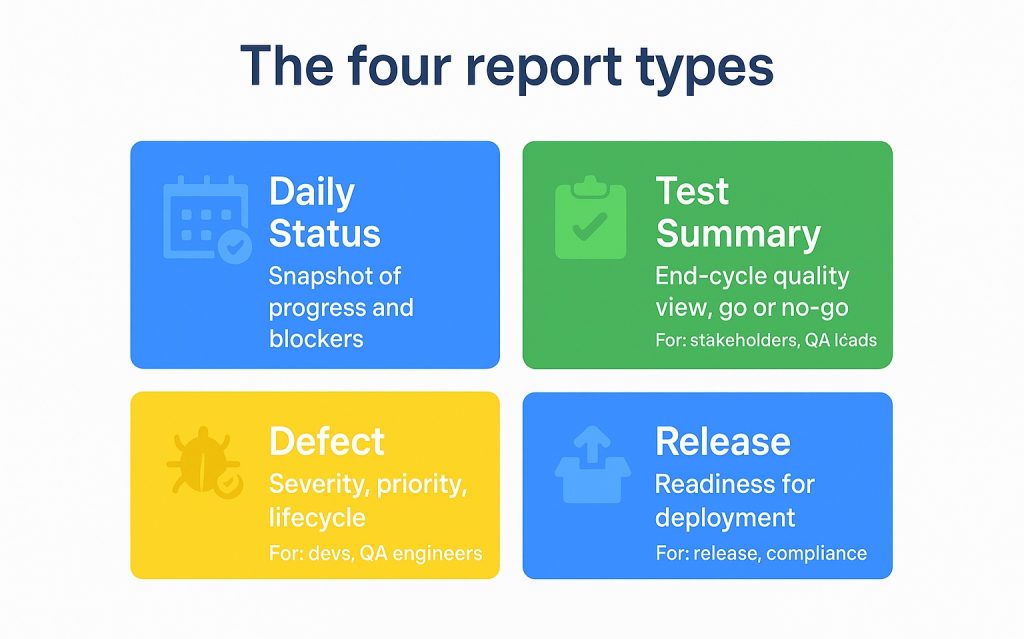
These provide a high-level snapshot of the daily testing activities. Daily status reports are brief but informative summaries. They are designed to keep project managers, team leads and stakeholders informed about what testing tasks have been completed on a day-to-day basis.
Besides the completed tasks, the ones that are ongoing are also mentioned, along with any immediate issues impacting progress.
The purpose of daily status reports is to offer rapid insight for timely decision-making and resource adjustment. It enables quick responses to emerging risks.
Only actionable, up-to-date information for ongoing projects is added to them. There are no exhaustive details.
Test Summary Reports
As the name suggests, test summary reports present detailed, end-of-cycle reviews of the testing phase. They provide a comprehensive breakdown of things like:
- Testing objectives
- Test coverage
- Execution results
- Defect statistics
- Quality assessments
These reports are usually shared with both the technical teams and business stakeholders. A summary of what has been accomplished, what remained incomplete and the overall quality health of the software build is provided.
Because test summary reports form the basis for go/no-go decisions, clarity and accuracy are paramount. Visual elements like charts and tables are often added to support executive-level understanding.
Defect Reports
Defect reports focus explicitly on the identification and lifecycle of bugs discovered during testing. Each defect entry records important information such as:
- Defect ID
- Description
- Steps to reproduce
- Severity
- Priority
- Affected modules
- Current status (open, resolved, deferred, etc)
These reports serve as the primary tool for developers, QA engineers and triage teams to prioritize issue resolution.
Furthermore, defect reports facilitate transparency in quality challenges. They help coordinate debugging efforts and are often integrated with bug tracking systems. Doing so helps ensure traceability from detection through closure.
Release Test Reports
The release test reports validate the software’s readiness for deployment or delivery by aggregating testing outcomes from all phases. These reports confirm compliance with exit criteria. This leads to assurance that critical defects have been resolved and key quality benchmarks have been achieved.
Release test reports summarize:
- Comprehensive test coverage
- Overall defect status
- Regression impacts
- Performance or security testing outcomes
You can say that they provide confidence to release managers. Along with compliance officers and business stakeholders that the software is up to the mark and meets user requirements.
Summary Table of Test Report Types
| Report Type | Purpose | Audience |
| Daily Status Report | Ongoing progress snapshot, immediate risk flags | Project managers, team leads |
| Test Summary Report | Comprehensive cycle review and quality assessment | Stakeholders, QA leads, executives |
| Defect Report | Detailed bug tracking and resolution management | Developers, QA engineers |
| Release Test Report | Final readiness validation for deployment | Release managers, compliance teams |
What to Include in a Software Test Report
An effective software test report generally includes the following sections.
- Project Details: Clearly specify the project or software name, version number, along the detailed test environment context. This includes the hardware configurations, operating systems, network setups and any specific tools or test frameworks that were used. Providing this context ensures reproducibility and helps stakeholders understand the technical backdrop.
- Test Objectives: Outline the goals and scope of the testing effort. Define what functionalities, modules or features were tested and what the report aims to achieve. Whether it’s to verify bug fixes, validate new features or conduct regression testing. Specifying objectives sets the expectation and purpose for the report.
- Test Execution Summary: Present a concise yet complete overview of testing activities. Mention the total test cases planned versus executed. Detail counts and percentages of passed, failed, blocked or skipped tests so that progress and quality can be measured. This section basically acts as a quick health check for project stakeholders.
- Defect Overview: Summarize the defects discovered during testing. And not just in the form of a list. They must be categorized by severity (critical, major, minor), status (open, fixed, deferred) and impact on the project timeline. Defect trends or recurrent issues have to be included as well, so prioritization and correct actions can be taken.
- Risks & Challenges: Document any hindrances that occurred in the testing process. They can be environment issues, resource constraints or uncovered risks that impacted quality or schedule. Highlight unresolved blockers or technical challenges that require managerial attention so project risks can be managed proactively.
- Recommendations: Suggest actionable next steps based on test findings. These can be additional testing areas or improvements in test coverage. This section bridges test insights with decision-making, guiding teams on quality assurance paths forward.
- Metrics & Trends: Visualize key testing metrics through graphs and tables. For example, test coverage percentages, defect density over time, pass/fail trends and test execution velocity. These trends enable data-driven quality assessments and continuous improvement.
- Attachments: Supply supporting documentation such as screenshots, log files, automated test results or defect reports. These things support the findings mentioned in the main report and can also be helpful in audits.
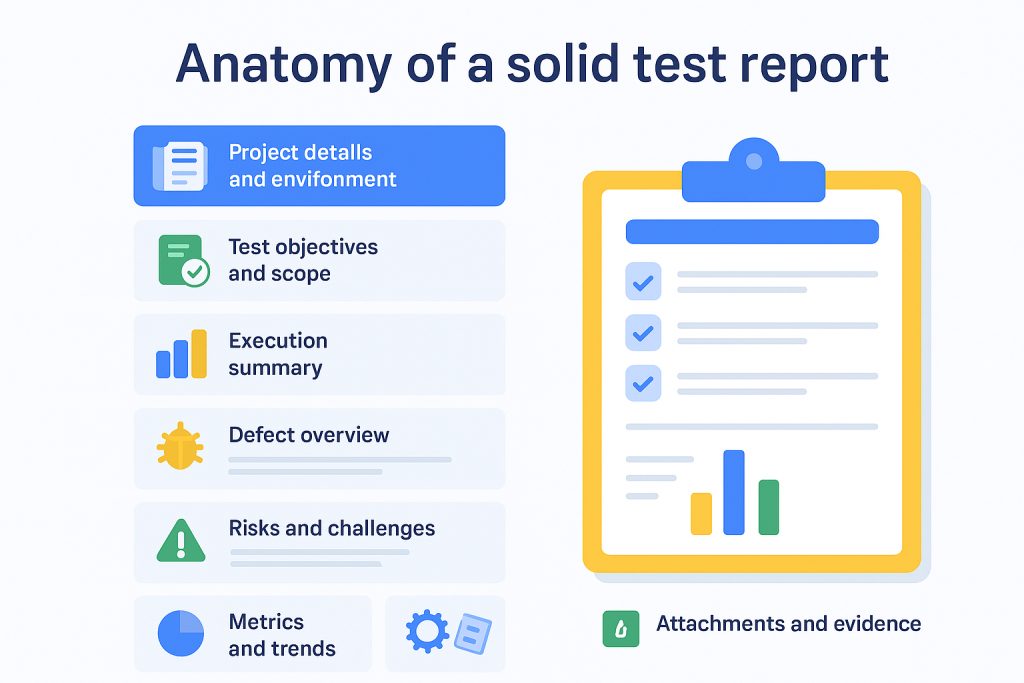
Do note that the report content has to be tailored according to the audience’s needs. For example, technical teams may require granular defect logs and execution details. Whereas the management and stakeholders prefer concise summaries with visual insights that support high-level decision-making.
How to Write a Software Test Report: Step-by-Step
Writing a good software test report is a skill that combines technical accuracy, clarity and audience focus. You need to communicate the true status of software quality.
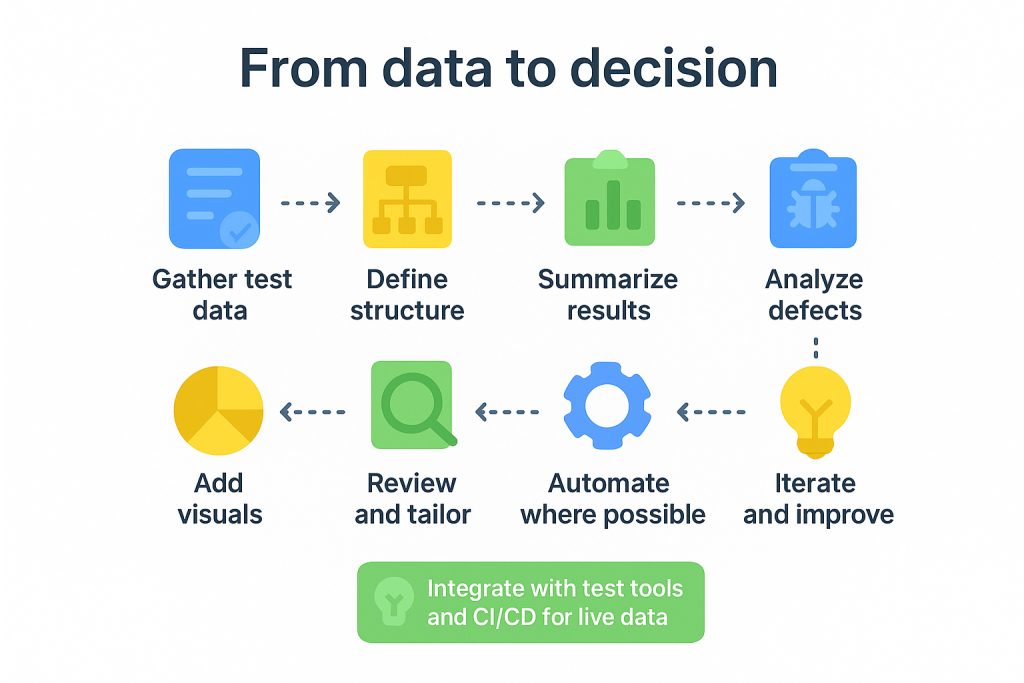
A professional approach involves several steps to turn raw testing data into actionable insights. Ones that guide decision-making and improve software outcomes. That said, the following are the detailed, practical steps for creating software test reports.
Step 1: Gather Test Data
The quality of data that you collect will directly impact the effectiveness of your software test report. Hence, before you begin drafting, it’s better to dedicate ample effort to gathering accurate information from the whole process of testing. This data forms a sort of foundation for all the insights and conclusions you will draw.
A good place to start would be accumulating outputs from automated test execution tools. Ensure the status of each test case (passed, failed, blocked or skipped) is logged. Similarly, include manual testing records that capture exploratory or ad hoc tests, which are often missed by automation setups.
Don’t overlook defect tracking systems. Pull in detailed logs that describe each bug’s nature, severity and resolution status. Complement these with environmental specifics such as operating system versions, hardware configurations, etc. Just be sure to include all the factors that can influence test outcomes.
Also, gather metrics that reflect test coverage in relation to system requirements or user stories. They will help showcase the “completeness” of your testing scope.
So, the things you need to gather are:
- Automated test execution statuses (pass/fail/block/skipped)
- Manual test observations and logs
- Comprehensive defect reports with severity, priority and status
- Test environment details like the OS, hardware, network and configuration
- Coverage metrics aligned with features or requirements
Neglecting this step or collecting incomplete data can put you at risk of producing a misleading report.
Step 2: Define Report Structure
Once your data is in order, it’s time to craft a clear and uniform structure for presenting it. Consistency in formatting not only results in better report creation but also builds reader confidence and facilitates comprehension.
Considering this, design your report to flow logically from the introduction to the conclusion. Standard sections usually include:
- Overview of objectives
- Detailed test environment information
- Test execution summaries
- Defect analysis
- Risk assessments
- Recommendations
- Appendices with evidence, such as logs or screenshots
Furthermore, it’s important to strike a balance. So, tailor your template to fit project nuances without losing the familiarity that helps stakeholders quickly find key details.
Step 3: Summarize Test Results
After structuring your report, your focus shifts to summarizing the core findings. Provide a concise yet comprehensive snapshot that conveys the scope and outcomes of the testing phase.
Clearly state which modules, features or requirements were covered. This will provide the context for results. Present high-level quantitative data such as the number and percentage of test cases planned, executed, passed, failed or blocked.
Additionally, transparency regarding any deviations, like skipped tests or scope changes, is particularly valuable to mention. Use bullet points or tabular presentations for clarity and impact.
Besides these things, you should:
- Highlight trends compared to previous test cycles to show progress or regression.
- Include pass rate benchmarks aligned with industry standards or project goals.
- Contextualize failed or blocked with root causes when available.
- Offer a drill-down link or reference to detailed execution logs for interested readers.
Step 4: Analyze Defects
The best test reports elevate raw defect numbers into meaningful insights that guide priorities and risk management. Beyond counting, your analysis should articulate the business and technical impact of identified issues.
Categorize defects by severity. Bugs that are critical and threaten core functionality deserve urgent attention. While minor ones can be deferred. Reflect their current status clearly: open, fixed or deferred. Identify patterns such as frequently failing components or recurring issues that may point to deeper systematic problems.
Where possible, collaborate with development teams to provide preliminary root cause hypotheses. Also, convey defect risks in terms that stakeholders understand. You can do this by:
- Correlating defect trends with release schedules
- Highlighting defect resolution velocity and backlog trends
- Integrating defect priority with business criticality
Step 5: Add Visuals
Visual storytelling makes technical data approachable and more impactful. Add well-chosen graphics that translate numbers into narratives at a glance.
Bar charts or pie charts vividly illustrate the distribution of pass/fail statuses or defect severities. Line charts showing trends in test execution or defect discovery help convey progress or emerging issues over time. Heatmaps and traceability matrices visualize test coverage and highlight problem zones in the codebase.
Note that utilizing reporting dashboards that are embedded in tools like Kualitee makes the generation of these visuals easier. With them, you can ensure consistency and save effort.
Some other things worth doing in this step are:
- Use color coding to differentiate severity levels and status in visuals.
- Annotate charts to highlight significant deviations or anomalies.
- Combine multiple related metrics in composite visuals to show correlations.
- Ensure all visuals are clearly labeled, with legends and source notes.
Step 6: Review and Customize
Before finalizing your test report, don’t forget to refine content and style to fit the intended audience’s needs. Tailor both the language complexity and level of detail.
For technical teams, provide complete logs, bug reproduction steps and environment specifics to facilitate immediate troubleshooting. Contrastingly, executives prefer concise overviews with the main risks and actionable recommendations. These things also have to be accompanied by clear visuals.
For mixed audiences, try to avoid jargon and prioritize clarity to improve comprehension.
Step 7: Automate Where Possible
Automation massively improves test reporting efficiency and accuracy. Make use of automated report generation capabilities so you can not only save time. But also ensure that reports are always up-to-date and reflect live system states.
Integrate test management tools such as Kualitee and CI/CD pipelines to pull live data. Along with generating charts and producing in-depth reports with minimal manual intervention.
Moreover, scheduled or trigger-based automation guarantees timely delivery and consistency across reporting cycles. This allows QA teams to focus on analysis and strategic quality improvements. Rather than repetitive compilation tasks.
Other than this, what you can do is:
- Utilize APIs to connect test execution frameworks with report generators.
- Schedule automated report distribution to stakeholders to improve transparency.
- Combine automated and manual inputs to capture all quality aspects fully.
- Monitor automation health and validate report accuracy regularly.
Research published by Mark Esposito, which discusses the use of artificial intelligence for automatic analysis and reporting of software defects, mentions that automation can reduce report preparation effort by up to 40%. Thereby enhancing overall team productivity. Hence, always automate reports where possible.
Step 8: Iterate and Improve
Lastly, don’t view reporting as a one-time task. It’s a dynamic process. Each report cycle is an opportunity to gather feedback and refine your approach.
Take constructive input from all report consumers regarding clarity, completeness and utility. Try and examine how effectively reports aided decision-making or raised early warnings. Then adjust templates, content focus, visuals and automation workflows to meet the changing needs and project complexities.
Even if you’re not there yet, continuously iterating your test reports over time will turn them into indispensable assets that support strategic quality assurance. So, stay committed.
Software Test Report Example and Template
We understand that making a test report template from scratch can be hard. So, here’s an example and a template to help you get started.
Example:
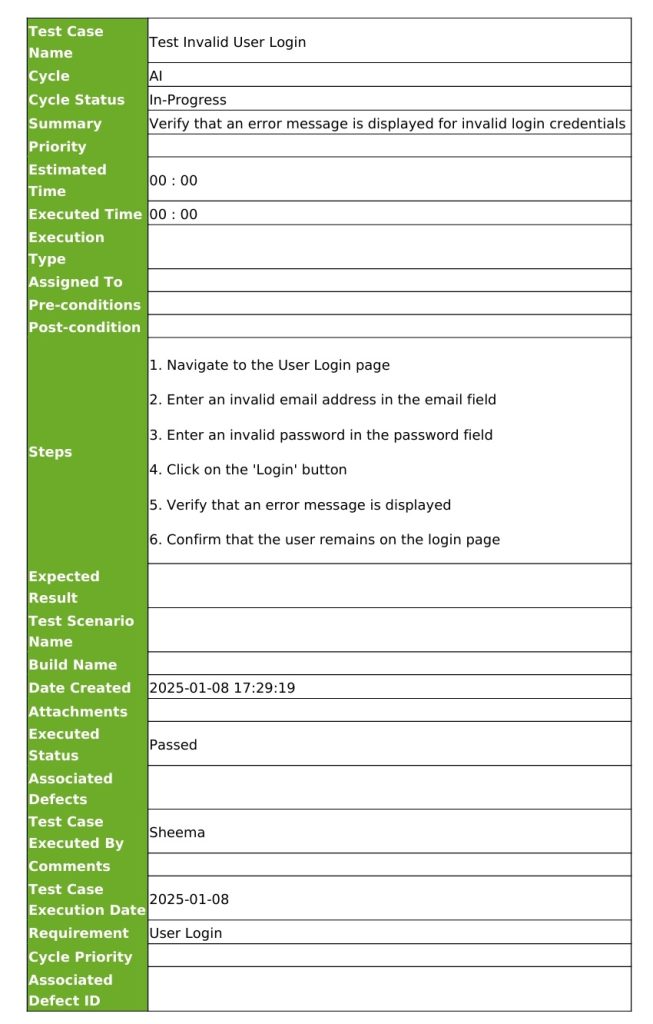
Template:
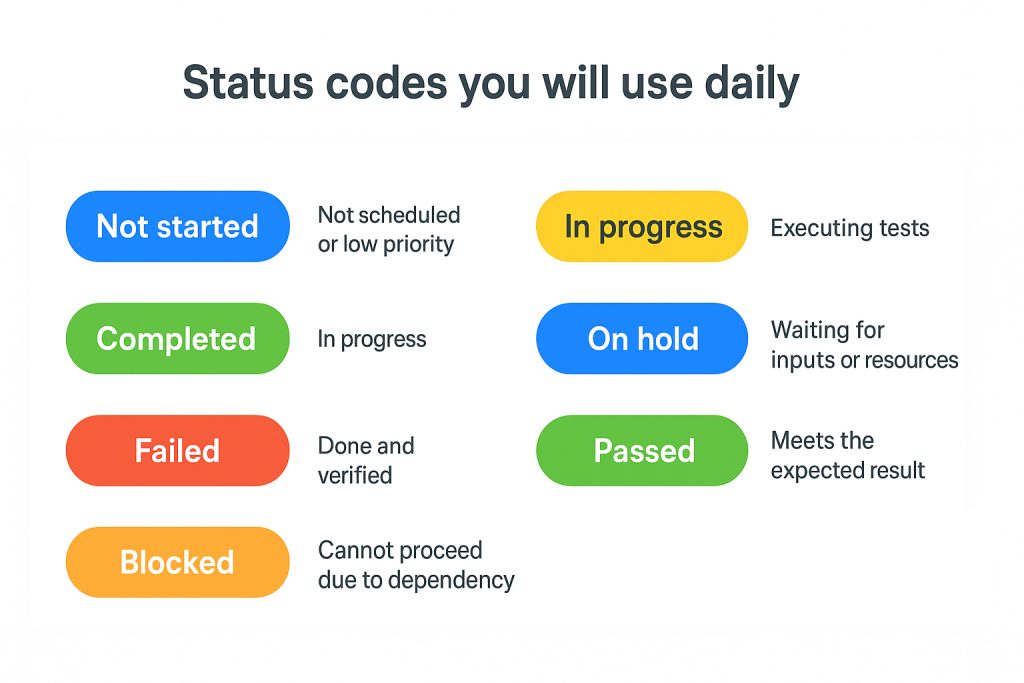
Different Software Testing Statuses
There are different types of process statuses in a software test report. If you’re a beginner, it’s important to understand what they are. Each status has a specific meaning. That said, here’s a short overview of the different types of testing statuses.
Not Started
As is obvious, this indicates that a particular activity has not been started. There could be various reasons for it, such as:
- Not being scheduled
- Resources not available
- The Priority of the task is low
In Progress
If the team is currently executing test cases and trying to identify issues or bugs, then this status is used. “In Progress” shows that the task is being worked on.
Completed
“Completed” is used in test reports to convey that the task has been successfully completed. The team has executed all test cases and resolved all bugs found.
On Hold
This status shows that a task in the testing process or cycle has been paused or delayed. There could be multiple reasons for it, such as:
- Waiting for additional resources
- Input from stakeholders
Failed
“Failed” represents that a particular test case or cycle has not met the expected result. The issue or the bug will be investigated further and logged again so the developers can resolve it in the next cycle.
Passed
Pretty obvious, this one. “Passed” status conveys that the test case has met the expected result and is working according to customer expectations.
Blocked
The “Blocked” status represents that the task cannot proceed until a specific issue is resolved. There could be various holdups, a couple of which are:
- Previous bug in the software
- Requirement that has not been met yet
Tools for Creating Software Test Reports
To make test report creation easier, several tools stand out in the market. Each one offers features that come in handy for testers. The following are the ones we recommend.
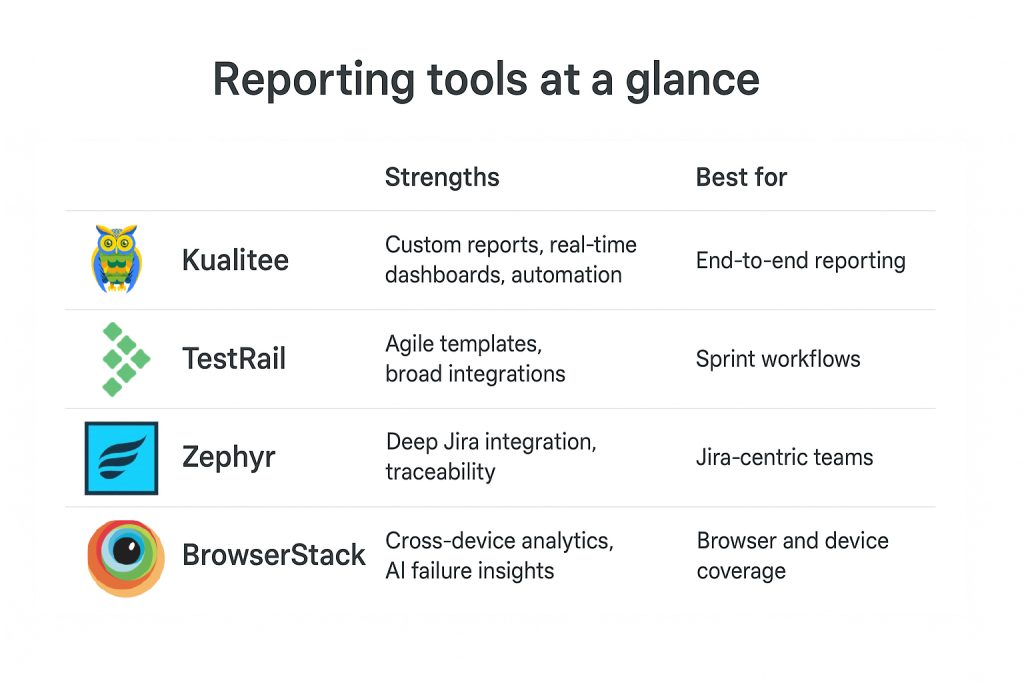
Kualitee
Kualitee is the superior solution for all your testing and report generation needs. It’s a test management platform that excels not only in test execution tracking but also in delivering highly customizable reporting options.
It also offers an interactive dashboard that gives teams and stakeholders real-time insights into the test progress and quality metrics. The interface is user-friendly, which simplifies creating detailed reports that are customized to match diverse project demands.
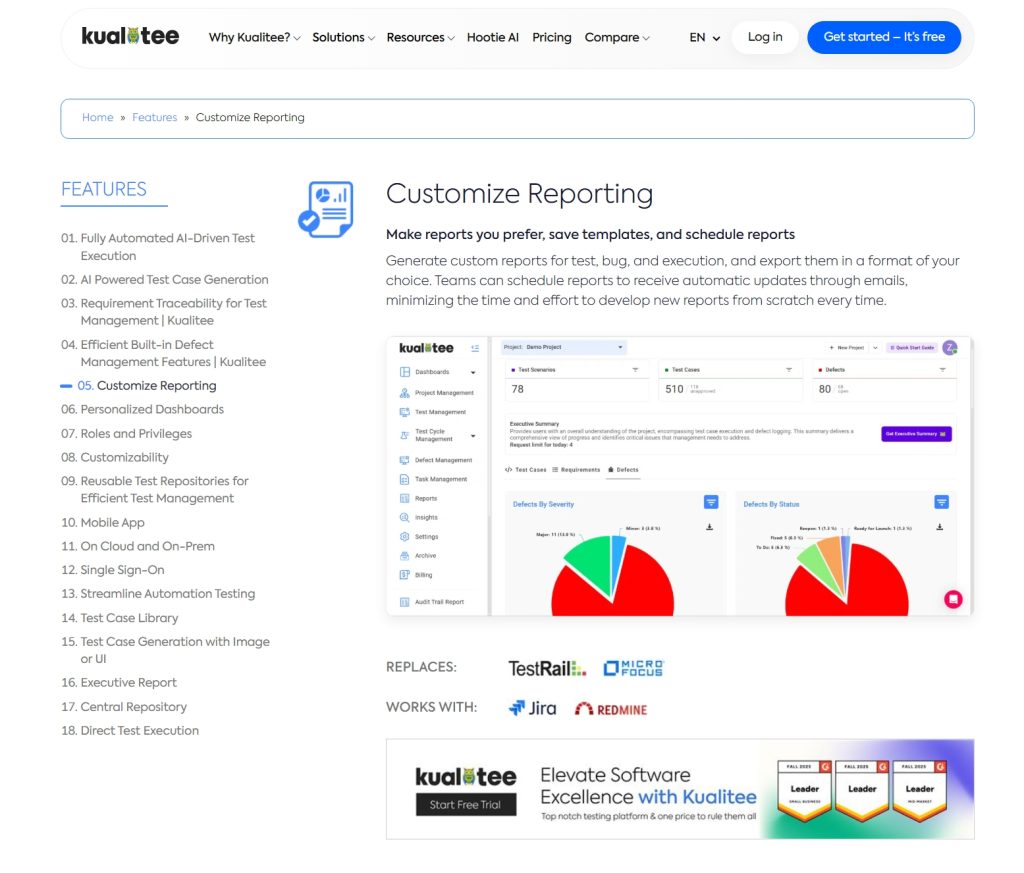
Furthermore, Kualitee’s strong integration capabilities with CI/CD pipelines, defect tracking systems and automation frameworks enable automatic data synchronization. In turn, this reduces manual errors and saves considerable time and effort for you.
Prominent features of Kualitee include:
- Generation of customizable reports that are tailored to project specifics and stakeholder needs.
- Real-time dashboard with graphical insights into test execution, as well as defect trends and coverage. You can add these graphs to your reports.
- Advanced filters and options to explore granular data without clutter.
- Multi-platform integration support, i.e., Jira, Jenkins, Selenium, and others, for unified data.
- Scheduled or on-demand automated report generation and distribution.
- Focus on collaboration. Teams can comment, annotate and share reports easily.
So, if you’re seeking flexibility, customization and advanced analytics capabilities along with easy software test report generation, Kualitee is the superior solution.
TestRail
TestRail is a popular test case management tool and is widely appreciated for its straightforward reporting templates. It offers easy integration with various other testing and development tools, so you can work in sync with the team.
This tool caters particularly well to Agile teams. Especially ones who are looking for painless test planning and execution with clear reports aligned to sprints and releases.
Zephyr
Zephyr integrates tightly with Jira. It best serves organizations that are already deeply embedded in the Atlassian ecosystem. This tool enables traceability from requirements through to the defects and test reports.
End-to-end visibility is also supported in Jira-centric projects. If your team is aiming to prioritize requirements-driven testing and Jira workflows, definitely give Zephyr a try.
BrowserStack
BrowserStack offers strong cloud-based testing report analytics. They are enhanced with AI-driven failure tagging as well.
Its focus on cross-browser and device testing analytics helps your team understand the impact of issues in different environments. This also accelerates troubleshooting with intelligent insights.
Common Challenges in Software Test Reporting
The following are some of the most common challenges we’ve seen testers face when writing a software test report.
1. Learning and Practicing Test Reporting Skills
Many beginners struggle with the practical side of writing effective test reports. They often use platforms like Udemy or search for interactive, “Codecademy-style” practice environments that are focused on test case writing.
However, we’ve seen testers frequently report that such resources don’t fully simulate real-world complexities of test reporting. In the words of a tester: “You can find plenty of courses on test cases, but learning how to construct a meaningful test report that balances detail with readability requires hands-on experience in live projects.”
This gap results in inconsistent report quality. It also makes it difficult for newcomers to confidently contribute to professional QA workflows.
2. Writing from Requirements and Converting Jira Acceptance Criteria
A common challenge arises when testers need to convert Jira acceptance criteria into structured test cases. Often using BDD or Gherkin syntax. This approach helps clarify expectations. But it presents difficulties in maintaining alignment across constantly changing requirements.
Testers report feeling overwhelmed by the need to keep reports in sync with Jira. All while ensuring clarity for stakeholders who may not be familiar with the technical jargon.
One QA professional pointed out, “Bridging the gap between Jira stories and actionable test reports feels like translating between two languages. It’s easy to lose nuance or miss important scenarios.”
3. Maintenance Overload due to Repetitive Documentation
Another widespread issue is the maintenance burden imposed by repetitive or redundant documentation. This is often referred to as “WET” (Write Everything Twice) practices.
Testers crave DRY (Don’t Repeat Yourself) reusable libraries for test cases and reporting templates (Available in Kualitee, by the way). But many existing processes demand duplicative updates across multiple documents.
This overload results in outdated and inconsistent reports and drains time away from actual testing.
4. Scalability Struggles as Teams Grow
As QA teams expand or testers rotate across projects, informal notes and ad hoc reporting approaches quickly lose effectiveness. Without standardized, scalable reporting frameworks, maintaining coverage, consistency and traceability becomes insupportable.
These scalability issues cause knowledge loss and degraded quality visibility. Managers frequently observe, “When teams scale up, reports become fragmented, incomplete or inconsistent. This makes it impossible to accurately track quality metrics or release readiness.”
Closing Thoughts
A strong test report isn’t just paperwork. It’s how teams stay aligned and make smart choices. When everyone (from developers to managers) can see where things stand, problems get fixed faster. Risks also drop, and projects move forward without confusion.
Good reporting helps teams see progress clearly, not guess it. It also builds trust between QA and leadership because decisions are based on facts, not assumptions.
Testing keeps getting complex, hence you need tools to keep up and make accurate reports. Fortunately for you, Kualitee makes it easier to turn raw data into clear, real-time insights.
Don’t forget that in the end, what matters most is consistency. When your reports tell the real story of quality, your software stands out for all the right reasons.
Frequently Asked Questions (FAQs)
Q: What is a software test report?
A software test report is a concise summary document that captures the scope of testing, detailed results of executed test cases, identified defects and overall software quality status.
It provides stakeholders with a clear understanding of the product’s readiness and highlights areas needing attention or improvement.
Q: How to write the test report?
Writing a test report involves collecting all relevant test data, following a structured template covering objectives, environment, execution summary, and defect analysis.
It’s recommended to also include visual charts, as they help in quick comprehension. And tailoring the report content and language for the specific audience ensures clarity and usefulness.
Q: How do we generate a test report in a software?
In Kualitee, generating a test report starts by selecting the project and test cycle you want to report on. You apply filters such as test status, testers, or dates to narrow down the scope.
Then, you generate a report that aggregates execution results, defect data and coverage metrics. You can also preview reports, along with exporting them in various formats.