img

Integrates with JIRA

Here’s the revised version with the word “Jira” reduced:

“A popular project management tool from Atlassian, widely used by teams to manage, organize and track team activities. With its issue tracking, you can perform your testing more easily. It also helps in planning team activities with prompt and thorough incorporation from both ends.

Kualitee, as a major incentive, integrates with the tool to provide both one-way (i.e. Kualitee to the tool) and two-way integration and keep the information updated at all times for all ends. There is also a Kualitee plugin available on the Atlassian Marketplace for test management.

Kualitee simplifies test management by providing robust features for tracking, reporting, and optimizing your testing workflows.”
image
img

Key Feature

Kualitee’s integration with Jira allows you to create and update your defects either in Kualitee or the tool. You can also integrate your stories with your Requirements in the Kualitee module.
The two-way sync feature synchronizes all issues in both tools. Kualitee’s integrated mapping wizard allows you to create issues and stories from Kualitee inside the tool as per the requirement of the task. There are 3 types of Integration options we have in Jira and the details are below:

  • Two-Way Integration:

Enables full synchronization between Kualitee and Jira. Defects and requirements can be mapped with user stories. Updates made in either system are reflected in the other.

  • One Way (Kualitee – Jira):

Data is pushed from Kualitee to Jira. No updates or data are pulled from Jira.

  • One Way (Jira – Kualitee):

Data is pushed from Jira to Kualitee. No updates or data are pushed back to Jira.


img

Configuration:

Jira requires you to be an admin in it and an Admin Tenant in Kualitee to configure two-way integration between two tools. Kualitee offers two integrations with this; one is basic with hard-coded field integrations, and the second is a custom mapping for all issue types inside it.

To configure:

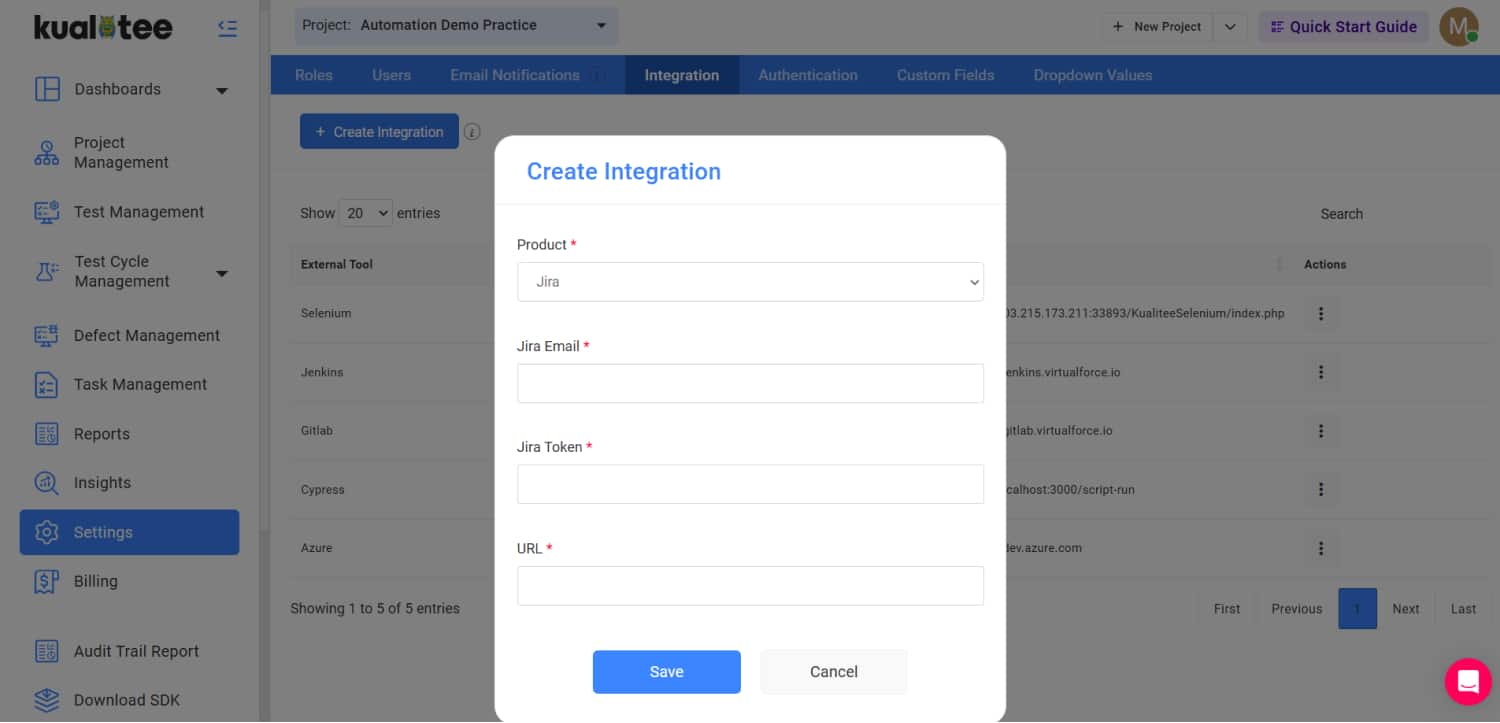
– Go to Settings and select integration from the drop-down menu.
– Click “Create New” in the external tool integration listing.
– Select, Jira tool from drop down menu.
– Enter the details of your admin account.
– Click “Save” button to finalize Jira integration.

FAQs
  • How does Kualitee integrate with Jira?
    Kualitee connects to Jira via native two-way integration configured in Project Settings → Integrations. Once authenticated with a Jira API token, defects created in Kualitee sync automatically to a chosen Jira project as issues, and status updates from Jira flow back to Kualitee. This gives QA teams a testing-focused UI while keeping developers in Jira for their sprint work.
  • Can I link Kualitee test cases to Jira user stories?
    Yes. Kualitee test cases can be linked to Jira issues (user stories, epics, tasks) either manually or via API. Once linked, test execution results appear on the linked Jira issue, and coverage reports show which user stories have test coverage. This creates full traceability from Jira requirement → Kualitee test case → test execution result → Kualitee defect → back to Jira.
  • Is Kualitee a Jira alternative or complement?
    Kualitee complements Jira rather than replacing it. Jira handles agile project management, sprint planning, and developer workflow. Kualitee handles the QA-specific work: test case authoring, test execution tracking, defect capture with reproduction steps, and QA reporting. Teams using both typically save the cost of Jira testing plugins like Zephyr Scale ($10/user/month) or Xray ($8/user/month) — Kualitee replaces those.
  • Do I need a Jira admin account to set up Kualitee integration?
    No. You need a Jira user account with permission to create issues in the target project and generate an API token. Most non-admin users can create their own API tokens in Jira profile settings. If your organization restricts API token generation, work with your Jira admin to create a dedicated service account for the Kualitee integration.
  • Does Kualitee support Jira Cloud and Jira Server / Data Center?
    Kualitee supports Jira Cloud, Jira Server, and Jira Data Center. Authentication method differs: Jira Cloud uses email + API token, while Jira Server/Data Center supports both API token and username/password. Configuration is otherwise identical. On-premise Jira Server deployments must be network-accessible from Kualitee (either public URL or VPN-tunneled).
  • Can I migrate existing Jira issues into Kualitee for test management?
    Yes. Kualitee provides CSV import and API-based migration for existing Jira test cases (from Zephyr, Xray, or custom issue types). During onboarding, most teams import active test cases from the last 2-3 sprints and archive the rest in Jira. Historical defect data typically stays in Jira for reference. The migration typically takes 2-4 hours for teams with under 1,000 active test cases.