





Playwright Test Management Software for Automated Testing
Playwright runs your automated tests. Kualitee gives you a place to manage everything around them. Connect the two, and you can run Playwright tests from Kualitee, pull the results in, and update your test-case status from the same screen. Your automation, your test cases and your defects all live together, with your Playwright reports in one place instead of scattered across runs.
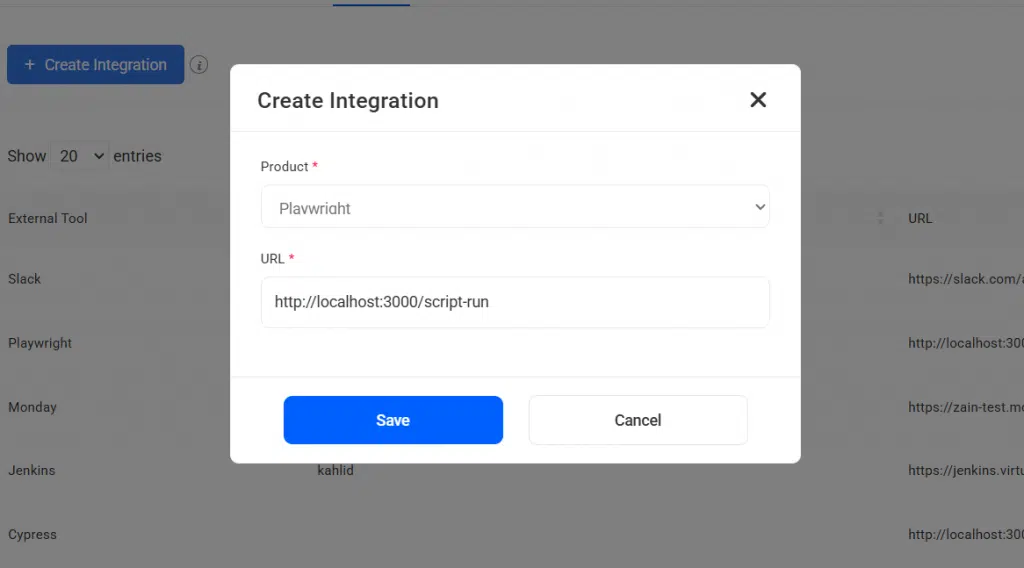
Manage Playwright Testing From One Centralized Platform
Playwright and Kualitee handle two different parts of QA. Together, they connect your automation to the rest of your testing.
Playwright is where your automation runs. It's an end-to-end testing framework for web apps, built for:
- ✓ Browser automation across Chromium, Firefox and WebKit
- ✓ Cross-platform, cross-language end-to-end tests
- ✓ Fast, reliable automated test runs
Kualitee is where your test management lives. It's where you:
- ✓ Organize and maintain your test cases
- ✓ Track executions and results across cycles
- ✓ Manage defects through a full QA workflow
The gap is that automation results tend to sit apart from everything else. A Playwright run finishes, and unless someone pulls the results into a central place, the automated side never meets the manual side. Kualitee closes that gap. You run Playwright from Kualitee, the results come back in, and your test-case status updates from the same run.
Here's what that gives you:
- ✓ Run Playwright tests from Kualitee
- ✓ Import Playwright results and update test-case status
- ✓ Keep test cases, executions, defects and reports in one place
Simplify Playwright Test Management
Connecting Playwright to Kualitee takes the manual logging out of automated testing. Here's what your team gets.
Run Playwright Tests From Kualitee
Kick off your Playwright scenarios from Kualitee as part of your wider QA workflow, instead of running them off to the side.
Centralize Test Results
Pull Playwright execution results into Kualitee, so all your testing information sits in one environment.
Keep Test Status Updated
Test-case status updates from your Playwright results, so your records match what actually ran.
Improve QA Visibility
See test cases, execution results, defects and QA reporting together, so you always know where a release stands.
Connect Playwright With Kualitee Test Management
This is the part that matters most day to day. Here's how a Playwright run fits into your QA once the two are connected.
Your team writes Playwright tests the way it always has. Using the Kualitee Bridge, you connect those tests to Kualitee with a token, a project ID and a report path. From there, you run your Playwright scenarios, and the execution results flow into Kualitee. Your test-case status updates to match, and the reports land in one place through the Sync Playwright option in Test Cycle management.
The point is that the automation and the management stop living in two worlds. Playwright provides the automation. Kualitee provides the test management, the execution visibility and the reporting around it. Your engineers keep writing tests in Playwright, and your QA team sees the whole picture in Kualitee.
Playwright Alone vs Playwright With Kualitee
Playwright is built to run automation. Managing the wider QA process is a different job. Here's what the integration adds.
| Task | Playwright on its own | Playwright + Kualitee |
|---|---|---|
| Automated test runs | Runs the tests across browsers | Same runs, triggered from Kualitee |
| Result logging | Lives in Playwright's own output | Imported into Kualitee automatically |
| Test-case status | Tracked manually, if at all | Updates from the Playwright run |
| Manual and automated together | Automation only | Both sit side by side in one view |
| Test case management | Not built for it | Full test case repository with steps and results |
| Defect management | Not a defect workflow | Full defect lifecycle with severity and priority |
| Reporting | Per-run report output | Centralized reports across runs and cycles |
Playwright keeps running your automation. Kualitee brings the test management around it, and the results come back on their own.
Key Features of Playwright Test Management Software
These are the features that make the Playwright connection work.
Playwright Test Execution
Run your Playwright scenarios through the Kualitee integration, as part of one QA workflow.
Playwright Result Import
Bring Playwright execution results into Kualitee to keep your automated test data in one place.
Test Status Updates
Test-case status updates based on how the Playwright run turned out.
Centralized Test Reporting
See Playwright execution information alongside the rest of your test management and QA activity.
Test Case and Defect Management
Manage test cases, executions, defects and the rest of your QA next to your Playwright automation.
Manage Playwright Test Cases Beyond Automation
Writing an automated test and managing the whole testing process are two different jobs. Playwright is built for the first. It creates and runs the tests. It was never meant to organize test cases, track cycles or manage defects across a release.
That's where Kualitee comes in. It gives your Playwright automation a test management home, so your team can:
- ✓ Organize test cases into suites
- ✓ Run and track executions across cycles
- ✓ Keep test-case status current
- ✓ Handle regression runs between releases
- ✓ Record and review results
- ✓ Track defects raised from failed tests
- ✓ Report on QA across the whole project
Playwright helps you automate testing. Kualitee helps you manage those tests and their results as part of a broader QA process.
Centralize Playwright Test Reporting
Playwright has its own reporting, and it's good at showing you what happened in a run. The trouble starts when you have dozens of runs across cycles and releases, and the results live in separate reports nobody pulls together.
Kualitee brings that Playwright test reporting into one place. Instead of opening run after run, your team sees:
- ✓ Playwright execution results in one view
- ✓ Passed and failed tests per run
- ✓ Test-case status tied to each result
- ✓ Execution history across cycles
- ✓ Automated results next to manual ones
- ✓ QA reporting for the whole project
This doesn't replace Playwright's own reports. It gives them a home. Playwright generates the automation results, and Kualitee centralizes them within your wider test management, so a Playwright test report is one part of the full QA picture rather than a file on its own.
Connect Playwright Results With Defect Management
When an automated test fails, you need more than a red line in a report. You need a defect you can investigate, own and retest. That's where Kualitee comes in.
Here's the flow: a Playwright test fails, the result shows up in Kualitee, and a tester looks into it and raises a defect. From there you get:
- ✓ Failed test results visible in one place
- ✓ Defect tracking with clear ownership
- ✓ Severity and priority on every defect
- ✓ Retesting until the fix holds
- ✓ QA and development working from the same information
The failures come from your automated runs. The defect management happens in Kualitee, where the rest of your QA already lives.
How to Integrate Playwright With Kualitee
Setup is straightforward, and the full walkthrough is in the Kualitee User Guide.
Set Up Playwright
Create and maintain your automated Playwright tests the way you already do.
Connect Playwright to Kualitee
Use the Kualitee Bridge to connect your tests, with your token, project ID and report path.
Run Playwright Tests
Execute your Playwright scenarios through the Kualitee workflow.
Review Results
Import the execution results, let test-case status update, and review your reports in Kualitee.

What's the Difference Between Playwright and Test Management Software?
It's a fair question, and the two are easy to mix up because both deal with tests. The difference is what each one is built to do.
Playwright is an automation framework. You use it to write and run automated end-to-end and browser tests. Kualitee is a test management platform. You use it to manage test cases, executions, results, defects and the wider QA process, and to bring automated testing into that same workflow.
They're not competitors. They're complementary. Playwright handles the automation, Kualitee handles the management around it, and the integration connects the two so your automated runs feed into one QA workflow.
Frequently Asked Questions
Playwright is an end-to-end automation framework for web apps. On its own, it runs tests, but it isn't a test management system. Playwright test management software connects it to a platform like Kualitee, so you can run Playwright tests, import the results, update test-case status and manage your test cases, defects and reports in one place.
Yes. Using the Kualitee Bridge, you connect your Playwright tests to Kualitee, run them through the integration, and bring the execution results back into Kualitee.
Yes. You can execute your Playwright scenarios through the Kualitee workflow, and the results and test-case status update in Kualitee.
Yes. Kualitee centralizes your Playwright execution results, so instead of opening each run's report separately, you see passed and failed tests, execution history and QA reporting in one place. It doesn't replace Playwright's own reports. It brings them together.
The Kualitee Bridge is the connection you configure with a token, project ID and report path. It links your Playwright test runs to Kualitee so execution reports generate in one place.
No. Kualitee works alongside Playwright. Playwright stays your automation framework, and Kualitee adds the test management, defect tracking and reporting around it.
Bring Playwright Automation and Test Management Together
Keep Playwright for your automated testing. Give your QA team a place to manage test cases, executions, defects and reporting. Connect the two, run your tests from Kualitee, and keep your Playwright results, test status and reports in one structured workflow.
Start a free trial and connect your Playwright tests with Kualitee. Or book a demo and we'll walk you through it.