Ask three QA engineers to define a bug, and three different answers will come back. The same happens with defect and error. Teams use the words interchangeably in standups, ticket titles, and status reports. That habit works, until it doesn’t.
A production incident gets logged as a low-priority bug. A requirement gap gets patched like a coding typo, only to resurface two releases later. Getting the bug vs defect distinction right is what lets testers, developers, and product owners agree on where something went wrong, how urgent it is, and who fixes it.
This guide breaks down bugs, defects, errors, faults, and failures, specifically covering:
- What each term means.
- When each issue surfaces in the development process.
- How they differ in cost and ownership.
- How can the testing team track them all systematically without the taxonomy living in one manager’s head.
Bug vs Defect vs Error – The Quick Answer
A bug is a coding error that causes unexpected behavior. Usually, a testing team catches these bugs during the QA cycle. A defect is a deviation from specified requirements. Usually discovered after software release, in production, or during user acceptance testing.
An error is a human mistake that causes both. Teams that separate the three communicate more effectively with developers. Tossing bugs and defects into one undifferentiated pile is a classic recipe for confusion between testers and the dev team.
Quick Reference Table – Error, Bug, Defect, Fault, Failure
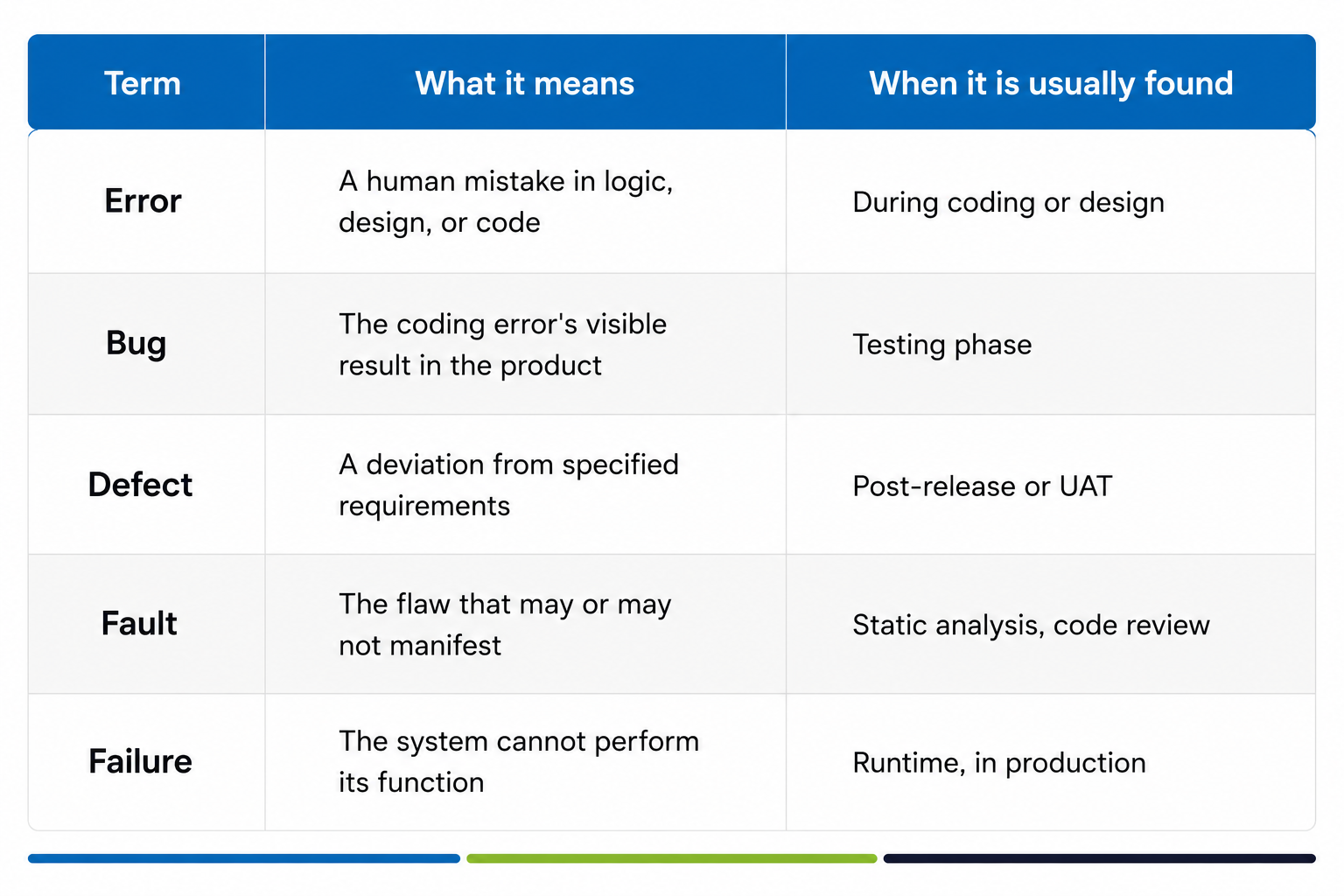
These five terms describe one chain:
- An error in judgment creates a fault that sits dormant in the code.
- That fault surfaces as a bug during testing, or as a defect after release.
- If nothing catches it, the defect eventually causes a failure in production.
Most day-to-day conversations only require two of these words: bugs and defects. But comparing bugs and defects side by side is the fastest way to pinpoint exactly where things went wrong.
What Is a Bug?
A bug is a coding error causing unexpected behavior. It’s the exact word testers reach for when the software product does something the specification never intended: a wrong calculation, a crash on a specific input.
Software bugs live inside the code itself. That is why fixing bugs is generally a smaller job during software development than fixing defects that trace all the way back to initial requirements.
Software testing exists to surface these bugs before they reach a customer.
Common Causes of Bugs (Coding Errors, Logic Mistakes, Miscommunication)
Bugs arise from coding mistakes or miscommunication between developers and the people who wrote the requirements. They’re often introduced in the early stage of the development process.
The most frequent culprits include:
- Coding errors: Think typos, off-by-one mistakes, and incorrect logic branches.
- Miscommunication: A developer builds what they thought was asked for, instead of what was actually written.
- Missed edge cases: Overlooking unusual scenarios during the initial build.
Types of Bugs – Functional, Performance, Security, Compatibility, Syntax
Not every bug behaves the same way. Categorising them helps a testing team prioritize what to check first:
- Functional bugs: A feature simply doesn’t do what it’s supposed to. It produces unexpected behavior that a user notices immediately.
- Performance bugs: The software works, but it responds too slowly under load. Performance issues affect the speed, stability, or resource consumption of software.
- Security bugs: A flaw that exposes data or lets unauthorized actions slip through. Security vulnerabilities could expose data or allow unauthorized access.
- Compatibility bugs: The software crashes or glitches on a specific browser, device, or OS version.
- Syntax bugs: Malformed code that breaks compilation or execution entirely.
When and How Bugs Are Detected
Bugs are typically identified during the testing phase. Teams catch them before the code ever hits production by using distinct testing layers:
- Unit testing: Catches bugs at the smallest, most isolated level, a single function or method.
- Integration testing: Catches bugs that only appear once separate modules interact.
- Test automation: The primary line of defense for repetitive checks. It catches regressions that a manual pass would miss.
What Is a Defect?
A defect is a deviation from specified requirements. Defects are usually discovered after the software release. They pop up once real users interact with the software product in ways the internal team never anticipated.
While a bug is a coding-level accident, a defect represents a gap between what the requirements said and what the software delivers. Sometimes the code technically works, just not the way the business intended. For a broader walkthrough of how teams handle these issues end-to-end, see Kualitee’s guide to defect management basics. Left unmanaged, a steady stream of defects erodes software quality faster than an equivalent number of bugs.
Why? Because defects reach the exact people the software development effort was meant to serve.
Common Causes Of Defects
Defects often originate much further upstream than bugs do:
- Poor design decisions were made before a single line of code was written.
- Requirement mismatches: ambiguous, incomplete, or contradictory specifications.
- Environmental differences between staging and production infrastructure.
- Scope changes were introduced mid-project without updating the downstream requirements.
Because the root cause sits closer to planning them to code, defects often require significant code changes to fix. Sometimes, a full module redesign rather than a single-line patch.
Types Of Defects
Defect management processes typically classify defects by how much damage they do to the software product:
- Critical defects cause complete application crashes and block all further use.
- Major defects severely malfunction core features of the software, though the application itself stays usable.
- Moderate defects affect non-essential functions but do not hinder overall application use.
- Minor defects cause small, isolated problems that rarely affect the end user’s workflow.
- Cosmetic defects do not impact functionality and involve visual flaws, misaligned buttons, wrong fonts, or inconsistent spacing.
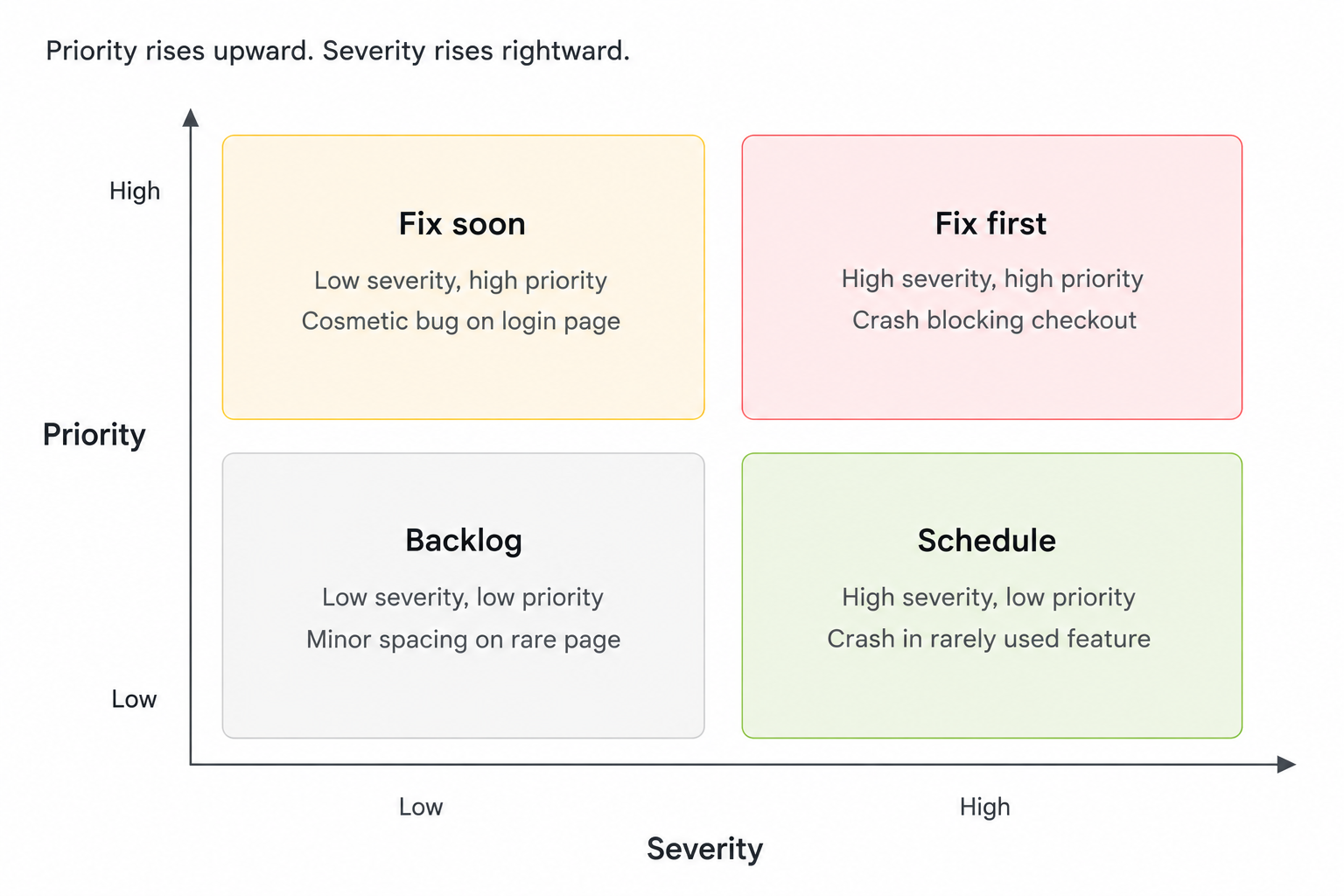
Severity vs priority in defect classification
- Severity assesses how severely the defect disrupts the system’s functions, a technical, objective measurement.
- Priority determines the order in which developers tackle the defects, a business decision weighing severity against deadlines and customer impact.
For instance, a cosmetic defect on a banking app’s login page might carry high priority despite low severity, simply because it’s the first thing every customer senses.
What Is An Error?
An error is a human decision or mistake that starts the whole chain. Common examples include:
- A developer misreading a requirement.
- A designer overlooking an edge case.
- An architect is choosing the wrong data structure.
Errors themselves are invisible. They only become traceable once they produce a bug during testing or a defect after release. Fixing the symptom doesn’t always fix the error that caused it; the same mistake can resurface elsewhere in the software system if the underlying process issue goes unaddressed.
Error vs Fault vs Failure – The Chain
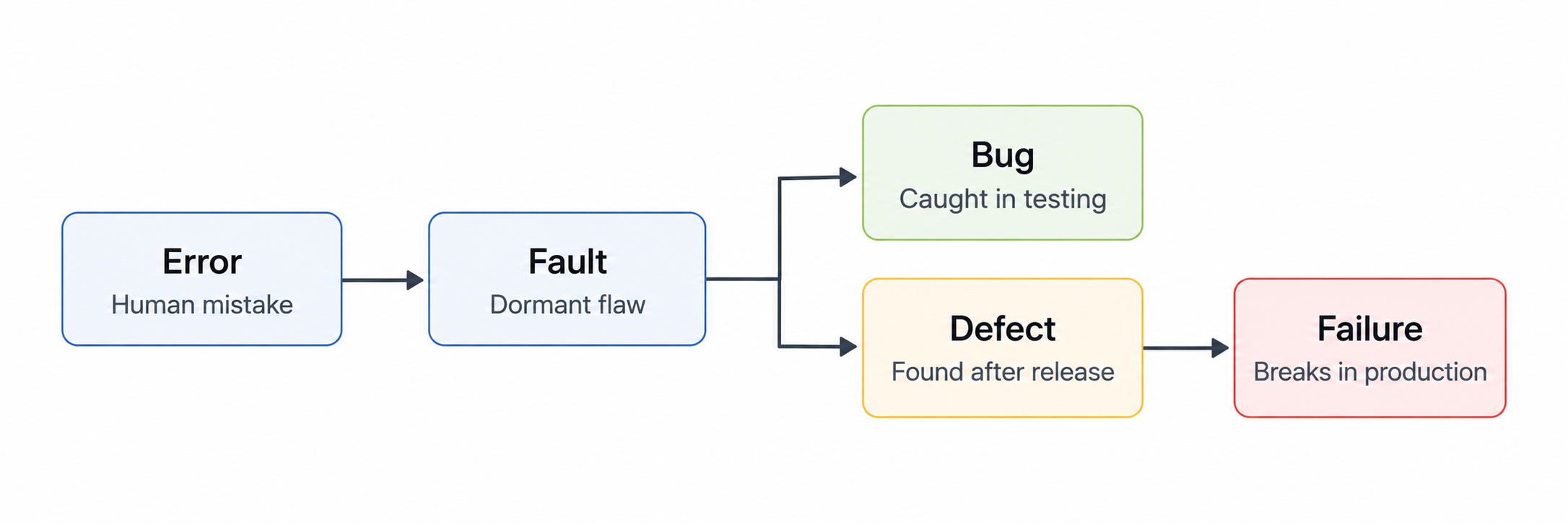
The cleanest way to separate these three: an error is the cause, a fault is the resulting flaw sitting dormant in the code design, and failure is what happens when that fault triggers during real operation. Not every fault becomes a failure. A fault in rarely used code might sit untouched for years, unlike most software bugs, which surface the moment a tester exercises that path.
But every failure traces back to a fault, and every fault traces back to a coding error. That is why coding errors deserve inspection during code review, not just after software bugs get reported.
Core differences – Bug vs Defect vs Error
Origin: Who Introduces Them
Errors originate with people (a developer, a business analyst, a designer) during the development process, before any code runs.
Bugs originate in the code itself, as the visible output of coding errors.
Defects originate at the intersection of code and requirements, surfacing when what was built doesn’t match the spec.
Detection Phase: When They’re Found
Bugs are typically identified during the testing phase (unit testing, integration testing, or manual QA cycles) well before release.
Defects are usually discovered after software release, though a strong defect management process catches a portion during user acceptance testing.
Cost to Fix: Bugs Are Typically Cheaper than Defects
Defects are generally harder and costlier to fix than bugs.
A bug caught during unit testing might take a developer minutes to patch.
A defect discovered in production can require code changes, cross-team coordination, and a hotfix release before it’s resolved. A production fix can cost up to 100 times more than catching an error at the design stage. This cost is exactly why defects are so much harder to fix than bugs.
Reporting and Tracking Workflow
Both bugs and defects need a documented trail. Applying the same reporting discipline to both avoids duplicate tickets later, even if their actual resolution workflows differ. A bug report usually stays inside the development and testing team, moving from tester to developer to retest across the bug’s life cycle.
A defect report typically pulls in more stakeholders: product owners, support teams, and sometimes the customer who reported it. A bug tracking system helps manage the status of bugs and defects, giving both workflows one place to log severity, priority, and resolution history.
How Agile and CI/CD Teams Use The Bug vs Defect Distinction
Agile teams working in short sprints often blur the bug vs defect line intentionally, logging bugs and defects both as issues in the same backlog and relying on severity and priority fields to sort them. CI/CD pipelines reinforce this: automated test suites run on every commit, flagging bugs within minutes, long before a defect reaches a release build.
Continuous software testing shrinks the window where a bug matures into a defect. Test automation checks every merge against the regression suite before it ships. This fits perfectly for modern, daily release cycles.
How To Manage Bugs and Defects Effectively
Bug Tracking System Fundamentals
A bug tracking system is the backbone of any serious QA workflow. At a minimum, it captures the summary, steps to reproduce, severity, priority, environment, and owner for every issue logged. Kualitee’s bug tracking system ties this into test case execution, so a failed test case can generate a bug report with reproduction steps already attached.
Managing Defects With a Dedicated Module
Effective bug management includes identifying, documenting, and retesting fixes. The same discipline applies to defects, with more stakeholders involved at each stage. Kualitee’s defect management module centralizes this lifecycle: defects raised during UAT or production monitoring are routed automatically to the right owner, with status changes visible to stakeholders in real time.
Hootie AI can also assist with prioritization by weighing severity, resolution history, and affected user volume. This allows Kualitee to handle both bug tracking and defect management seamlessly in one place.
Prioritisation: Severity Matrix
Prioritizing bugs by severity ensures critical issues are addressed first, but severity alone isn’t the whole picture. A severity matrix cross-references severity against business priority to produce a ranked queue. Critical defects that block core functionality sit at the top regardless of how many users they affect; cosmetic defects on a low-traffic page sit at the bottom, even if dozens are noticed. A management tool that surfaces the matrix automatically keeps that judgment call from living in one manager’s head alone.
Common Bug and Defect Management Mistakes
- Treating every bug as equally urgent. Without a severity matrix, teams fix whichever bug was reported loudest, not the one causing the most damage.
- Skipping root cause analysis. Patching the symptom without tracing the underlying cause lets the same coding mistakes resurface in the next release.
- Splitting bug and defect tracking across tools. A dev-only bug tracker plus a separate support ticketing system breaks the traceability that a single management tool should provide for bugs and defects alike.
- Under-investing in test automation. Manual-only QA cycles miss performance issues and security vulnerabilities as a software product’s codebase grows.
- No verification pass after a fix. A fix not confirmed with regression testing can reintroduce the same bug in the next build.
- Ignoring environmental differences. Defects that only appear because staging never matched production are the hardest and costliest to reproduce.
Kualitee brings bug tracking and defect management into one platform, with Hootie AI to prioritize what matters first.