If you are a QA leader, you most likely have a “horror story” about spreadsheets.
Maybe you had 500 tests in an Excel file, and someone deleted the “Pass/Fail” section by mistake. Maybe it was the fear you felt at 3 a.m. when you couldn’t figure out which tests had been run on the newest build because of careless file versioning.
This is why test case management (TCM) is a thing.

You can’t count on static files anymore since teams are working quickly and release cycles are getting shorter, from months to days. Your code needs a way to work and be useful.
You don’t have to use any more formal language. You only need to know three things: what it is, why you need it, and how to pick a tool that your staff will like using.
What Is Test Case Management?
Simply put, test case management is the way of planning, running, and keeping track of your tests. But it is more than just a checklist.
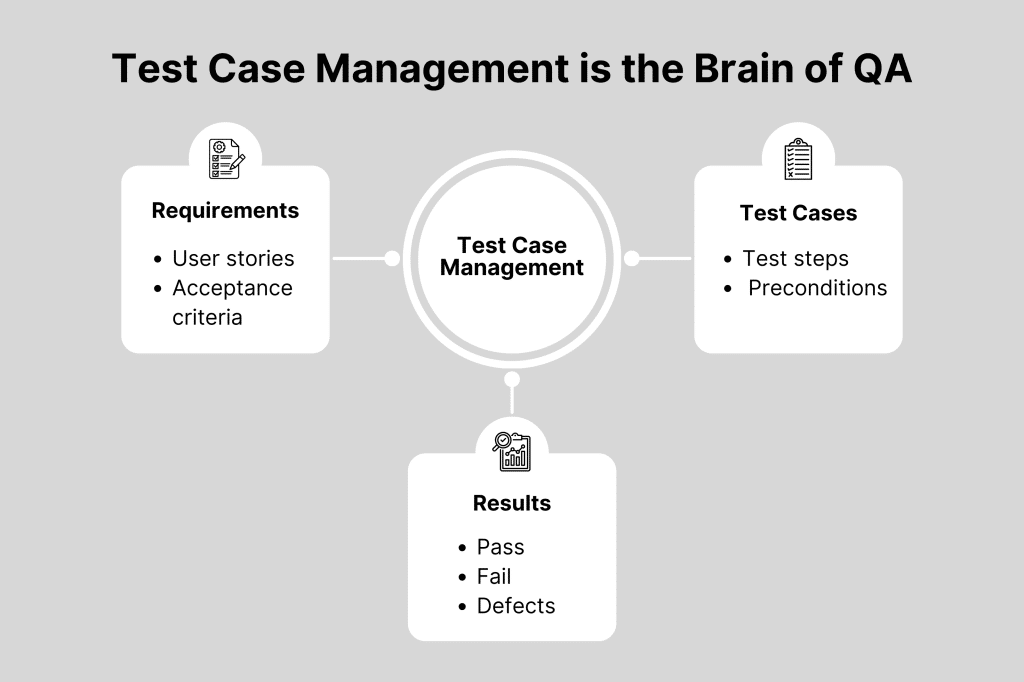
Think of it as the “brain” of your QA operation. It is where you define what you are testing (requirements), how you are testing it (cases), and what happened when you did (results).
A proper TCM system replaces chaos with structure. It allows you to:
- Centralize every test case in one secure location.
- Map tests directly to user stories or requirements.
- Track history, so you know who ran a test and when.
According to industry reports, teams that switch from spreadsheets to dedicated management tools often see a significant reduction in administrative overhead. That means less time copy-pasting rows in Excel and more time actually finding bugs.
Why Is Test Case Management Important?
You could be thinking, “My spreadsheet is fine for now.” And it could work for a team of one. Things go apart as soon as you add a second tester or a third developer.
This is why modern teams need a specialized system.
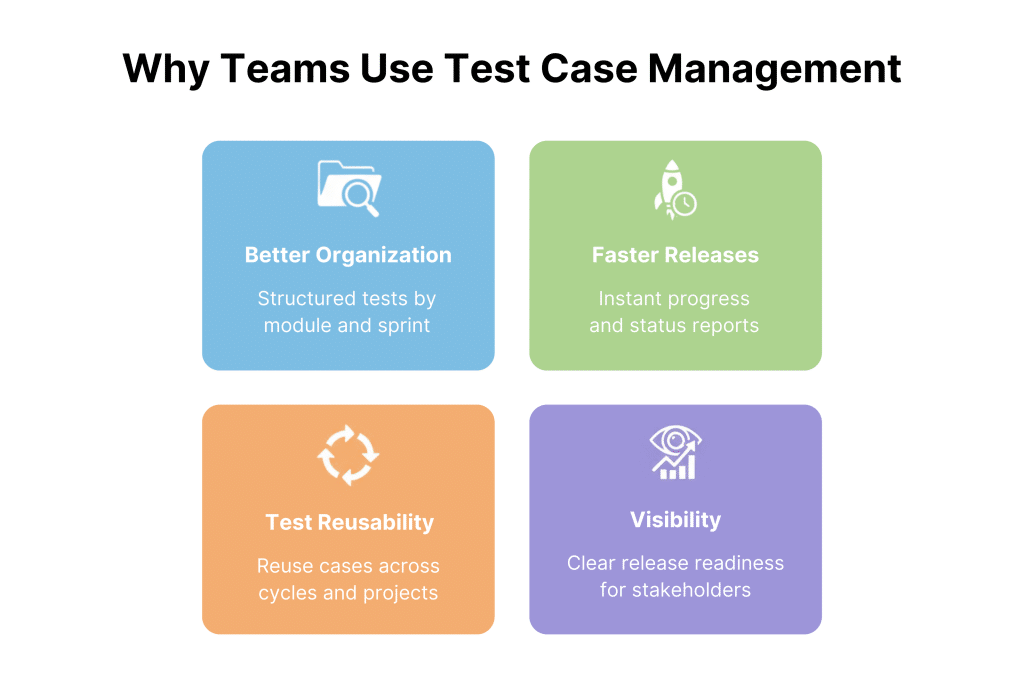
1. Better Documentation and Organization
With 2,000 login page test cases, finding the right one might be difficult. With TCM tools, you may categorize tests by modules, features, or sprint cycles. Tag, search, and filter immediately.
2. Faster Release Cycles
Speed is everything. If you are manually tallying up pass/fail rates at the end of a sprint, you are blocking the release. TCM tools generate real-time reports. You can look at a dashboard and say, “We are 90% passed,” in seconds.
3. Reusability of Test Cases
Why do the same test twice? If you have a management system, you can run the same test case in several projects or test cycles. This is one of the most important things to perform when managing software tests, so you don’t waste time doing things over again.
4. Enhanced Visibility and Control
Stakeholders love charts. They don’t want to read your raw data; they want to know if the product is ready to ship. TCM tools visualize your quality status, giving management the confidence to give the “Go” signal.
Who Needs Test Case Management?
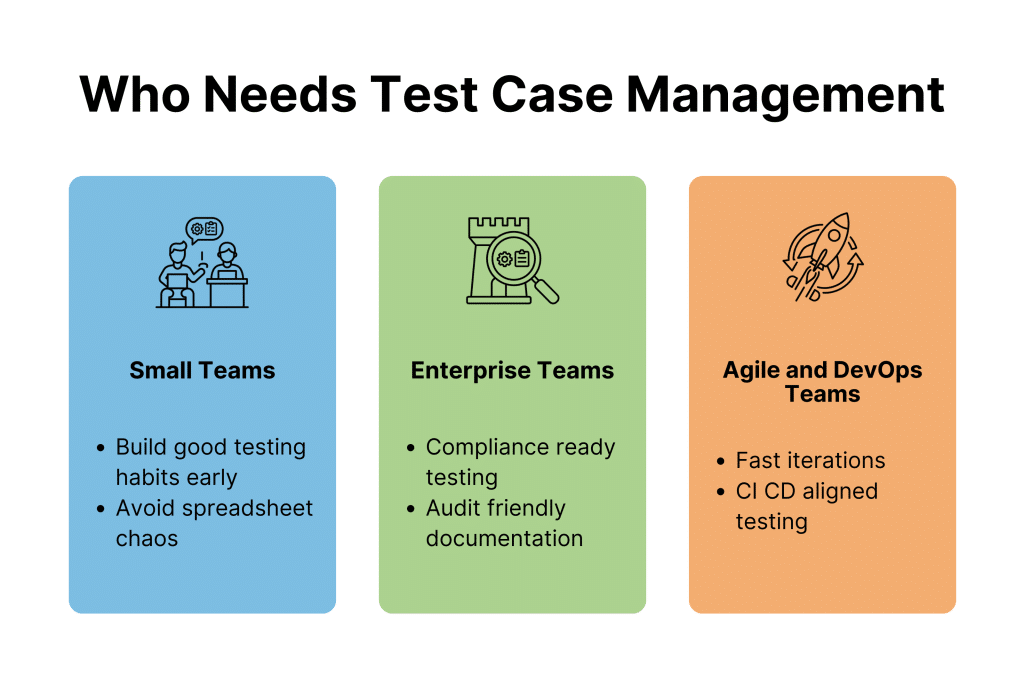
- Small Teams: If you’re a company, you need to begin good habits early on. A tool that is easy to use is better than a Google Sheet that is full of useless information.
- Enterprise Teams: When big companies need to follow the rules and do checks, they need TCM. You need to write down what you tried.
- Teams that use Agile or DevOps: You need a tool that works with your CI/CD process. Something else has to help a worksheet operate.
Understanding the Test Case Management Process
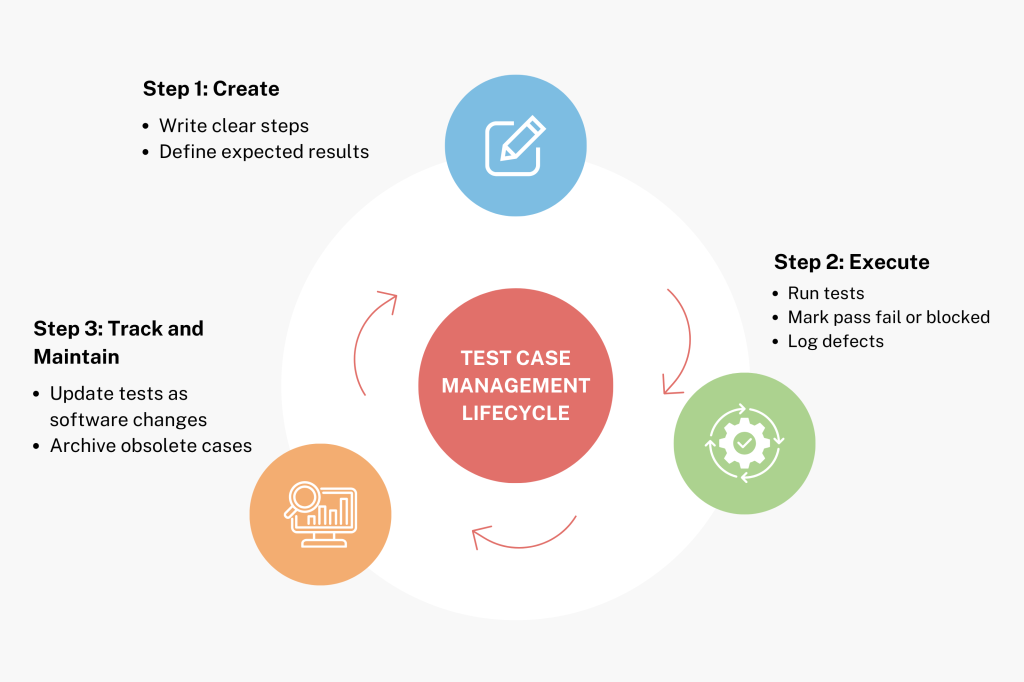
The steps aren’t hard, but you have to complete them the same way every time. These three things happen most of the time.
Stage 1: Creating Test Cases
Put the script here. A good test case informs you what to do, what to expect, and what has to happen before the test can be executed.
- Tip: Keep it simple. If a test case is too hard, make it easier.
- Do you want to know how to do it? To learn how to make test cases, watch this video guide.
Stage 2: Test Case Execution
This is “running” the test. You mark each step as Pass, Fail, or Blocked.
- If it fails, you log a defect.
- If it passes, you move on.
Stage 3: Tracking and Maintenance
Software changes. Your tests must change with it. If a feature is removed, archive the test. If a button moves, update the steps. This maintenance phase is crucial to prevent “test rot,” where your suite becomes full of obsolete tests that no one runs.
Key Features of Test Management Tools
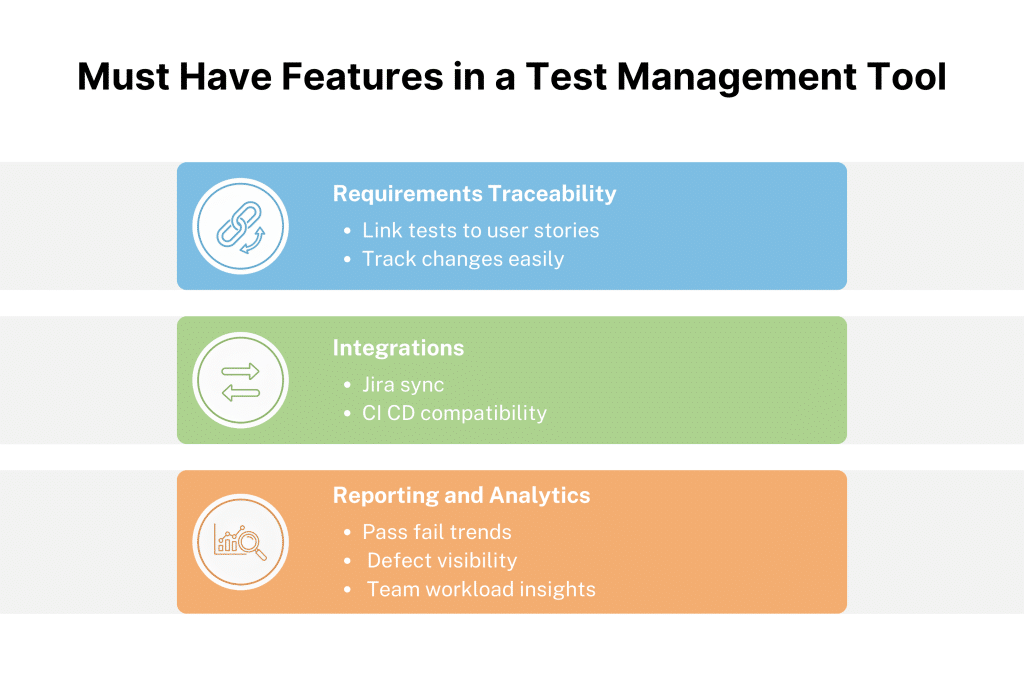
Some tools are better than others. These are the “must-have” qualities you should look for while you are purchasing.
1. Requirements Traceability
You need to know what the test is for. Good tools let you connect your test cases to the original user stories or requirements. The tool should let you know when a requirement changes so you can update the test.
2. Essential Integrations (Jira, CI/CD)
Your TCM tool shouldn’t live on an island. It needs to talk to your bug tracker.
- Jira Integration: This is the big one. You want to be able to push a bug from your test tool directly into Jira without switching tabs.
- Learn More: See how integrating with Jira can sync your QA and Dev teams seamlessly.
3. Reporting and Analytics
You need proof to back up your choices. Look for tools that show “Pass/Fail” percentages, defect density reports, and views of the tester’s workload.
How to Choose the Right Test Management Tool
Don’t just pick the tool because it has the best dashboard. You should check out how your team operates. Think about these three things before you buy.
1. “Does it integrate with our existing stack?”
If your devs use Jira, your TCM must sync two-way. Your automation engineers’ Selenium or Cypress tool must automatically consume test results.
- Why it matters: If your tool is an island, your team will stop using it. Integration reduces friction.
2. “Is the learning curve steep?”
There is a lot going on with QA teams. People won’t use the tool if it takes three weeks to learn how to use it. You want an interface that a beginner tester can learn how to use in an hour.
- Pro Tip: Find tools that have drag-and-drop features and make it easy to organize folders. Complexity makes it hard to adopt.
3. “Can it handle both manual and automated tests?”
Most modern teams are “hybrid,” meaning they run some manual exploratory tests and some automated regression scripts. You need a single “pane of glass” that shows you the results of both side-by-side.
Reviews of Leading Test Case Management Tools
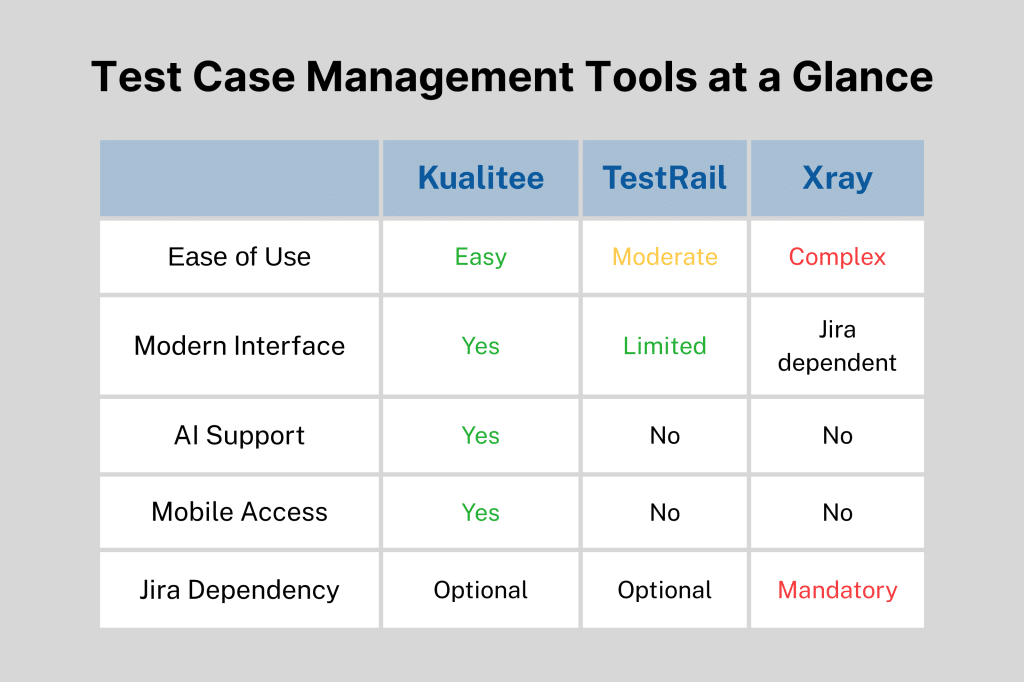
To save you some Googling, here is a breakdown of three popular options. We’ve analyzed them based on usability, features, and how they fit into a modern QA workflow.
Kualitee (The Best All-Rounder)
Kualitee hits the perfect balance. It was designed specifically to solve the problems of the other two: it is more powerful than a simple plugin like Xray, but significantly easier to use than a legacy tool like TestRail.
- Why it wins on features:
- AI-Powered: Kualitee is different because it has an AI helper named Hootie that looks at your needs and writes test cases for you.
- Mobile App: It’s one of the only tools with a mobile app, so leads can accept builds and keep track of tests from anywhere.
- Simple Integration: A clean, dedicated QA dashboard works with Jira in both directions. The best way to test is without silos.
- Verdict: The smartest choice for agile teams who want the most features (AI, Mobile, Jira Sync) wrapped in the most user-friendly interface.
TestRail
People often choose Testrail by default because it is the oldest option. It’s a strong tool, but it looks old.
- Where it struggles: It could seem sluggish and “heavy” by today’s standards. People often remark that the layout is out of date and that it costs a lot for big teams.
- Verdict: Okay for old-fashioned business teams that don’t care about an outdated interface, but current DevOps needs speed and flexibility, which it doesn’t have.
Xray (for Jira)
Xray isn’t a separate program; it only works inside Jira.
- Where it struggles: Integration is expensive and limits what you can do. There may be latency in a Jira instance. The UI is complex and hard for testers who aren’t technical to use because QA employs a development tool.
- Verdict: A good technique for programmers to run tests, but not so ideal for QA teams that require a quiet place to work.
Best Practices for Managing Test Cases
Buying a tool won’t fix a broken process. Even the best software will fail if your test cases are a mess. Here are four golden rules to keep your TCM healthy.
1. Write for Humans, Not Robots
A test case should be easy enough for someone who has never done it before to run on their own.
- Bad: “Check login.”
- Good: “Go to the homepage, click on ‘Login,’ and enter the correct information. Make sure the user is sent to the Dashboard.”
- Resource: Check out these 3 best practices for test automation to see how clarity improves your script reliability.
2. Treat Test Cases like Code
Avoid rot in your tests as you would in your code. Try version control for tests. Update the test case if v2.0 features change. Most TCM tools automatically record modifications so you may rollback if required.
3. Use “Metadata” to Organise Smartly
Don’t just put tests in folders. Add tags (metadata) so people can find them.
- Tag by Priority: (P1, P2, P3) so you know what to test first when you don’t have much time.
- Tag by Component: (Login, Checkout, API) so you can run focused regression suites.
- Learn More: Read about using metadata tagging for better QA to keep your project organized as it scales.
4. Regular “Spring Cleaning.”
Put a test suite review every three months on your calendar. Put old feature tests into the archive. Combine tests that are not needed. Test sets with too many tests in them slow everyone down.
Customer Success Stories: The ROI of TCM
Does moving away from spreadsheets actually save money? Yes. Here is the proof.
The Fintech Turnaround
A financial services firm was drowning in a 4-day manual regression cycle. By switching to a structured TCM integrated with automation, they shrunk that nightmare down to just 4 hours. That is agility.
- Read the full story: Financial Tech Gains Efficiencies
The Banking Efficiency
A global bank faced a similar bottleneck with outdated processes. By modularizing their test cases in a proper management system, they slashed their regression testing time by 72%. Faster feedback means happier developers.
- Read the full story: Banking Giant Reduces Testing Time
The Big Tech Transformation
Even giants struggle. Microsoft implemented AI-driven test management to handle its massive scale. The result? They cut regression testing time by 60% and reduced script maintenance efforts by half.
- Read the full story: Microsoft AI Testing Case Study
The Healthcare Compliance Win
Healthcare apps cannot compromise data privacy. A health-tech supplier generated “synthetic” patient data using structured test data management. They could test thoroughly without risking HIPAA breaches, assuring 100% compliance and speeding up test cycles.
- Read the full story: Healthcare Test Data Solutions
Conclusion
Excel sheets are no longer used for software quality management. Human error is too great, and the lack of vision kills release velocity.
A robust test case management solution doesn’t merely make testers’ lives simpler (but it helps). Giving the whole company trust that your program works is key.
Whether you use a lightweight tool or an enterprise suite, start today. Structure your tests, interact with your dev tools, and let the software handle admin so you can detect issues.
Don’t let messy files hold up your next release. With a tool made for today’s rapid teams, you can experience the power of AI-driven test management.
FAQ: Common Questions About Test Case Management
What do you mean by test case management?
It is the whole process of making, organizing, running, and looking at test cases. It substitutes one-time testing with a mechanism that can be repeated and checked.
What is the best test case management software?
No tool is “best” for everyone, but Kualitee is ideal for teams that want current AI and a simple design. TestRail, a hefty reporting tool, and Xray, a Jira-only solution, are key competitors.
Is Jira a test management tool?
Not out of the box. Jira is a tool for managing projects. You must get add-ons (like Xray or Zephyr) or connect it to a specific tool like Kualitee to use it for testing.