





CircleCI Test Management Software for QA Teams
CircleCI does a great job running tests as soon as code hits the pipeline. It just isn't built to be a central QA hub. Kualitee changes that. By connecting the two, you automatically pull test activity out of the pipeline and into a centralized workspace.
Keep using CircleCI for what it does best. Give your QA team a real test management tool for the rest.
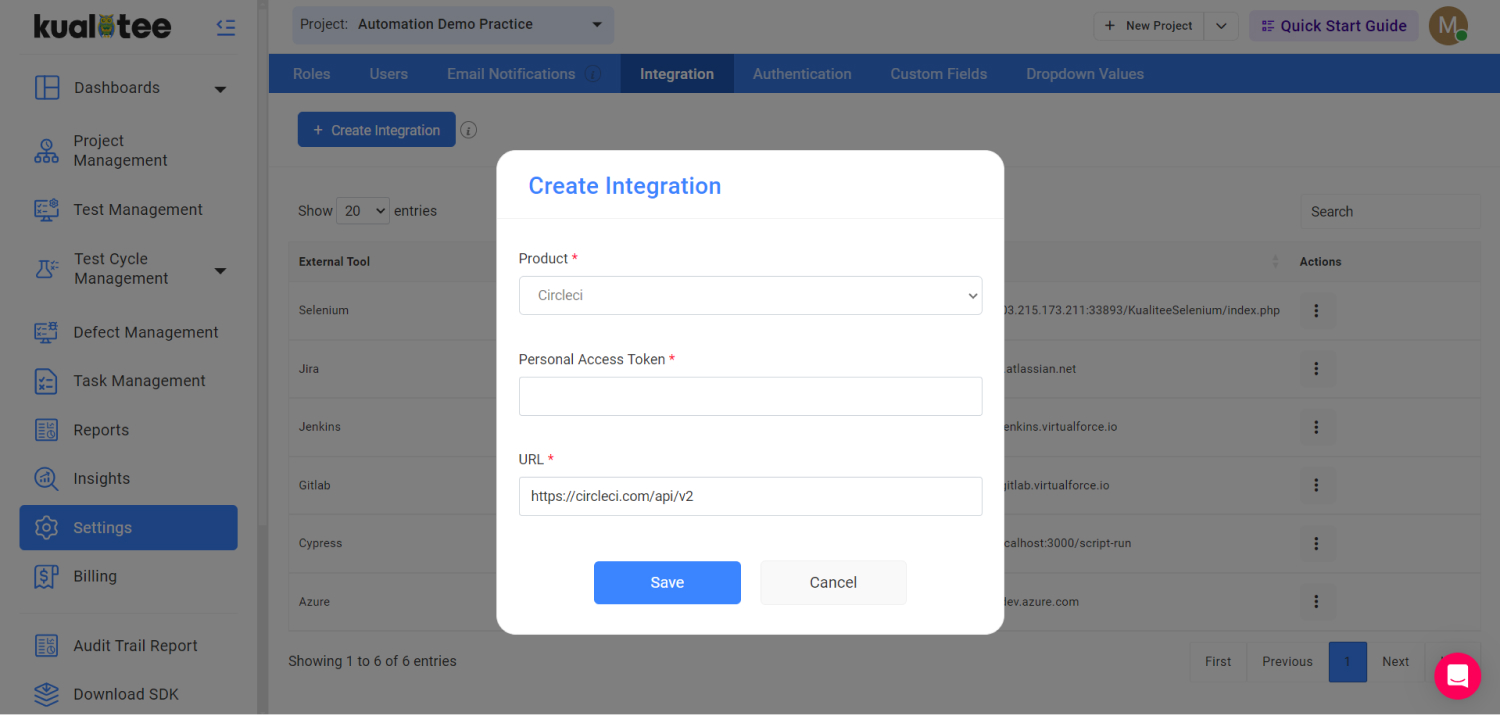
Connect CircleCI With Test Management
CircleCI and Kualitee solve two different problems. And they do them well.
CircleCI is your CI/CD engine. It's where your team:
- ✓ Automates build, test, and deployment pipelines
- ✓ Runs automated tests on every commit
- ✓ Ships changes fast, with each run gated by passing tests
Kualitee is built for the testing side. It's where you:
- ✓ Store and manage your test cases
- ✓ Run test executions and log the results
- ✓ Track defects from first report through to fix
The integration connects those two worlds. Link the two platforms to pull automated testing data directly into Kualitee.
Your QA team can finally manage manual and automated efforts side by side. You eliminate the need to check pipeline logs in one tool while updating workflows in another.
The workflow:
- ✓ Map a CircleCI project to its matching Kualitee project
- ✓ Import automated test cases and their execution statuses from CircleCI into Kualitee
- ✓ Save the integration to start syncing builds, so QA has visibility into what runs

Simplify Test Management With CircleCI Integration
Connecting the two pulls automated test data out of static pipeline logs and drops it into an active QA workflow.
Centralize Automated Testing
Bring automated test activity from CircleCI into Kualitee, alongside the rest of your QA workflow. One place for automated and manual testing, not two.
Connect CI/CD and QA
Keep CircleCI as your CI/CD and automation platform. Use Kualitee to manage the broader testing lifecycle around it.
Import Automated Test Cases
Pull automated test cases from mapped CircleCI projects into Kualitee, so they live in the same repository as everything else your team tests.
Track Test Execution Status
See automated test execution statuses from CircleCI inside your test management workflow, not buried in build output.
Sync CircleCI Builds
Keep build activity connected to your testing workflow, so QA always has visibility into what ran and when.
Combine Automated and Manual Testing
Manage automated test activity next to manual test cases, executions, defects, and the rest of your QA work.
How Kualitee's CircleCI Integration Works
Getting set up takes four steps. You will need admin access to both tools.
Connect CircleCI
In Kualitee, open your integration settings and set up the CircleCI connection using your CircleCI account details and a Personal Access Token.
Map Your Projects
Pick the CircleCI project you want to connect and link it to the matching project in Kualitee.
Import Testing Data
Import automated test cases and their execution statuses from the mapped CircleCI project into Kualitee.
Manage Testing in Kualitee
Run and organize your testing in Kualitee, while CircleCI keeps handling CI/CD and automated test execution. Your testing activity stays connected to the pipeline.

CircleCI on Its Own vs CircleCI With Kualitee
CircleCI is built to run tests, not manage them. Here's where the two tools split the work, and what you gain by connecting them.
| Task | CircleCI only | CircleCI + Kualitee |
|---|---|---|
| CI/CD automation | Built for it, works well | Stays in CircleCI, nothing changes |
| Running automated tests | Runs them on every pipeline | CircleCI handles the execution, Kualitee imports the results |
| Test case repository | Not built to track test cases | Full test case repository, automated and manual |
| Manual test management | Not supported | Manage manual and automated tests side by side |
| Execution status tracking | Lives in CircleCI’s build output | Synced directly to Kualitee for easy tracking |
| Defect management | Not built in | Track defects from report through to fix |
| Requirement traceability | None | End-to-end traceability from requirement to bug |
| QA visibility & reporting | Per-pipeline, developer-facing | Full QA visibility across both automated and manual testing |
| Who works from it | Developers in the pipeline | Custom access for QA, dev, and product managers |
Key Features of CircleCI Test Management Software
These are the features that make the CircleCI connection work. They are integration specific, not a generic list of everything Kualitee does.
CircleCI Project Mapping
Map CircleCI projects to the right Kualitee projects, so CI/CD activity connects to the correct QA workspace.
Automated Test Case Import
Import automated test cases from mapped CircleCI projects straight into Kualitee's repository.
Execution Status Import
Bring automated test execution statuses into Kualitee for centralized, QA-facing tracking.
Build Synchronization
Sync CircleCI builds with Kualitee to keep visibility into automated testing activity as it runs.
Personal Access Token Authentication
Connect CircleCI securely using your account details and a Personal Access Token.
Centralized Test Management
Manage all testing activity in Kualitee without replacing or disrupting your existing CircleCI workflow.
Manage CircleCI Automated Tests in One Place
Reports find that almost 30% of main-branch merges fail. Success comes down to how quickly teams validate and recover.
Here is how connecting CircleCI with Kualitee closes that gap:
- ✓ CircleCI runs the pipeline: it uses the store_test_results step to read JUnit XML reports (Jest, Cypress, pytest, etc) and flashes pass/fail results on its Tests tab.
- ✓ It surfaces slow or flaky tests so developers can see what broke.
- ✓ This integration gives QA a dedicated environment to track those automated results right next to their manual workloads.
When Kualitee steps in:
- ✓ Automated tests still run through CircleCI pipelines without disruption.
- ✓ Mapped CircleCI projects connect to their Kualitee projects.
- ✓ Automated test cases imported into Kualitee.
- ✓ Automated test execution statuses are tracked in Kualitee.
- ✓ Builds stay synced for visibility.
- ✓ Automated and manual testing are managed together.
- ✓ Defects and requirements are tracked in one place.
- ✓ QA progress is monitored across the whole effort, not just the pipeline.
Frequently Asked Questions
CircleCI is primarily a CI/CD platform built to automate software delivery and run tests inside your pipeline. Kualitee steps in to provide the missing test management layer, handling your cases, executions, defects and requirements.
Link the two together and CircleCI keeps executing tests while Kualitee gives your QA team a central hub to manage the results.
Yes. Kualitee CircleCI integration connects your projects and imports automated testing data. This merges your manual and automated testing into a single, unified workflow.
The current integration supports importing automated test cases and their execution statuses from mapped CircleCI projects.
CircleCI uses the store_test_results steps to parse JUnite XML reports from test runners like Jest, pytest, RSpec, Playwright, and Cypress.
What happens in CircleCI: Results land in the Tests tab. This is where Test Insights flags flaky and slow tests.
What happens in Kualitee: The integration imports those automated test cases and execution statuses directly into your mapped projects.
This workflow allows your QA team to finally track manual and automated testing side by side in a single hub.
Yes. Once you save the integration, Kualitee starts syncing your CircleCI builds, so your testing workflow stays connected to pipeline activity.
Yes. you will just need your standard CircleCI account details and a Personal Access Token to authenticate the connection.
From your integration settings in Kualitee:
Settings → Integration → Create New → select CircleCI → enter your CircleCI account details → add your Personal Access Token → Save.
Save the configuration to map your CircleCI project to its Kualitee match. From there, you can instantly import your test cases and execution statuses.
Connect CircleCI With Kualitee for Better Test Management
Keep using CircleCI to automate your CI/CD automation. Give QA a dedicated home for everything else.
Connecting the two funnels your automated test data straight into Kualitee, centralizing your test cases, executions, and defects in one place.
Start a free trial and connect your first CircleCI project with Kualitee, or book a demo and we'll walk you through it.